
 Black Steel Doors
 Woodstock Campers
 Phillips Joinery

A good Performance Max strategy comes down to four things: clean conversion data, plenty of good creative, sensible guardrails, and the patience to leave the campaign alone while it learns. Get those right and Google’s automation has something useful to work with. Get them wrong and it will cheerfully spend your budget on the wrong people.
This guide is for UK business owners and marketing managers who want leads or sales from Google Ads. It’s the advice we’d give a friend over a coffee, minus the buzzwords.
TL;DR
- Performance Max (PMax) is one campaign that runs across Search, YouTube, Display, Discover, Gmail and Maps. It is only as smart as the conversion data and creative you give it.
- Track actions that signal real value, such as qualified leads or sales, not just page views or any old form fill.
- Upload plenty of your own assets, including video. Google’s own figures link better ad strength and video to more conversions.
- Give it 1 to 2 weeks for simple setups and up to 6 weeks for lower volumes before judging it. Big edits in that window can restart learning.
- Use brand exclusions, a tidy landing page and consent-compliant tracking, and review results monthly, not daily.
Table of Contents
- What Performance Max actually is (and isn’t)
- Step 1: Fix your conversion tracking before anything else
- Step 2: Feed it creative worth learning from
- Step 3: Structure asset groups around themes
- Step 4: Set budgets and bids with realistic expectations
- Step 5: Put guardrails around it
- Step 6: Don’t forget the landing page
- Step 7: Review it like an adult
- How PMax fits with the rest of your marketing
- Our perspective: PMax rewards the boring bits
- Working with us on Performance Max
- A quick pre-launch checklist
- FAQ
- Sources
What Performance Max actually is (and isn’t)
Performance Max is a goal-based campaign type. You tell Google what a conversion is worth to you, hand over a budget and a bundle of assets (headlines, descriptions, images, logos, video), and its AI decides where and when to show them. Google describes it as a way to buy and optimise ads across YouTube, Display, Search, Discover, Gmail and Google Maps in one go, complementing keyword-based Search campaigns rather than replacing them.
That last part matters. PMax is not “PPC” in general. It is one campaign type inside Google Ads, sitting next to standard Search, Shopping, Demand Gen and so on. It is also not the same as AI Max, which is a different feature layered onto Search campaigns. If someone tells you PMax is the whole of Google Ads, be politely suspicious.
What does Google claim it delivers? According to Think with Google’s EMEA data, advertisers using Performance Max see an average 13% increase in total incremental conversions at a similar cost per action. That’s Google’s own average, so treat it as a promising signal rather than a promise for your account. Your results depend heavily on what you feed it.
Is Performance Max worth it?
Often, yes, but not automatically. It tends to work best when you have:
- Reliable conversion tracking that reflects real business outcomes.
- Enough conversion volume for the system to learn from.
- A decent bank of creative, ideally including video.
- A landing page that doesn’t make visitors wince.
If you’re missing most of those, fix them first. A small, tightly controlled Search campaign can beat a starved PMax campaign any day of the week.
Step 1: Fix your conversion tracking before anything else
If you only do one thing from this article, do this. Performance Max optimises towards whatever you call a conversion. Tell it that a visit to your contact page counts, and it will find you lots of people who visit your contact page. Tell it that a qualified enquiry counts, and it has a fighting chance of finding those.
Google’s lead generation guidance makes the same point: the quality of your conversion signals shapes the quality of your leads. For B2B businesses, that means thinking beyond a simple form submission. Practical options include:
- Count only the actions that matter. A booked call or a completed quote request is worth more than a PDF download.
- Import offline outcomes. If your sales team qualifies leads in a CRM, feed those outcomes back so Google learns which enquiries turn into revenue.
- Assign different values. A lead from a £20,000 project is not the same as a lead from a £500 one. Value-based bidding lets the system know.
- Remove junk conversions. Duplicate tags, test submissions and micro-actions inflate numbers and mislead the algorithm.
Tracking rules also keep changing. We’ve written about updating Google Ads conversion tracking, and it’s worth checking your setup against it, particularly if your account was built a few years ago and nobody has touched the tags since.
Tracking and consent in the UK
UK rules add a wrinkle. Under PECR, users must take a clear, positive action to consent to non-essential cookies, and pre-ticked boxes or sliders defaulted to on don’t count. In practice, that means your cookie banner and your Google tags need to work together. If consent is declined, you’ll see fewer measurable conversions, so build your reporting expectations around that rather than being surprised by it.
The wider direction of travel is towards more transparency and user control. The CMA has noted in its Privacy Sandbox consultation that Google’s plans around third-party cookies have been a matter of regulatory oversight, so it’s wise not to build your whole strategy on cookies alone. Collecting your own customer data, with permission, gives you something sturdier. There’s a good read on the shift towards first-party data if you want the bigger picture. If you hold a decent customer list, it’s also useful as a signal for PMax.
If you’re unsure whether your consent set-up is legally sound, that’s a question for a data protection adviser or solicitor, not an ad platform.
Step 2: Feed it creative worth learning from
Google’s own phrase for this is “good in, good out”, and it’s annoyingly accurate. PMax mixes and matches your headlines, images and videos into different combinations for different people and placements. The more distinct, useful material you give it, the more combinations it can test.
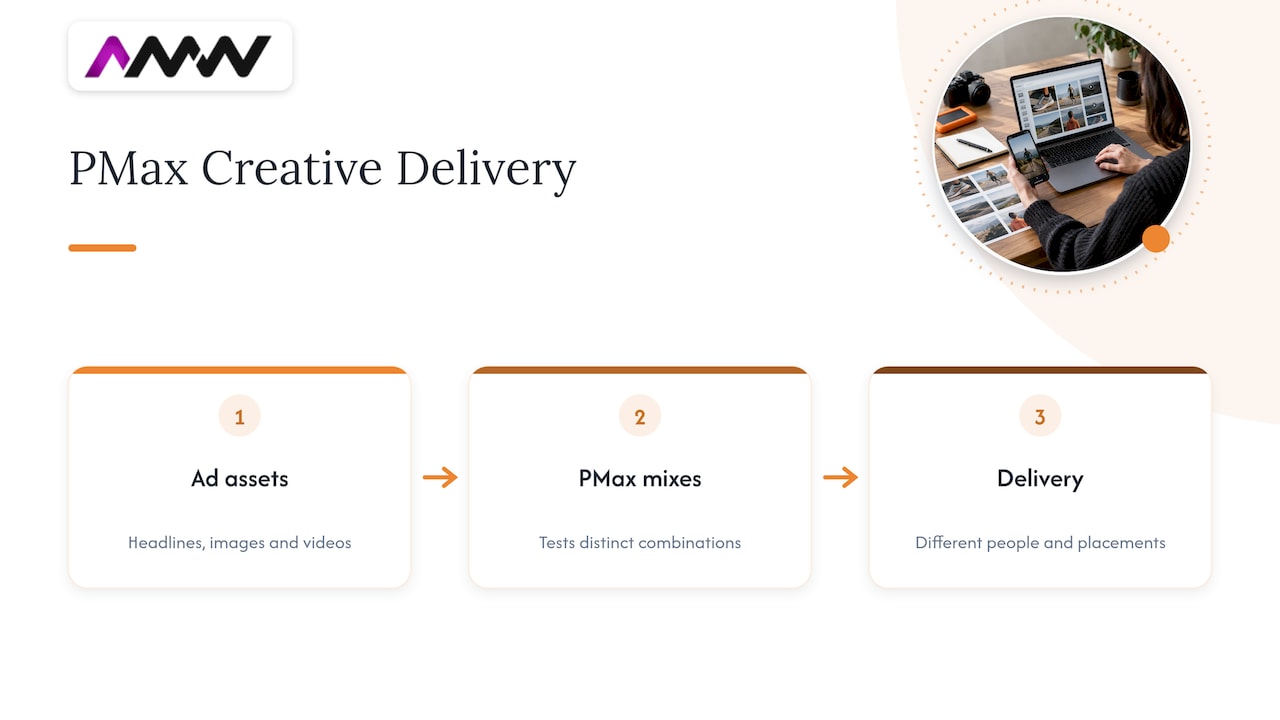
Two figures from Google’s help centre are worth remembering. Advertisers who raise their ad strength to Excellent see 6% more conversions on average, and those who include at least one video asset see an average 12% increase in total incremental conversions. These are Google’s averages across advertisers, not guarantees, but they point the same way as common sense: more complete, richer asset groups tend to help.
What a strong asset group looks like
| Asset | What to aim for | Practical tip |
|---|---|---|
| Headlines | Use as many variations as allowed | Mix benefits, proof, offers and plain descriptions |
| Descriptions | Several, of different lengths | One should work as a standalone sentence |
| Images | Landscape, square and portrait | Real photography beats generic stock |
| Logos | Square and landscape | Check they’re legible when small |
| Video | At least one of your own | Landscape, vertical and square versions |
One caution on video. Google can generate videos automatically from your images and text if you don’t supply any. That’s a convenient fallback, but it rarely looks like your brand. Upload your own, and make versions for different shapes so the ad looks native on YouTube Shorts as well as standard YouTube.
You don’t need a film crew for every ad. But a short, honest clip of your team, product or work in action will usually beat a slideshow. If you’d like ideas on formats, our guide to types of creative content is a good starting point, and our piece on content production strategies for brand growth covers how to plan a library of assets so you’re not scrambling every quarter.
Write like a person
Test different messages rather than hunting for one perfect ad. Try a version that leads with price, one that leads with speed, one that leads with a result, and one that speaks straight to the reader. Let the system tell you what works. Then, and this is the bit people skip, look at what it favoured and use that insight in your other marketing too.
Step 3: Structure asset groups around themes
A common beginner mistake is dumping every product or service into one asset group. The AI then has to guess which headline belongs with which image, and you end up with an ad for your accountancy software next to a photo of your payroll team.
Instead, split asset groups by theme. For a service business, that might be one group per service line or per customer type. For a retailer, it might be one per product category or margin band. Each group should have its own creative and landing page.
Use audience signals as hints, not fences
Audience signals let you point PMax at the kind of people you think are likely to convert, using things like your customer lists, website visitors and relevant search themes. They’re suggestions, not hard targeting, so the system can and will look beyond them. Use them to give it a head start, particularly when the account is new.
Good starting signals include:
- Your existing customer list (where you hold consent to use it).
- People who have visited key pages or started an enquiry.
- Search themes that reflect what your best customers actually type.
If your list is tiny, don’t panic. Add what you have and let the campaign gather its own evidence over time.
Step 4: Set budgets and bids with realistic expectations
PMax needs enough conversions to learn from. A budget so small that you get one conversion a fortnight gives the AI very little to go on. As a rule of thumb, work backwards: if a lead is worth roughly £X to you and you want to be able to afford to learn, set a daily budget that can plausibly produce a handful of conversions per week at your expected cost per lead. Your account manager, or we, can help you sanity-check that number against your own sales figures. We can’t give you a universal figure because it depends entirely on your market and margins.
On bidding, start with the goal that matches your tracking. If you have good conversion value data, bidding towards value usually makes more sense than simply maximising the number of conversions. If you only have basic lead counts, maximise conversions first and add targets later, once you have data. Google’s optimisation tips for Performance Max cover bidding, targeting, creative and attribution if you want the official version.
How long to wait before judging it
Patience is the unglamorous secret. Google’s guidance suggests around 1 to 2 weeks for simpler setups, and up to 6 weeks where conversion volume is lower or the campaign is more complex, before the learning phase settles. Large edits during that window can send the system back to the start.
That means:
- Don’t change budgets by huge amounts every other day.
- Don’t swap all your creative at once.
- Don’t panic on day three because Tuesday looked rough.
Small, planned adjustments are fine. Keep a simple change log so you know what you changed and when. Future you will be grateful.
Step 5: Put guardrails around it
Automation is brilliant at finding conversions and occasionally terrible at knowing which ones you actually want. A few controls make a big difference.
Brand exclusions
PMax can happily claim credit for people who were already searching for your business name. That flatters your numbers without finding anyone new. Brand exclusions let you stop a campaign serving on branded queries you want to avoid. For Performance Max they apply to Search, Shopping and YouTube search inventory, with an option to let Shopping ads still appear on excluded brands. If you run a separate branded Search campaign, this keeps your reporting honest.
New customer goals
If growth means finding new buyers rather than re-selling to existing ones, look at Google’s new customer acquisition goal. It tells the campaign to prioritise people who haven’t bought from you before. It works best when you give Google a customer list so it can tell the difference. If you’re a B2B business with a small, high-value customer base, the value of this is smaller, but it’s still worth understanding.
Location and exclusions
For a UK business that serves particular regions, check your location settings carefully. Make sure you’re targeting people in your area, not people merely showing interest in it. A London agency doesn’t need clicks from someone idly browsing London from Perth, Australia.
Watch the lead quality
The quickest way to spot a drifting campaign is to look at the leads themselves. Are they the right size of business? Are they in the right area? Are they real? If your sales team is rolling its eyes, your conversion setup needs another look, whatever the dashboard says.
Step 6: Don’t forget the landing page
PMax can send traffic from half a dozen Google surfaces, but they all end up at your website. If the page is slow, confusing or doesn’t match the promise in the ad, you’ll pay for clicks that never convert and the AI will learn from that poor data too.
A few basics:
- Match the page to the asset group’s message.
- Put the main action above the fold.
- Keep forms short, especially on mobile.
- Test speed on a normal phone connection, not your office fibre.
We’ve put together a short guide on PPC landing pages that match ads and load fast, which is handy to run through before launch.
Step 7: Review it like an adult
A monthly rhythm beats daily fiddling. Here’s a simple routine:
- Check conversions first. Are they firing correctly and reflecting real enquiries or sales?
- Look at asset performance. Which headlines, images and videos is Google rating highly, and which are lagging?
- Review search themes and categories. Do the queries and placements it’s finding make sense for your business?
- Compare against your sales data. Which leads actually became customers?
- Refresh the weakest assets. Replace one or two at a time, not the lot.
It’s also worth checking where the budget is going. PMax reporting has become more transparent over time, but it still shows less than a standard Search campaign. That’s part of the trade. If you need granular control over keywords and exact match, a conventional Search campaign alongside PMax is a perfectly sensible set-up.
How PMax fits with the rest of your marketing
PMax shouldn’t live in a bubble. It can do a lot of work for you, but it’s best when it supports a deliberate account strategy rather than replacing one. A sensible pairing looks like this:
- Standard Search for the high-intent keywords where you want exact control.
- PMax to find extra conversions across channels from your assets and signals.
- YouTube or Demand Gen where you want to build awareness with video.
- SEO to build the long-term organic base that doesn’t switch off when the budget does.
If video is part of your plans, our 90 day YouTube ads strategy shows how creative and first-party data can work together over a few months.
Our perspective: PMax rewards the boring bits
We’ve seen plenty of PMax campaigns that disappoint, and the cause is rarely the algorithm. It’s usually something much less exciting: the tracking counts the wrong thing, there are four mediocre images and one headline repeated in different fonts, or someone changed everything on day four because they got nervous.
Our view is that PMax is a brilliant amplifier. If your foundations are good, it amplifies them. If they’re shaky, it amplifies that instead, and quickly. So we spend most of our effort before launch: sorting out what counts as a conversion, producing proper creative (video and photography included, because we make those ourselves), and making sure the landing page deserves the traffic.
We also believe in being straightforward about results. That means clear reporting you can read without a glossary, and no long-term contracts holding you in place. If the work is good, you’ll want to stay. If it isn’t, you shouldn’t have to.
The other thing we’d say is that PMax isn’t the answer to every question. Sometimes a well-run Search campaign, a refreshed website or better email follow-up will do more for your pipeline. A good agency will tell you that, even when it means selling you less.
Amir Wanas, founder of AMW Media
Working with us on Performance Max
If you’d rather have this handled than do it yourself, our team runs Google Ads and Meta Ads campaigns for UK businesses, alongside the creative, web design and tracking work that makes them perform. You can see how we approach it on our PPC campaign management page, browse the full range of AMW Media services, or look at some recent projects first. Pricing depends on scope, so the easiest first step is a chat about what you’re trying to achieve.
A quick pre-launch checklist
Before you press go, run through this:
- Conversion actions reflect real enquiries or sales, with no duplicates.
- Cookie consent works with your tags and meets PECR requirements.
- Each asset group has its own theme, creative and landing page.
- At least one original video is uploaded, ideally in several formats.
- Brand exclusions are set up if you run branded Search separately.
- Budget can realistically produce enough conversions to learn from.
- You’ve agreed a review date and you won’t touch it before then.
- Someone in sales knows to flag lead quality back to marketing.
FAQ
Is Performance Max worth it?
For many advertisers, yes, provided the tracking is accurate and there is enough conversion volume to learn from. Google reports an average 13% increase in incremental conversions at a similar cost per action in its EMEA data, though your results will vary. If your budget is very small or your tracking is shaky, a focused Search campaign may serve you better to begin with.
Is PMax the same as PPC?
No. PPC is the general model of paying when someone clicks your ad. Performance Max is one specific Google Ads campaign type that uses automation to run ads across Search, YouTube, Display, Discover, Gmail and Maps. Standard Search, Shopping and Demand Gen campaigns are also PPC.
What’s the difference between PMax and AI Max?
Performance Max is a separate campaign type that runs across Google’s channels from a set of assets. AI Max is a set of AI features that sit within Search campaigns. Check Google’s current help pages before deciding, as both are evolving quickly.
How long before I should change a Performance Max campaign?
Google suggests allowing about 1 to 2 weeks for simple setups and up to 6 weeks for more complex or lower-volume ones. Making big changes before then can restart learning. Small, planned tweaks are fine, and it helps to keep a note of what you changed.
Sources
- Performance Max best practices for lead generation, Google Ads Help
- Drive conversions across Google’s ad channels with Performance Max, Google Ads Help
- Optimisation tips for Performance Max, Google Ads Help
- Apply brand exclusions to Performance Max or Search campaigns, Google Ads Help
- Performance Max is the future of marketing, Think with Google
- CMA consults on releasing Google from Privacy Sandbox commitments, GOV.UK
Recommended
- Best marketing methods for UK businesses in 2026
- Conversion optimisation: a practical guide for UK SMEs
- Master your SEO strategy: guide for effective brand growth
- Google Business Profile SEO: local ranking guide for UK small businesses
Our free marketing audit looks at your site, your ads and your content, and comes back with a 30 day plan. No pitch deck.

Founded AMW Media in 2024 and runs strategy, paid media and the CRM builds. The reason everything here is in house and measured in revenue. Meet the team.