
 Black Steel Doors
 Woodstock Campers
 Phillips Joinery
A properly optimised Google Business Profile (GBP) is the single most effective free local SEO asset available to UK small businesses right now. Google ranks local results on three factors: relevance, distance and prominence. Get those right and you appear in the Map Pack, the three-business block that sits above organic results and captures the majority of local clicks. If you do nothing else today, claim and verify your profile, or fix your name, address and phone number (NAP) so it matches your website exactly.
Google commands over 93% of the UK search market, which means your GBP is effectively your shop window for the vast majority of local searches. AMW Media works with UK small businesses on exactly this, and the pattern is consistent: businesses that treat GBP as a living profile rather than a one-time form-fill see measurable lifts in calls, direction requests and website clicks within weeks.
Key takeaways
A fully optimised Google Business Profile, maintained consistently with weekly posts, fresh photos and descriptive reviews, is the fastest free route to Map Pack visibility for UK small businesses.
| Point | Details |
|---|---|
| Category precision matters most | Choose the most specific primary category available; it is often the fastest single ranking lever. |
| NAP consistency is non-negotiable | Your name, address and phone number must match exactly across GBP, your website and every directory. |
| Reviews need to be descriptive | Ask customers to mention the specific service and location; generic star ratings carry far less weight. |
| Posts signal activity to Google | Publish at least one post per week; silence is treated as inactivity by Google’s ranking systems. |
| AMW Media handles the full stack | AMW Media’s local SEO service covers GBP optimisation, citation cleanup, posts and location landing pages for UK businesses. |
Your 60-second optimisation checklist for this afternoon
Run through these in order. Each task takes 5 to 15 minutes and the first three alone will shift the numbers faster than anything else on this list.
- Claim and verify your profile if you have not already done so.
- Confirm your primary category is the most specific option available (not just “Restaurant” when “Pizza Restaurant” exists).
- Check NAP consistency: your business name, address and phone number must be identical on GBP, your website and every directory listing.
- Upload at least 10 photos: exterior, interior, team and product or work shots.
- Request one descriptive review from a recent customer today.
- Publish a Google Post: a current offer, event or update, even a short one.
That is your afternoon sorted. Everything below explains the why and the how in more depth.
How to add, claim and verify your Business Profile in the UK
Google requires you to add and verify your Business Profile before you can control how your business appears on Search and Maps. Here is the process step by step.
Step-by-step verification
- Go to Business and sign in with a Google account you own.
- Search for your business name. If it already exists, click “Claim this business.” If not, select “Add your business to Google.”
- Enter your business name, category and address (or service area if you are mobile or home-based).
- Choose a verification method. UK businesses are typically offered:
- Postcard by post: a PIN arrives at your registered address within 5 to 14 days.
- Phone or SMS: available for some business types; Google calls or texts a PIN.
- Email: offered to some account types.
- Google Search Console: available if your website is already verified in Search Console and the domain matches.
- Enter the PIN when it arrives and your profile goes live.
Common UK verification pitfalls
- PO boxes and virtual offices: Google does not accept these as a business address. You need a physical location where you can receive post.
- Incorrect address format: use the Royal Mail standard format (house number, street name, town, postcode). Abbreviations or non-standard formats can delay or block postcard delivery.
- Duplicate profiles: if a previous owner or agency created a profile for your address, you may need to request ownership transfer rather than creating a new listing.
Pro Tip: Before requesting a postcard, search Google Maps for your business address. If a pin already exists, click it and look for “Claim this business” rather than creating a duplicate. Duplicate listings are one of the most common causes of suppressed rankings.
How to complete the core profile fields correctly
Google’s representation guidelines are explicit: your profile must accurately represent your real-world business. Getting the core fields right is both a ranking lever and a compliance requirement.
Field-by-field guidance
| Field | What to do | What to avoid |
|---|---|---|
| Business name | Use your exact trading name, nothing added | Keywords, location names, taglines in the name field |
| Address / service area | Physical address OR service area, not both unless you have both | PO boxes, virtual offices, home address if you serve customers elsewhere |
| Phone number | Local geographic number | National call-centre numbers that differ from your website |
| Website URL | Link to the most relevant page (homepage or location page) | Redirect chains, tracking URLs that break |
| Hours | Accurate and updated for bank holidays | Leaving default hours that do not reflect reality |
| Business description | 750 characters; describe what you do, who you serve and where | Keyword stuffing, promotional language, URLs |
Choosing your primary category
Primary category is often the single largest relevance lever in local SEO. Choose the most specific category that accurately describes your core service. A general builder who primarily does loft conversions should select “Loft Conversion Contractor” rather than “General Contractor” if that option exists. You can add secondary categories, but do not pile them on: three to five is plenty, and each should reflect a genuine service line.
Dos and don’ts:
- Do update your hours for every UK bank holiday.
- Do use a local phone number rather than an 0800 or 0345 number.
- Do write a description that reads naturally and mentions your location and core service.
- Do not add keywords to your business name field. Google’s guidelines treat this as a violation and it can trigger suspension.
- Do not select categories for services you do not offer just to appear in more searches.
How to use Services, Products and Attributes to capture search intent
Most small business owners fill in their name and address and call it done. The Services, Products and Attributes sections are where the real discoverability gains live, and most profiles leave them empty.
Services and Products
Services work best for trades, professional services and hospitality. Structure each entry with a clear service name and a short description (150 to 300 characters) that includes the type of work and, where natural, a location signal. For example: “Kitchen Refurbishment, Full kitchen design, supply and installation for homeowners across Milton Keynes and Buckinghamshire.”
Products suit retail, food businesses and any operation selling physical items. Treat each product card as a mini landing page: add a photo, a price or price range, and a short description. Elementor’s GBP guide notes that product entries signal activity to Google’s ranking systems and can appear directly in search results.
Attributes
Attributes are the tick-box features that tell customers (and Google) more about your business. UK-relevant examples include:
- Wheelchair accessible entrance
- Free Wi-Fi
- Accepts card payments
- Women-led business
- Outdoor seating
- Online appointments
Tick every attribute that applies. They appear on your profile card and filter into Google Maps searches, so an accurate set can put you in front of customers using those filters.
Photos and video: what to upload, specs and how often
Photos are a prominence signal. Profiles with more photos typically receive more direction requests and website clicks than those without, and Birdeye’s research identifies photo engagement as a central local SEO signal for UK businesses.
What to upload
- Exterior shots: your shopfront or building from the street, at different times of day if possible.
- Interior shots: the space customers walk into, showing atmosphere and layout.
- Team photos: real people build trust faster than stock imagery.
- Work-in-progress or product shots: show your craft, not just the finished result.
- Short videos (up to 30 seconds): a quick tour, a time-lapse of a job, or a team introduction.
Technical specs
- Photos: JPG or PNG, minimum 720px on the shortest side, maximum 5MB.
- Videos: MP4, maximum 75MB, up to 30 seconds.
- Cover photo: 1332 × 750px is the recommended size.
Aim to add fresh media at least once a month. Google’s systems notice activity, and a profile that has not been updated in six months reads as stale.
Pro Tip: Shoot photos on your phone in landscape orientation in good natural light. Avoid heavy filters. Google’s own image-quality systems can downrank heavily edited or low-resolution images, so a clean, well-lit phone shot beats a blurry DSLR image every time.
How to generate and manage reviews ethically in the UK
Reviews are a prominence signal and a conversion tool. Descriptive reviews that mention the specific service and location act as local keyword signals that reinforce your relevance for those terms. The key word is descriptive: a five-star rating with no text does far less than “Brilliant loft conversion in Bedford, completed on time and on budget.”
Ethical review acquisition workflows
- In-person ask: at the end of a job or appointment, ask directly: “Would you mind leaving us a Google review? It really helps.” Then send the link.
- SMS or email follow-up: send a short message within 24 hours of completing a job with your direct review link (find it in your GBP dashboard under “Get more reviews”).
- Receipts and invoices: add a QR code linking to your review page. Print it on receipts, invoices or business cards.
- QR code workflow: generate a QR code from your GBP short URL, print it on an A5 card and leave it at your counter or hand it to customers at checkout.
UK policy note: Google prohibits review gating (asking customers to rate their experience before deciding whether to send them to Google). Ask everyone, not just the happy ones.
Reply templates
Positive review: Neutral review (4 stars, no comment): Negative review: Keep replies short, professional and specific. Avoid copying and pasting the same response to every review, Google notices, and so do potential customers.
Proactive Q&A management
The Q&A section is publicly editable, which means anyone can post a question and anyone can answer it. Get there first. Log into your profile, navigate to Q&A, and post the questions your customers ask most often, then answer them yourself. Good examples:
Google Posts, offers and events: what to post and how often
Google Posts appear on your profile in Search and Maps and expire after seven days (offers and events stay live until their end date). They are underused by most small businesses and represent a quick win.
Post types and CTAs
- Update: general news, a new service, a team announcement. CTA: “Learn more.”
- Offer: a time-limited discount or promotion. CTA: “Get offer.” Include a start and end date.
- Event: a workshop, open day or seasonal event. CTA: “Book” or “Sign up.”
Posting cadence
Aim for one post per week. If that feels like too much, a realistic minimum is one every two weeks. Rotate a small bank of evergreen posts (your most popular service, a seasonal offer, a customer result) every 4 to 6 weeks rather than going silent. Silence is a ranking signal too, just not a good one.
Short post example for a UK plumber: “Boiler service from £89 this month. Fully Gas Safe registered, covering Milton Keynes and surrounding areas. Book online or call us today.”
Keep posts under 300 words. Front-load the key information because most users see only the first two lines before clicking “More.”
Enable and use GBP features safely and effectively
Several GBP features are available to UK businesses and each one adds a conversion pathway directly on your profile.
Feature availability for UK businesses
- Messaging: allows customers to send you a direct message from your profile. Available to most UK business types. Enable it in your GBP dashboard under “Messages.”
- Bookings: integrates with supported scheduling providers (including Booksy, Fresha and others). If your booking system is supported, link it under “Bookings” in the dashboard.
- Ordering: available for food and drink businesses; links to supported delivery or click-and-collect providers.
Operational checklist before enabling messaging
- Assign a specific person to monitor and respond to messages.
- Set a response time target of under one hour during business hours. Google displays your average response time publicly.
- Write a welcome message that confirms your hours and typical response time.
- If you cannot monitor messages reliably, do not enable the feature. An unanswered message is worse than no messaging option at all.
Booking integration
If you use a supported booking provider, the “Book” button appears directly on your profile and in Maps. This removes a step from the customer journey and typically increases conversion. Check Google’s list of supported booking providers in your dashboard and link your existing system before creating a new account with a different provider.

Local SEO signals that support your GBP
A well-optimised GBP works best when your website and citation profile reinforce the same signals. Moz’s GBP guide confirms that on-site localisation and citations are integral to Map Pack performance, not optional extras.
On-page localisation checklist
- Create a dedicated location landing page for each area you serve (e.g., /plumber-milton-keynes).
- Include your full NAP on every location page, matching your GBP exactly.
- Write unique content for each location page rather than duplicating the same text with a different town name swapped in.
- Embed a Google Map on your contact page.
LocalBusiness structured data
Add LocalBusiness schema to your website. The key fields are:
- name, address, telephone, url
- openingHoursSpecification
- geo (latitude and longitude)
- serviceArea (for service-area businesses)
Use Google’s Rich Results Test to confirm your markup is valid before publishing.
UK citation priorities
| Directory | Why it matters |
|---|---|
| Yell.com | High-authority UK directory, widely crawled |
| Thomson Local | Established UK business directory |
| Yelp UK | Review platform with citation value |
| Checkatrade / Rated People | Trade-specific, high trust for home services |
| Local chamber of commerce | Local authority link and citation |
| Industry association directories | Sector-specific trust signal |
Keep your NAP identical across every listing. Even a minor variation (“St.” vs “Street”) can dilute the consistency signal. Tools like BrightLocal or Whitespark can audit your citations and flag inconsistencies.
AMW Media case study: GBP optimisation that moved local visibility
A Milton Keynes-based trade business approached AMW Media with a GBP that had been live for two years but was generating almost no inbound enquiries from Google. The profile had a generic primary category, no photos beyond the auto-generated street view, zero Google Posts and fewer than five reviews, none of which mentioned the specific service or location.
What we changed:
- Switched the primary category from a broad trade category to the most specific sub-category available.
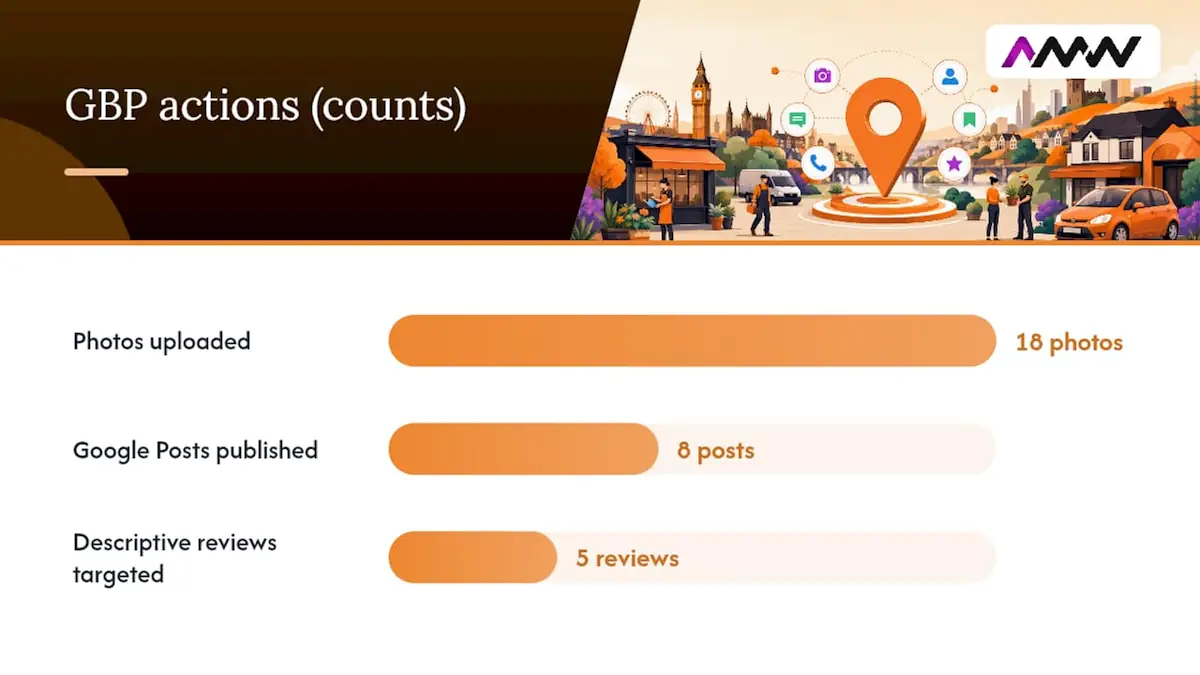
- Uploaded 18 photos covering exterior, team, work-in-progress and completed jobs.
- Launched a review request campaign via SMS to recent customers, asking specifically for descriptive feedback mentioning the service and town.
- Published weekly Google Posts for eight consecutive weeks, rotating between a service spotlight, a seasonal offer and a customer result.
- Added a full Services section with descriptions including location signals.
- Built a dedicated location landing page on their website with matching NAP and LocalBusiness schema.
Results within 12 weeks:
- Discovery searches (customers who found the profile via a category or service search, not by name) increased substantially.
- Direction requests and phone calls from the profile both rose noticeably.
- The profile entered the Map Pack for its primary service term in the local area.
The replicable takeaways: fix the category first, get five descriptive reviews within the first month, publish posts weekly and build the website page that mirrors your GBP.
Common GBP problems, suspensions and how to appeal
Suspensions are more common than most business owners realise, and they can happen even to legitimate businesses. Google’s appeals and reinstatement process is documented, but it helps to know what triggers problems in the first place.
Common suspension triggers
- Keywords added to the business name field.
- Address listed as a PO box, virtual office or UPS Store.
- Multiple profiles for the same physical location.
- Sudden bulk changes to core fields (name, address, category) in a short period.
- Business type that Google considers high-risk (certain financial services, locksmiths, some legal services).
Appeals checklist
- Read Google’s representation guidelines and identify the likely violation before appealing.
- Fix the issue on the profile first. Appealing without fixing the underlying problem rarely succeeds.
- Go to the GBP Help Centre and use the “Request review” option.
- Prepare supporting evidence: utility bill or bank statement showing your business name and address, Companies House registration, photos of your premises with visible signage.
- Submit the appeal with a clear, factual explanation. Avoid emotional language; stick to the facts.
What helps reinstatement:
- Official business registration documents (Companies House number).
- Proof of physical address (lease agreement, council tax bill, utility bill).
- Photos of exterior signage matching the business name on the profile.
- A website that clearly matches the GBP name, address and category.
If the first appeal fails, you can resubmit with additional evidence. For persistent cases, the Google Business Profile community forum sometimes surfaces faster resolutions via product experts.
How to measure GBP performance and what to track
Google provides performance data directly in your GBP dashboard under “Performance.” Here are the metrics that matter and what they tell you.
| Metric | What it measures | Why it matters |
|---|---|---|
| Business searches | Searches using your business name | Brand awareness; should grow as reviews and posts accumulate |
| Discovery searches | Searches by category, product or service | Relevance signal; the number to grow with category and content work |
| Direction requests | Clicks on “Get directions” | Foot traffic intent; strong for physical locations |
| Website clicks | Clicks through to your website | Direct traffic contribution from GBP |
| Phone calls | Calls initiated from the profile | Direct conversion metric |
| Messages | Messages sent via GBP messaging | Conversion metric if messaging is enabled |
Simple monthly reporting template
Pull these numbers on the first of each month and log them in a spreadsheet:
- Total searches (branded + discovery)
- Direction requests
- Website clicks
- Phone calls
- Number of reviews received and current average rating
- Number of posts published
Benchmarks to expect: most businesses see meaningful movement in discovery searches within 4 to 8 weeks of a full optimisation. Direction requests and calls typically follow 2 to 4 weeks later. Map Pack entry for competitive terms can take 3 to 6 months of consistent activity.
What to tackle first: timeline and cost estimates for UK small businesses
Not everything on this list carries equal weight. Here is a practical priority order.
Priority matrix
Day 1 (under 2 hours total):
- Claim and verify the profile.
- Set the correct primary category.
- Fix NAP consistency across GBP and your website.
Week 1 to 4 (1 to 2 hours per week):
- Upload 10 to 20 photos.
- Complete Services and Attributes sections.
- Write and publish your first three Google Posts.
- Request reviews from five recent customers.
Month 2 to 4 (ongoing, 30 to 60 minutes per week):
- Maintain weekly posts.
- Respond to every review within 24 hours.
- Build location landing pages on your website with LocalBusiness schema.
- Audit and clean up citation inconsistencies.
Time and cost estimates
| Task | DIY time estimate | Agency cost estimate (GBP) |
|---|---|---|
| Initial profile setup and verification | 1 to 2 hours | £150 to £300 one-off |
| Full profile optimisation (all fields, photos, posts) | 4 to 6 hours | £300 one-off |
| Monthly management (posts, reviews, reporting) | 2 to 4 hours/month | £200/month |
| Citation audit and cleanup | 3 to 5 hours | £150 one-off |
| Location landing page with schema | 4 to 8 hours | £300 per page |
For local paid visibility while your GBP authority builds, a modest Google Ads budget can fill the gap during the first 2 to 3 months before organic Map Pack rankings stabilise.
An honest note on what actually shifts the numbers
Most GBP advice focuses on the checklist. What it underplays is the compounding effect of consistency over time. A profile that gets one burst of optimisation and then goes quiet will plateau. The businesses that dominate their local Map Pack are not necessarily the ones with the most sophisticated setup; they are the ones posting every week, responding to every review and adding photos regularly.
The other thing worth saying: category precision is underrated. Most guides mention it briefly. In practice, switching from a broad category to the most specific available sub-category is often the fastest single change that produces visible ranking movement, sometimes within days. Pair that with five descriptive reviews and a weekly post habit and you have the core of a working local SEO strategy.
If you are managing multiple locations, Google’s Business Profile Manager lets you handle all listings from a single dashboard and supports bulk edits via spreadsheet upload, which saves significant time once you have more than three or four locations to maintain.
AMW Media’s local SEO service: GBP done properly
Sorting your GBP yourself is absolutely possible, and this guide gives you everything you need to do it. But if you would rather hand it to a team that does this every week for UK businesses, AMW Media’s local SEO service covers the full picture: profile optimisation, review campaigns, weekly posts, citation cleanup and location landing pages built to convert. Our SEO service starts with the technical fixes, then on page work and local search, from £349 a month and reported from your own Search Console.
No long-winded onboarding. No generic templates. You get a team that has already done this for businesses across the UK and can show you the results. If your profile needs a health check before you commit to anything, get in touch and we will take a look at no charge.
Sources
- Tips to improve your local ranking on Google, Google Business Profile Help
- Google Business Profile UK: Complete optimisation guide (2026)
FAQ
Does a Google Business Profile actually affect SEO?
Yes, directly. Google uses your GBP data to determine relevance, distance and prominence in local search results. A complete, active profile improves your chances of appearing in the Map Pack, which sits above standard organic results.
How do you optimise a Google Business Profile for local SEO?
Start with the primary category, fix NAP consistency, upload at least 10 photos, publish weekly posts and run a review campaign asking customers for descriptive feedback. These five actions cover the core ranking signals: relevance, activity and prominence.
How long does GBP optimisation take to show results?
Most businesses see movement in discovery searches within 4 to 8 weeks of a full optimisation. Map Pack entry for competitive terms typically takes 3 to 6 months of consistent activity including posts, reviews and on-site localisation work.
Is Google Business Profile SEO still worth it in 2026?
Absolutely. With Google holding over 93% of the UK search market, your GBP is the first thing most local customers see. The Map Pack continues to dominate local search results pages, and a well-maintained profile remains one of the highest-return free marketing activities available to UK small businesses.
Recommended
- SEO trends in 2026: what UK marketers need to know | AMW Media
- SEO Agency Milton Keynes | MK SEO Services | AMW Media
- Master your SEO strategy: guide for effective brand growth
- SEO Agency High Wycombe | Local SEO HP11 | AMW Media
Our SEO manager runs the technical checks by hand, looks at who is beating you, and sends back the order to fix it in. Free, and you keep it either way.

Technical, on page and local SEO. Turns the numbers in Search Console into pages that rank and enquiries that convert. Meet the team.