
 Black Steel Doors
 Woodstock Campers
 Phillips Joinery
Google Ads conversion tracking measures the specific actions you actually care about, whether that’s a sale, a phone call, or a completed form, and feeds that data straight into your bidding. If you haven’t set this up properly yet, your two moves right now are simple: create a conversion action inside Google Ads, then install the Google tag site-wide. (or turn on enhanced conversions if you’re already tracking basic events). Do both, and you’re measuring in hours, not weeks.
TL;DR:
- Properly setting up conversion tracking requires creating a conversion action, installing the Google tag site-wide, and verifying with Tag Assistant, which can be done without a developer.
- Choosing the correct conversion category and grouping similar micro-actions ensures more accurate bidding signals and campaign performance.
- Enhanced conversions use first-party data hashed with SHA256 to overcome cookie restrictions and require selecting the right setup method and maintaining data quality.
- The upcoming 2026 Data Manager API migration will impact offline conversions and requires early preparation, including token updates and maintaining transaction identifiers.
- Regular review and updating of conversion tracking setup are essential, as changes in Google’s rules and privacy regulations can break previously working configurations.
Table of Contents
- Quick start: get a working conversion live today
- What can Google Ads actually measure?
- How do I set up conversion tracking properly?
- What are enhanced conversions and why do they matter?
- The 2026 Data Manager API migration: what you need to do
- Why isn’t my Google Ads conversion tracking working?
- How does conversion data actually improve your results?
- What we’ve learned running conversion tracking for UK clients
- Editorial take: the fixation on setup misses the real problem
- How AMW Media can help you get this right
- Sources
- FAQ
Quick start: get a working conversion live today
You don’t need a developer on standby for this. Most of it is point, click, and a bit of patience while Google’s systems catch up.
- Create the conversion action. Pick a category (purchase, lead, sign up, call), set a value, choose an attribution type, and if it’s a genuine business outcome, mark it as primary so it can drive bidding.
- Install the Google tag. Add it site-wide, either directly or through Google Tag Manager, then drop event or phone snippets on the specific pages that mark a conversion.
- Turn on enhanced conversions for web or leads, and switch on Consent Mode if you collect any personal data from UK or EEA visitors.
- Enable auto-tagging and check that your GCLID survives redirects and any click trackers you run.
- Verify everything with Tag Assistant, then watch the conversion action’s status in Google Ads. Give it up to 48 hours before you panic.
Pro Tip: Set a calendar reminder for 48 hours after launch. Checking too early just makes you think something’s broken when it’s actually fine.
What can Google Ads actually measure?
Conversion tracking isn’t one-size-fits-all. Choosing the wrong category for your business is one of the most common reasons campaigns look like they’re underperforming when they’re really just being measured badly.
- Website conversions: page-load tracking works for simple thank-you pages; event-based tracking is better when you need transaction values or multiple actions per session.
- App conversions: installs and in-app events, usually connected through Google’s App Connect integrations.
- Phone call conversions: covers call-only ads, calls made from your website, and calls tracked through Google forwarding numbers.
- Offline conversions: imported from your CRM or point-of-sale system, often paired with enhanced conversions for leads when the sale happens well after the click.
Decide which of these is your primary, biddable conversion and which are secondary. Grouping similar micro-actions (newsletter sign-ups, brochure downloads) stops noisy low-value events from dragging down your bidding signal.
How do I set up conversion tracking properly?
There are three practical routes in, and most advertisers end up using a mix of them.
Installing the Google tag site-wide is the foundation. It sits on every page of your site, and event or phone snippets tell it exactly when something worth counting has happened. This is the setup Google itself recommends, and it’s covered in detail in Google’s guide to using the Google tag for conversion tracking.
Google Tag Manager is the more manageable option once you’re running more than one or two conversions. Import Google’s suggested tag configurations, set your Conversion Linker tag to fire on all pages (this is what actually preserves the click data across your site), then preview before you publish. Skipping the preview step is how most GTM containers go live broken.
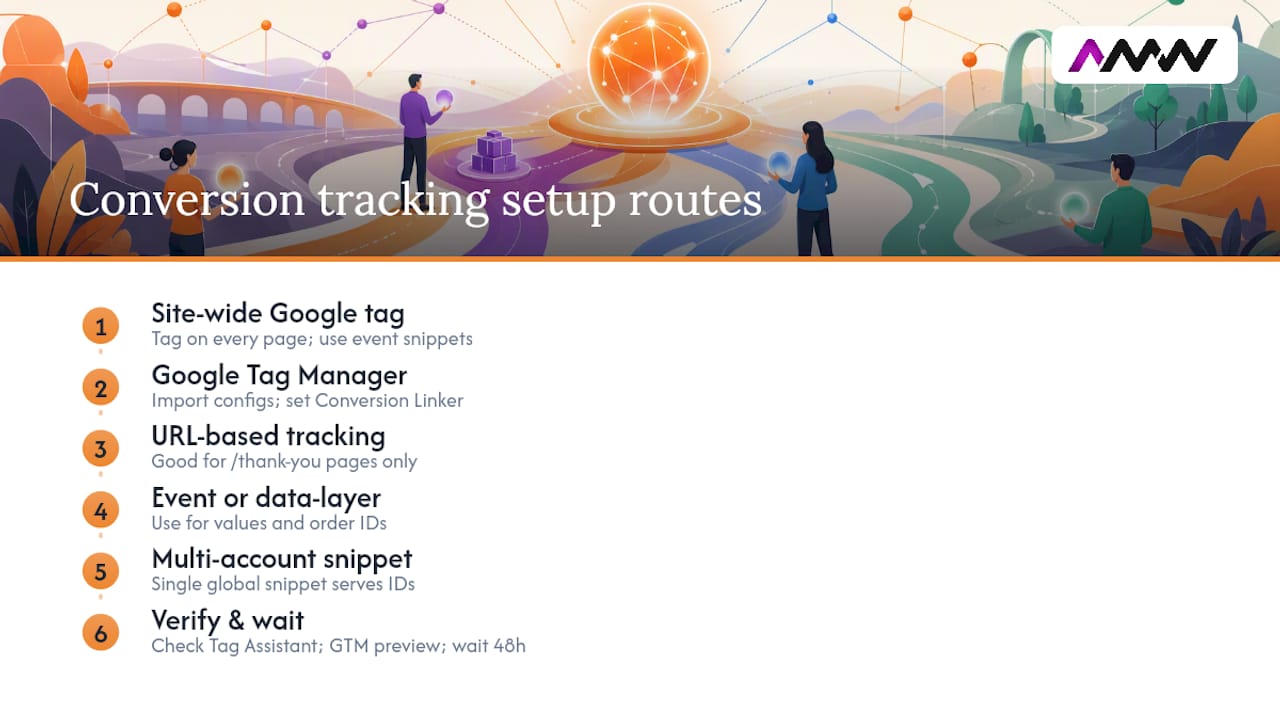
For simple actions, a URL-based conversion (someone lands on /thank-you) is fine. Once you need transaction values, order IDs, or dynamic pricing, you need an actual event snippet or a data layer variable feeding GTM. URL-based tracking can’t tell you if someone bought a £15 item or a £1,500 one.
If you run several Google Ads accounts, you don’t need to duplicate your tagging work. A single global snippet using gtag('config') can serve multiple destination IDs, which saves a lot of repeated GTM housekeeping.
Once it’s live, verify with Tag Assistant and GTM’s preview mode. Then check back in Google Ads; the Google tag documentation confirms status updates can take up to 48 hours to settle.
Pro Tip: If you manage tags for a client, keep a shared GTM workspace log of what changed and when. It saves hours when something breaks three weeks later and nobody remembers who touched what.
What are enhanced conversions and why do they matter?
Enhanced conversions plug a gap that cookie restrictions and privacy browsers have been widening for years. Instead of relying purely on a browser cookie, they use first-party data you already collect, an email address, phone number, or name, hash it with SHA256, and send that to Google to match against a signed-in account. Google’s enhanced conversions documentation confirms this hashing step happens before any data leaves your site, which is what makes the method privacy-safe rather than just privacy-adjacent.
There are three ways to implement it:
- Google tag: the quickest route if you’re already running the base tag and just need to add data fields.
- Google Tag Manager: better if you want central control and version history across a bigger site.
- API or Data Manager: the right choice for CRM-driven leads or high-volume ecommerce where manual tagging isn’t practical.
In the UK and EEA, Consent Mode governs how much of this Google can actually use. If a visitor declines cookies, Consent Mode signals that to Google, and enhanced conversions rely more heavily on modelled data to fill the gap. Best practice is to collect only the fields you need, keep that data clean, and test your match rates directly inside Google Ads rather than assuming they’re working. Google recommends combining enhanced conversions with Consent Mode specifically for advertisers in these regions, and enhanced conversions for web and leads have now been folded into a single unified on/off setting rather than two separate toggles.
The 2026 Data Manager API migration: what you need to do
Between April and June 2026, Google is moving offline conversion imports and enhanced conversions for leads onto the Data Manager API. If you’re relying on a legacy integration, particularly anything built on an older API version, this is the change that will actually break your pipeline if ignored.
- Check your developer tokens now; inactive or outdated tokens are being retired as part of this shift, according to Google’s conversion measurement documentation.
- If you upload conversions programmatically, migrate to the Data Manager API and run test uploads well before the cutoff, not the week of it.
- Small businesses running the occasional manual CSV import may not need to change anything urgently. Anyone with a CRM feeding conversions automatically absolutely does.
- When you migrate, keep transaction IDs or CRM identifiers intact in every upload. Losing them causes duplicate counting, which quietly inflates your reported conversion numbers.
Server-side and API-based uploads are becoming the standard route for anyone relying on offline sales data, not just a fallback for the technically inclined.
Why isn’t my Google Ads conversion tracking working?
Missing or stalled conversions almost always trace back to one of five things, and for ecommerce sites, implementing server-side tracking is often the key step to recover missing conversions. Work through them in this order before you assume something is fundamentally broken.
- Check the tag is actually there. Run Tag Assistant or a GTM preview and confirm the Google tag fires on the right pages.
- Confirm auto-tagging is on and trace whether the GCLID survives your redirects or any third-party click trackers, including affiliate links.
- Review the conversion action settings: status, whether it’s primary or secondary, the attribution window, and whether value tracking is configured correctly.
- Inspect enhanced conversions data capture. Check the hashing is firing and that Consent Mode isn’t silently blocking the data before it reaches Google.
- Escalate if needed. Persistent gaps, especially on ecommerce sites with complex checkouts, often mean it’s time for server-side tracking or bringing in an agency for API-level uploads.
Pro Tip: A short, repeatable verification routine, Tag Assistant, then GTM preview, then a GCLID check, solves the majority of missing conversion issues without ever needing a developer. Google’s own troubleshooting guidance backs this exact sequence.
How does conversion data actually improve your results?
Smart Bidding strategies like Maximise conversions, target CPA, and target ROAS are only as good as the data feeding them. Thin or inconsistent conversion volume means the algorithm is essentially guessing, and it will guess badly.
There’s a difference worth understanding between modelled and observed conversions. Observed conversions are one’s Google can directly verify happened. Modelled conversions fill statistical gaps where consent or technical limits blocked direct measurement, and enhanced conversions specifically help shrink that modelled portion by giving Google more first-party signal to work with.
The All conversions column is where cross-device behaviour shows up, someone clicks an ad on their phone at lunch and buys on a laptop that evening. Google’s conversion measurement documentation confirms this column is built specifically to capture that kind of journey.
Practically: consolidate low-volume micro-conversions into a single grouped action, and make sure your high-value actions (not the newsletter sign-up) are the ones set as primary and driving your bids.
What we’ve learned running conversion tracking for UK clients
Conversion tracking setup and audits typically follow a consistent pattern: site-wide Google tag, Google Tag Manager for control, Consent Mode configured properly for UK and EEA visitors, and CRM uploads where the sale happens offline.
Before flipping any account onto Smart Bidding, we run through a short checklist: is the primary conversion actually the right one, is the tag firing consistently, is Consent Mode blocking more data than it should, and is there enough conversion volume for the algorithm to learn from in a reasonable timeframe. If any of those answers is shaky, we fix it before touching bidding, not after.
DIY tagging is entirely workable for a simple single-conversion setup. Once you’re juggling offline imports, multiple accounts, or the Data Manager API migration, briefing an agency usually saves more in wasted ad spend than it costs.
Editorial take: the fixation on setup misses the real problem
Most guidance on this topic treats conversion tracking as a one-off technical task: install the tag, tick the box, move on. That’s the wrong frame. The advertisers who struggle aren’t usually the ones with broken tags, they’re the ones who set it up correctly eighteen months ago and never revisited it as Google’s own rules shifted underneath them.
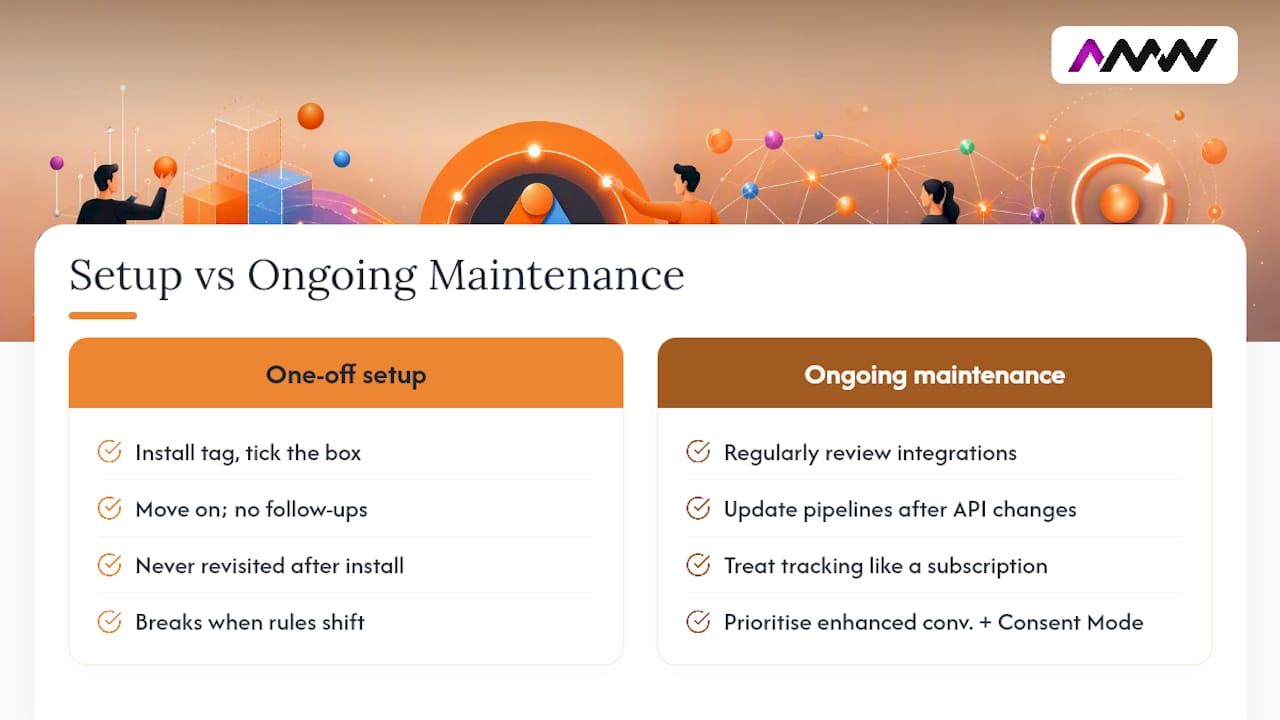
The 2026 Data Manager API migration is a good example of why this matters. Advertisers who built solid offline conversion pipelines two years ago are now the ones at risk, because the integration that worked perfectly then needs updating now. Conversion tracking isn’t a project with an end date. It’s closer to a subscription you have to keep renewing your attention to.
If there’s one thing worth prioritising above all else, it’s enhanced conversions combined with proper Consent Mode configuration. Not because it’s the newest option, but because it’s the one path that stays resilient as cookies keep dying off and privacy regulation keeps tightening. Everything else, the dashboards, the bidding strategy tweaks, works better once that foundation is solid, and barely matters at all when it isn’t. Our Google Ads and Meta Ads management is priced as a flat monthly fee, from £599 and £299 a month, never a percentage of your advertising budget.
Amir
How AMW Media can help you get this right
If your conversion data has gaps, or you’re not entirely sure your tag is even firing correctly, that’s usually a half-day fix rather than a rebuild. AMW Media runs tagging audits and full conversion tracking setups for clients who’d rather have someone check the wiring properly than discover a problem three months into a Smart Bidding campaign. For London businesses, our London agency page sets out four clients with four different problems and what each one was sold.
We handle the Google tag, GTM configuration, Consent Mode setup, and enhanced conversions implementation as part of our PPC campaign management work, backed by our team’s Google Ads certifications. If your setup predates the recent Consent Mode and Data Manager API changes, it’s worth getting it reviewed before those gaps start costing you in wasted spend. Get in touch through our contact page and we’ll tell you whether you need a full setup or just a tidy up.
FAQ
Why do I need Google Ads conversion tracking?
Without it, Google Ads has no way of knowing which clicks actually turned into sales, calls, or sign-ups, so it can’t optimise your bidding towards the outcomes that matter to your business.
How do I set up Google Ads conversion tracking?
Create a conversion action in Google Ads, install the Google tag site-wide (directly or via Google Tag Manager), and verify it with Tag Assistant before checking the conversion status in your account.
Why isn’t my Google Ads conversion tracking working?
The most common causes are a missing or misconfigured tag, a GCLID getting stripped by a redirect or click tracker, or Consent Mode blocking data collection; run through each with Tag Assistant and GTM preview.
How do I set up enhanced conversions?
Choose one of three routes, the Google tag, Google Tag Manager, or the Data Manager API, and configure your site to hash first-party customer data with SHA256 before sending it to Google for matching.
Should I use AMW Media or set up tracking myself?
A single, simple conversion is manageable in-house; once you’re running offline imports, multiple accounts, or need the Data Manager API migration handled properly, an agency setup like AMW Media’s typically pays for itself in avoided tracking gaps.
Recommended
- What Google Ads really costs UK businesses in 2026
- GA4 Not Tracking? UK Agencies Run These Five Checks in Five Minutes
- Conversion optimisation: a practical guide for UK SMEs
- Best automation tools for digital marketing: 2026 UK guide
Tracking is the part most local campaigns bolt on last. We do it first, before a penny of spend goes live, on every account including our Milton Keynes PPC clients.
Our free marketing audit looks at your site, your ads and your content, and comes back with a 30 day plan. No pitch deck.

Founded AMW Media in 2024 and runs strategy, paid media and the CRM builds. The reason everything here is in house and measured in revenue. Meet the team.