
 Black Steel Doors
 Woodstock Campers
 Phillips Joinery
If an active Meta ad is showing zero impressions, it usually means a delivery block or a configuration issue. Check the Delivery column, confirm the campaign, ad set and ad are all switched on, and make sure your payment method is working. Most cases trace back to something fixable in minutes, not a platform-wide fault.
TL;DR:
- Zero impressions often result from a delivery block, such as paused accounts, end dates passing, payment failures, or audience limitations, not the creative itself.
- Check the delivery sub-status, campaign, ad set, and ad toggles, as well as account payment status and audience size, before modifying creative elements.
- Delivery issues linked to tracking gaps can be confirmed by verifying event firing in Events Manager and testing the pixel with Meta’s tools; server-side tracking adds robustness.
- When multiple ads are active, high frequency or rising costs per result indicate ad fatigue, which can be mitigated by creative rotation or expanding the audience.
- Mismatched campaign objectives and optimization events often cause poor performance, and lifecycle best practices include testing new creative variants as duplicates, not edits.
Table of Contents
- Run these quick checks before you touch the creative
- Work through delivery, creative and conversion in that order
- Which Ads Manager numbers actually tell you something
- Why a tracking problem can look exactly like a delivery problem
- When the whole account, not just one ad, stops delivering
- Fix the immediate problem, then stop it coming back
- Common policy violations that quietly block delivery
- Why the same audience seeing your ad too often kills delivery
- When your campaign objective is working against you
- How to test new creative without breaking what’s working
- What actually gets an account back to healthy delivery
- How AMW Media gets your Meta ads delivering again
- Where to check the facts yourself
- Sources
- FAQ
Run these quick checks before you touch the creative
Before you rewrite copy or swap out images, spend five minutes ruling out the obvious. Most “not delivering” cases come down to one of a handful of usual suspects, and Meta’s own troubleshooting guidance walks through the same checklist advertisers should work through when a campaign isn’t running.
- Check the Delivery column first: look for a sub-status like “Not delivering”, “Learning limited” or “Update required” rather than just “Active”.
- Confirm every toggle is on: the campaign, the ad set and the individual ad all need their own switch flipped to active.
- Check the end date: it’s easy to set a short end date months ago and forget about it.
- Look at your payment method: a declined card or an account spending limit will quietly stop delivery with no dramatic warning.
- Check your audience size: an audience that’s too narrow struggles to find enough people to spend the budget on, so understanding audience targeting explained can help optimize your reach.
- Check for a learning phase reset: a recent edit to budget, targeting or optimisation event can send an ad set back to square one.
- Rule out a platform hiccup: occasionally the fault sits with Meta’s systems rather than your account.
Most of these take seconds to check once you know where to look. The trickier ones, tracking problems and learning phase resets, need a bit more digging, which is what the rest of this article covers.
Work through delivery, creative and conversion in that order
Once the quick checks are done and the ad is still stuck, it helps to think of the problem as three separate links in a chain: delivery, creative and conversion. Something is broken at only one of these points, and testing them in the wrong order wastes time.
Meta’s help centre recommends checking campaign status and spend limits before assuming anything is wrong with the ad itself, and that’s the right instinct. If the ad hasn’t been given a fair run yet, don’t touch the creative.
Here’s the order that actually saves time:
- Check status and spend first. If impressions are at zero and spend is at zero, this is a delivery problem, not a creative one. Nothing has been shown yet, so there’s nothing to judge.
- Check whether it’s had time to leave the review queue. New ads and edited ads can sit in review for a few hours. Meta suggests giving delivery up to 24 hours before troubleshooting further.
- Look at impressions against clicks. Getting impressions but very few clicks points to a creative or targeting mismatch, not a delivery block.
- Look at clicks against results. Getting clicks but no conversions usually means the landing page, the pixel, or the offer itself is the weak link, not the ad.
- Only then consider a creative refresh. If delivery is confirmed and clicks are healthy but results are not, that’s your cue to test new creative.
Fixes follow the same logic. If the campaign or ad set was paused, switch it back on. If the end date has passed, extend it. If the payment method failed, update the card and clear any outstanding balance. If the audience is too small, widen it rather than layering on more exclusions, our guide to audience targeting for marketers covers sensible ways to do this without losing relevance.
One thing catches almost everyone out at some point: editing a live ad set. A meaningful change to budget, audience or the optimisation event can send the ad set back into the learning phase, where delivery is deliberately less stable while Meta gathers fresh data. Give it a few days and roughly 50 optimisation events before judging performance again, and avoid making a second edit in the middle of that window.
Pro Tip: If you’re not sure whether an issue is delivery or creative, check the spend number before anything else. Zero spend means Meta hasn’t shown the ad to anyone yet, so the fault is almost never the creative.
Which Ads Manager numbers actually tell you something
Ads Manager gives you more than a red or green light, and the sub-status text under “Not delivering” is usually the most useful thing on the page. Meta documents specific statuses such as “Update required”, which points to an issue flagged during ad review rather than a budget or audience problem.
- Delivery column and sub-status: this is the first place to look, and the wording (learning, learning limited, not delivering, update required) tells you which chapter of this article applies.
- Impressions and reach: zero impressions means the ad hasn’t been shown at all, while low reach with high frequency means it’s being shown repeatedly to the same small group.
- Frequency: a frequency climbing past 3 or 4 within a short window is often the first visible sign of audience fatigue, covered further down.
- Spend versus budget: if spend is well below the daily budget, something is capping delivery, often a narrow audience or an aggressive bid cap.
- CTR and cost per result: a falling CTR alongside rising cost per result usually points to creative fatigue rather than a delivery block.
When comparing numbers across dates, use a like-for-like window. Comparing a Monday to a Saturday, or a week that included a learning phase reset to one that didn’t, will make a healthy ad look broken and vice versa.
Why a tracking problem can look exactly like a delivery problem
Meta’s delivery system needs signal to work with. Without reliable events coming back from your pixel or Conversions API, the algorithm has nothing useful to optimise towards, and delivery can slow or become erratic even though nothing in Ads Manager looks obviously wrong.
Start in Events Manager and check whether your key event, usually a purchase, a lead or an add to cart, is firing in the last 24 to 48 hours. A gap in that timeline is your answer.
- Test the pixel directly using Meta’s Pixel Helper browser extension to confirm the event fires on the page you expect.
- Check consent banners: many cookie consent tools block the pixel by default until a visitor actively opts in, which quietly starves your data.
- Look for script errors: a site update, plugin change or theme swap can break pixel code without any obvious symptom on the page itself.
- Check event match quality in Events Manager, a low score usually means the browser-side pixel is missing data that a server-side setup could recover.
Browser-based tracking alone is increasingly unreliable thanks to ad blockers, browser privacy settings and consent tools, so a server-side Conversions API setup is worth having as a backstop even if your pixel looks healthy today.
Pro Tip: If your delivery has degraded without any account or campaign changes, check Events Manager before touching the campaign at all. A silent tracking failure is one of the easiest things to miss because everything in Ads Manager still says “Active”.
When the whole account, not just one ad, stops delivering
Some faults sit above the campaign level entirely, and no amount of tweaking an ad set will fix them because the account itself is the problem.
- Automated account reviews: Meta occasionally asks advertisers to verify identity or business details, and these emails often have a real deadline attached, respond promptly rather than assuming it can wait.
- Payment method errors: a declined card, an expired card, or hitting your account spending limit will pause every active campaign at once, not just one ad.
- Ad-level rejection versus account-level block: a single rejected ad is usually a policy issue with that specific creative or copy, while every campaign stalling at once points to a payment or verification problem instead.
- Where to check: Payment Settings and the Account Quality section in Business Manager are the first two places to look when nothing is delivering.
- When to contact Meta support: if payment, verification and policy all check out clean and delivery is still stuck after 24 hours, that’s the point to raise a case through Meta’s support channels rather than keep guessing.
Getting these two categories mixed up wastes time. Chasing a creative fix for what’s actually a payment failure, or appealing a policy rejection when the real issue is your spending limit, means the clock keeps running with no delivery either way.
Fix the immediate problem, then stop it coming back
Restoring delivery is only half the job. The other half is making sure you’re not back here again in a fortnight.
- Widen rather than narrow: if an audience is too small, broaden it or build a fresh lookalike rather than piling on more layers of exclusion, our guide to lookalike audiences and budget controls covers how to do this without wasting spend.
- Avoid tight bid caps: an aggressive bid cap can throttle delivery just as effectively as a small audience, give the auction some room to work.
- Make budget changes gradual: a jump of more than roughly 20% can trigger a fresh learning phase, so step budget up in smaller increments when scaling.
- Keep your measurement wiring intact: treat pixel and Conversions API health as something you check on a schedule, not just when delivery goes wrong.
- Document your changes: note the date of every meaningful edit against your reporting, so a dip in performance can be matched to a cause rather than blamed on the algorithm.
Pro Tip: Keep a simple changelog, even just a spreadsheet row per edit, noting the date, what changed and the campaign it affected. It turns “delivery dropped last week, no idea why” into a five-second lookup.
Common policy violations that quietly block delivery
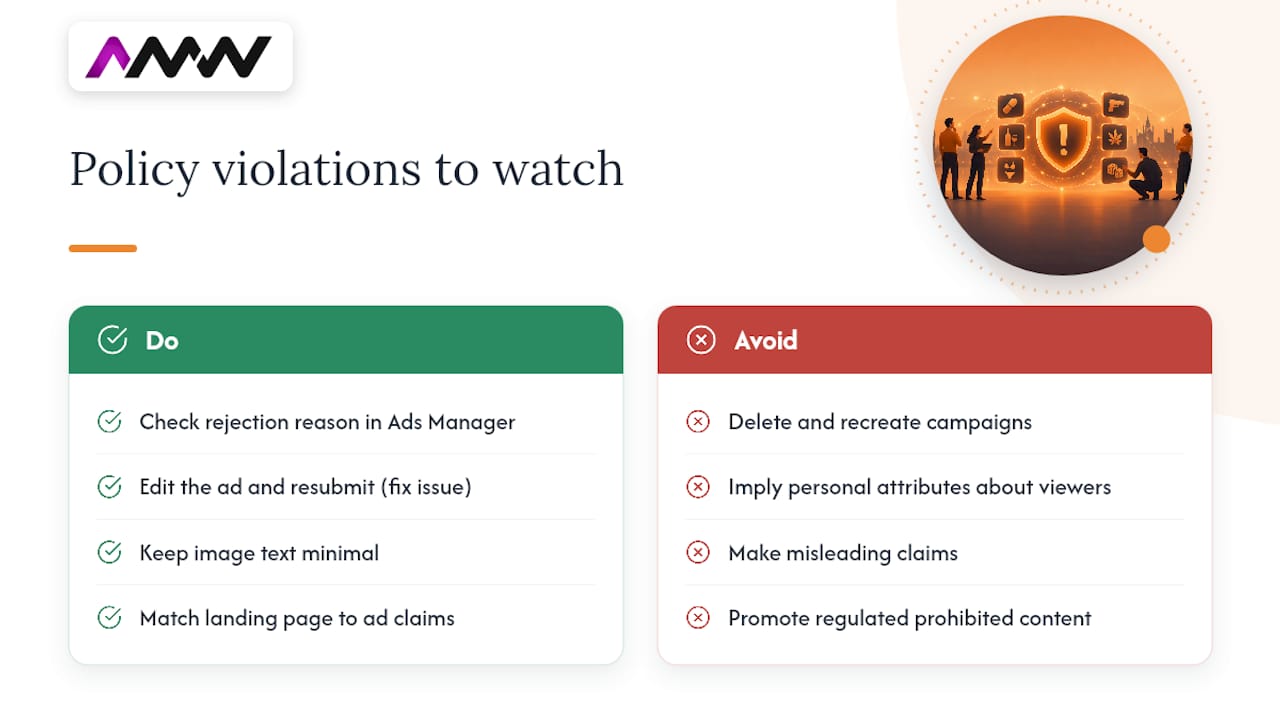
A rejected ad is the most visible policy problem, but plenty of violations show up as reduced delivery rather than an outright block, which makes them harder to spot. Personal attributes, implying you know something private about the viewer, misleading claims, and prohibited content in regulated categories such as health, finance or adult products are among the most common triggers.
Text overlay issues on images used to be a frequent cause of restricted delivery, though Meta’s policy has evolved over the years, it’s still worth keeping text minimal on image creative as good practice. Landing pages that don’t match the ad’s claims, or that ask for more personal information than the ad suggests, can also trigger a review flag even when the ad copy itself is clean.
If an ad is rejected, check the specific reason given in Ads Manager rather than guessing, Meta ties rejections to a documented review outcome that tells you exactly which policy was triggered. Edit the ad to address that specific issue and resubmit, rather than deleting and recreating the whole campaign, which just restarts the learning phase for no benefit.
Why the same audience seeing your ad too often kills delivery
Ad fatigue happens when the same group of people has seen your ad so many times that they’ve stopped reacting to it, and Meta’s system responds by delivering it less. This shows up as frequency climbing while CTR falls and cost per result rises, often over a period of a few weeks depending on audience size and budget.
The fix isn’t always a brand new campaign. Often it’s simply introducing new creative variations into the existing ad set, or genuinely widening the audience so the same people aren’t being shown the ad on repeat. Smaller audiences hit fatigue faster simply because there are fewer new people to reach, which is part of why audience size shows up repeatedly through this troubleshooting process.
Rotating in fresh creative before frequency climbs too high is far cheaper than trying to revive an ad set that’s already stalled. Our piece on creative campaign production covers a practical process for keeping a pipeline of fresh assets ready rather than scrambling for one new image when performance drops.
When your campaign objective is working against you
Choosing the wrong campaign objective doesn’t always cause an obvious error, it just means Meta optimises delivery for the wrong outcome. A campaign set to Traffic will happily deliver plenty of clicks while producing few actual leads or sales, because that’s precisely what it was told to optimise for.
This mismatch is often mistaken for a delivery problem when it’s really a setup problem. The ad is delivering exactly as configured, it’s just configured to chase the wrong signal. If your goal is purchases or leads, the campaign objective and the optimisation event inside the ad set both need to reflect that, not just the headline campaign goal.
Switching objectives on a live, otherwise healthy ad set will trigger a fresh learning phase, so this is worth getting right at setup rather than changing repeatedly once a campaign is running. If you inherited a campaign with a mismatched objective, it’s usually better to rebuild the ad set with the correct objective than to keep adjusting a structure that was never aimed at the right outcome.
How to test new creative without breaking what’s working
Once delivery is confirmed to be healthy and any tracking or account issues are ruled out, creative testing is the next lever. The trap to avoid is editing your one live, working ad directly, since that resets its learning and risks losing whatever momentum it had built.
A cleaner approach:
- Duplicate rather than edit. Create a new ad within the same ad set so you’re testing a genuine alternative, not disturbing the original.
- Change one variable at a time. Swap the image or the headline, not both, so you know what actually moved the numbers.
- Give each variant a fair sample. Judge results after a meaningful number of impressions per variant, not after a few hours.
- Compare CTR and cost per result, not just clicks. A creative that gets clicks but no conversions hasn’t solved anything.
For guidance on structuring these comparisons properly rather than eyeballing two numbers and guessing, our guide to Facebook A/B testing walks through how to run a test that actually tells you something. And if scale is part of the pressure you’re feeling, it’s worth remembering the sheer number of businesses you’re competing against for attention: Meta had close to 10 million active advertisers at last count, which is exactly why a fresh, well-tested creative matters more than ever.
What actually gets an account back to healthy delivery
We spend a fair amount of time on paid media audits, and the pattern is consistent: the fix is rarely the ad itself. Payment failures, tracking gaps and audiences that are too small or too fatigued account for the large majority of “not delivering” cases we see, and creative is usually the last thing worth touching, not the first.
The sequence we work through on a client account mirrors the order in this article: status and spend, then payment and account health, then tracking, then audience size, and only then creative. Skipping straight to a redesign because delivery looks broken almost always means solving the wrong problem well.
Delivery issues are rarely about the ad being bad. They’re almost always about something upstream of the ad, payment, tracking or audience, quietly getting in the way.
You can see the kind of results this approach produces in our work with Phillips Joinery, where fixing the fundamentals came before any creative overhaul.
— Amir
How AMW Media gets your Meta ads delivering again
If you’ve worked through this checklist and delivery is still patchy, or you’d simply rather someone else did the digging, that’s exactly the kind of thing we handle. AMW Media runs Meta Ads management, tracking audits and creative production as connected services rather than separate jobs, because a delivery problem rarely respects those boundaries neatly.
A typical diagnostic engagement starts with exactly what this article covers: a full Ads Manager review, a check of your pixel and Conversions API health, and an audit of account status and payment setup, before anything gets touched. From there, we fix what’s broken, whether that’s a tracking gap, an audience structure, or creative that’s gone stale, and hand back a working account with a clear note on what was wrong and why.
Have a look through our full range of services to see where this fits, or get in touch directly if you’d rather skip the diagnosis and just tell us what’s going wrong.
Where to check the facts yourself
These are the primary sources worth bookmarking before your next delivery scare:
- Meta’s own guide to troubleshooting a campaign that isn’t running, covering status checks, spend limits and timing.
- Meta’s breakdown of the update required sub-status and what it means for a rejected or flagged ad.
- StatusGator’s Meta Ads API monitor, useful for ruling out a platform-wide outage in minutes.
- Statista’s data on active Facebook advertisers, for context on how much competition sits in the same auction.
Sources
- Troubleshoot ad delivery: your campaign isn’t running
- Troubleshoot Facebook ad delivery issues with an ‘Update required’ sub-status
- Number of active Facebook advertisers
FAQ
Why is the status of my ad showing as not delivering?
It usually means the ad, ad set or campaign is switched off, the end date has passed, or there’s a payment or spending limit problem. Meta’s own guidance points advertisers to check status and spend first, since these two causes cover most cases.
Is something wrong with Facebook ads today, or is it just my account?
It’s almost always account-specific rather than a platform-wide fault. A quick check of a status monitor for Meta’s Ads API will confirm within minutes whether there’s a genuine outage, but most delivery dips trace back to payment, tracking or audience issues on the account itself.
What does “not delivering” actually mean in Ads Manager?
It means the ad currently isn’t being shown to anyone, which shows up as zero or falling impressions. The sub-status text underneath, such as “learning limited” or “update required”, tells you the specific reason, and Meta documents these sub-statuses directly.
Why are my Facebook ads marked active but not actually running?
An ad can show as “active” while still not delivering if it’s stuck in review, if the audience is too narrow to find anyone to show it to, or if the account has hit a payment or spending limit. Checking the Delivery column’s sub-status rather than just the on/off toggle usually reveals the real cause.
How long should I wait before assuming an ad is broken?
Give a new or recently edited ad up to 24 hours before troubleshooting further, since Meta’s own guidance builds in this window for review and initial delivery. If it’s still showing zero impressions after that, work through the payment, audience and tracking checks in this article before touching the creative.
Recommended
- Update Google Ads conversion tracking before June 2026
- 90 Day YouTube Ads Strategy | Creative and First Party Data
- What Google Ads really costs UK businesses in 2026
- Expert PPC Campaign Management London
Our free marketing audit looks at your site, your ads and your content, and comes back with a 30 day plan. No pitch deck.

Founded AMW Media in 2024 and runs strategy, paid media and the CRM builds. The reason everything here is in house and measured in revenue. Meet the team.