
 Black Steel Doors
 Woodstock Campers
 Phillips Joinery
TL;DR:
- A website redesign improves user experience, performance, and business results but can damage SEO if mismanaged.
- Thorough pre-redesign audits, data-driven decisions, and early accessibility integration are critical for success.
A website redesign is the process of planning, designing, and rebuilding a site’s structure, visual design, and code to improve user experience, performance, and business results. Done well, it is one of the highest-return investments a business can make. Done badly, it wipes out years of SEO equity in a weekend. This website redesign guide 2026 covers every stage, from the audit that should happen before a single wireframe is drawn, to the 90-day monitoring window after launch. Over 60% of UK web traffic is now mobile, and 53% of mobile users abandon a site that takes longer than 3 seconds to load. That number alone should reframe how you think about what a redesign is actually for.
When should a business decide to redesign its website?
The worst reason to redesign a website is that it looks a bit dated. Redesigning based on a schedule rather than business data consistently leads to poor outcomes. The right trigger is a measurable problem, not a feeling.
Symptoms that signal a redesign is needed
Watch for these specific warning signs before committing to a rebuild:
- Conversion rate is falling without a corresponding drop in traffic. This points to a UX or messaging problem, not an audience problem.
- Bounce rate is climbing on key landing pages. Users are arriving and leaving immediately, which suggests the page fails to meet their expectation.
- Mobile experience is broken or clunky. If your site was built before 2020 and has never had a mobile-first overhaul, it almost certainly underperforms on phones.
- Page speed scores are poor. A Largest Contentful Paint (LCP) above 4 seconds is a direct conversion killer.
- Accessibility failures are present. If your site cannot be navigated by a screen reader, you are excluding users and exposing yourself to legal risk under the Equality Act 2010.
- Your CMS or tech stack is holding you back. If publishing a blog post requires a developer, something has gone wrong.
Pro Tip: Before booking a single design meeting, pull 90 days of data from Google Analytics and Google Search Console. If you cannot point to a specific metric that the redesign will improve, you are not ready to start.
Facelift, targeted update, or full rebuild?
Not every problem needs a full rebuild. A facelift changes visual design without touching the underlying structure or URLs. A targeted update fixes specific pages or features. A full rebuild replaces the architecture, CMS, and URL structure entirely.
A facelift costs far less and carries almost no SEO risk. A full rebuild, by contrast, costs between £30,000 and £150,000 for larger projects and takes 8 to 12 weeks at minimum. Choose the scope that matches the problem, not the one that sounds most impressive in a board meeting.
Using data-driven decision making to identify your specific performance gaps is the clearest way to justify the right level of investment.
What audits should you complete before redesigning?
The pre-redesign audit is where most projects either succeed or fail before a single pixel is placed. Skipping it is like demolishing a house without checking where the load-bearing walls are.
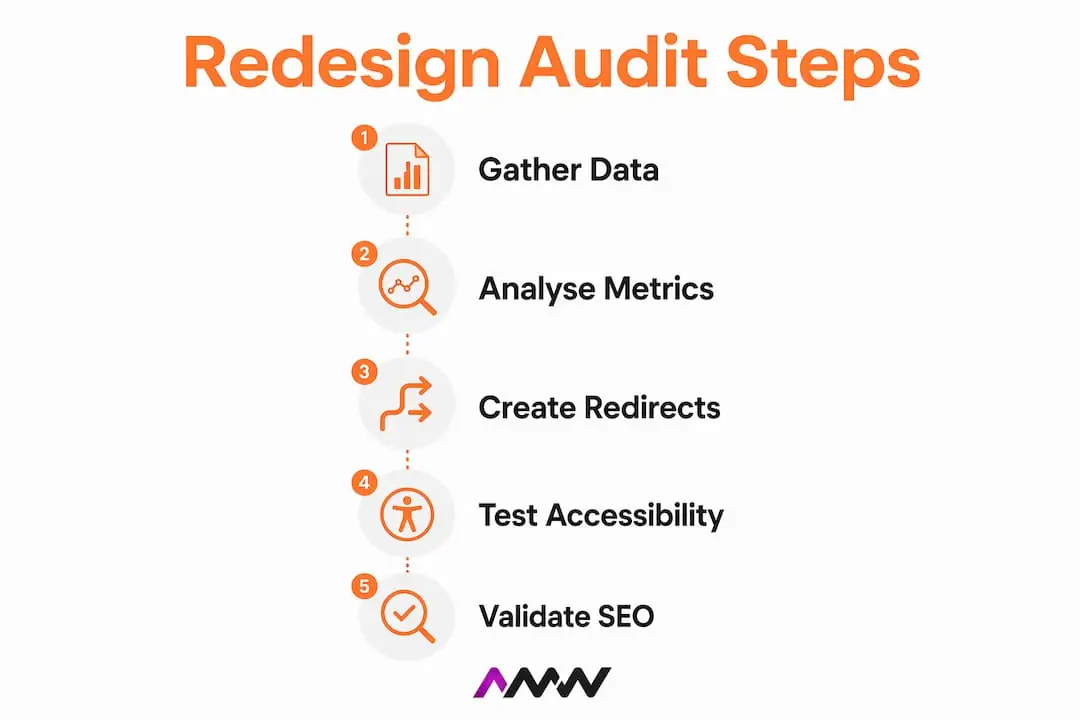
Step-by-step pre-redesign audit process
- Complete a full URL inventory. Export every indexed URL using Google Search Console or a crawl tool like Screaming Frog. This list becomes the foundation of your redirect map.
- Analyse your backlink profile. Identify which URLs carry the most external links. These pages must either be preserved or redirected precisely. Dumping old URLs to the homepage causes ranking loss; precise 301 redirects preserve backlinks and domain authority.
- Record current SEO rankings. Screenshot or export your top 50 keyword positions. You need a baseline to measure against post-launch.
- Run an accessibility scan. Use an automated tool such as Axe or WAVE for a first pass, then follow up with manual keyboard navigation testing. 95.9% of top homepages show WCAG 2 failures. That figure means your site almost certainly has issues you have not found yet.
- Measure Core Web Vitals. Record your current LCP, Cumulative Layout Shift (CLS), and Interaction to Next Paint (INP) scores using Google PageSpeed Insights or Chrome User Experience Report data.
- Audit JavaScript weight and third-party scripts. List every third-party tag, chat widget, and analytics script. Each one adds load time. Performance regressions often result from excessive JavaScript and third-party scripts, so setting caps early controls complexity.
- Set 3 to 5 measurable, non-visual KPIs. These might include conversion rate, task completion rate, LCP score, and organic traffic volume. Successful sites track non-visual KPIs like these rather than just how the site looks.
Pro Tip: Build your 301 redirect map in a spreadsheet with three columns: old URL, new URL, and redirect status. Mapping every URL variant and creating an exhaustive redirect file is the single most important document in any migration.
Key performance benchmarks to record
| Metric | Current target | 2026 best practice |
|---|---|---|
| Largest Contentful Paint (LCP) | Record current score | Under 2.5 seconds |
| Cumulative Layout Shift (CLS) | Record current score | As close to zero as possible |
| Accessibility standard | Note current failures | WCAG 2.2 AA compliance |
| Mobile traffic share | Record current % | Design for 60%+ mobile |
| Conversion rate | Record current % | Set improvement target |
What are the best practices for website design and development in 2026?
The standards that define a well-built site in 2026 are more demanding than they were even three years ago. Mobile-first design, Core Web Vitals compliance, and WCAG 2.2 AA accessibility are no longer optional extras. They are the baseline.

Mobile-first design is non-negotiable
Design for the smallest screen first, then scale up. This is not just a philosophical preference. With over 60% of UK web traffic on mobile, a desktop-first design process produces a site that works well for a minority of your visitors. Start with mobile layouts in your wireframes and treat desktop as the enhancement, not the default.
Performance targets to build toward
Your LCP target is under 2.5 seconds and your CLS should sit as close to zero as possible. These are not aspirational figures. Google uses Core Web Vitals as a ranking signal, so missing them costs you both traffic and conversions. The practical steps to hit these targets include:
- Serving images in WebP or AVIF format rather than JPEG or PNG
- Lazy-loading images below the fold
- Hosting fonts locally rather than pulling from Google Fonts at runtime
- Deferring non-critical JavaScript
- Setting a strict budget for third-party scripts before development begins
Integrating accessibility from the wireframe stage
Accessibility integration reduces costly redesign issues when it is built in from the start rather than retrofitted at the end. At the wireframe stage, define colour contrast ratios, focus states, heading hierarchy, and ARIA label requirements. Hand these specifications to developers before a single line of code is written. Retrofitting accessibility after build is three to five times more expensive than building it in correctly from the beginning.
Using AI tools responsibly
AI tools are useful for drafting component code and scaffolding page templates. The risk is that unreviewed AI-generated code increases accessibility errors. One in five companies have mature AI governance processes in place. If yours does not, treat every AI-generated code block as a first draft that requires a human review against WCAG 2.2 AA before it goes anywhere near a staging environment.
Pro Tip: Assign one person on your team the explicit role of accessibility reviewer. Give them a WCAG 2.2 AA checklist and the authority to block a component from going live if it fails. This single step prevents the most common and expensive post-launch fixes.
For a broader look at how design choices affect your brand, the 2026 graphic design guide from AMW Media covers visual strategy in depth.
How do you launch and monitor a redesigned website?
Launch day is the moment when months of work either pay off or unravel. The most common cause of post-launch traffic drops is not bad design. It is broken redirects and missing metadata.
Launch day checklist
- Verify every 301 redirect in your map is live and returning the correct status code.
- Confirm your robots.txt file is not blocking Googlebot from crawling the new site.
- Check that your XML sitemap is updated and submitted to Google Search Console.
- Confirm canonical tags are set correctly on all key pages.
- Test every page title and meta description. These are frequently lost during CMS migrations.
- Run a full accessibility scan on the live site before announcing the launch publicly.
- Check that Google Analytics and any conversion tracking tags are firing correctly.
Post-launch monitoring for 30 to 90 days is not optional. The redesign is visible at launch, but it is not complete. Broken redirects, indexing problems, and traffic shifts only become visible once real users and search crawlers interact with the new site. Build a monitoring schedule into your project plan before launch day, not after.
What to monitor after launch
- Google Search Console crawl errors. Check daily for the first two weeks. Any spike in 404 errors means a redirect is missing.
- Organic traffic by page. Compare week-on-week against your pre-launch baseline. A drop of more than 20% on a key page warrants immediate investigation.
- Core Web Vitals in the field. Lab scores from PageSpeed Insights are useful, but field data from real users takes 28 days to accumulate. Check it at the 30-day mark.
- Conversion rate by device. Mobile and desktop often behave differently post-launch. Track them separately.
- Server logs. These show you exactly which URLs Googlebot is crawling and how often. A page that drops out of the crawl budget is a page that will eventually drop out of the index.
Tracking marketing KPIs after launch gives you the data to make confident decisions about what to fix and what to leave alone.
Why redesign is an ongoing process
Continuous iteration is needed after every launch. The 90-day post-launch window is when you gather the real-world data that no amount of pre-launch testing can replicate. Use it to run A/B tests on key CTAs, fix accessibility issues flagged by real users, and refine page speed on the pages that matter most to your conversion funnel. A redesign that ends at launch is a redesign that will need repeating in 18 months.
Key takeaways
A successful website redesign in 2026 requires measurable goals, a thorough pre-launch audit, mobile-first design, WCAG 2.2 AA compliance, and a structured 90-day monitoring period after launch.
| Point | Details |
|---|---|
| Start with a business problem | Redesign only when you can name a specific metric you need to improve. |
| Audit before you design | Map every URL and record baseline KPIs before a wireframe is drawn. |
| Build for mobile first | Over 60% of UK traffic is mobile; design for the smallest screen first. |
| Integrate accessibility early | Adding WCAG 2.2 AA compliance at the wireframe stage costs far less than retrofitting it. |
| Monitor for 90 days post-launch | Broken redirects and indexing issues only surface once real users and crawlers arrive. |
What I have learned from watching redesigns go wrong
The redesigns I have seen fail most spectacularly share one trait: they started with a mood board instead of a problem statement. A stakeholder says the site looks old, a designer produces something beautiful, and six months later organic traffic is down 40% because nobody mapped the redirects. It is a remarkably consistent pattern.
The second most common failure is treating accessibility as a QA task rather than a design constraint. Teams bolt it on at the end, discover hundreds of failures, and then either ship a broken site or delay launch by weeks. Neither outcome is good. Integrating WCAG 2.2 AA at the wireframe stage is not idealism. It is the cheaper option.
The thing I push hardest on with clients is the KPI conversation before any design work begins. If you cannot answer “what does success look like in numbers?” you are not ready to redesign. A clear SEO strategy and a defined conversion target should exist before the first stakeholder meeting, not after the first design review.
Managing stakeholder expectations around timelines is its own skill. A custom redesign takes 8 to 12 weeks at minimum, and that assumes decisions are made promptly. Scope creep from ambiguous goals is the single biggest cause of blown timelines and budgets. Write down what the redesign will and will not include on day one, get sign-off, and refer back to it every time someone suggests adding a new feature mid-project.
Amir
AMW Media’s web design and SEO services
Redesigning a website correctly takes expertise across design, development, SEO, and accessibility. That is a lot to coordinate internally, particularly when your team is already running a business. For a north west London business, our digital marketing agency Harrow page lists the results we can show and the area we cover.
AMW Media works with ambitious brands to deliver custom web design built around performance, accessibility, and measurable business outcomes. Every project includes mobile-first design, Core Web Vitals optimisation, and a structured SEO migration plan to protect your existing rankings. The team also offers dedicated SEO services to maintain and grow your search visibility before, during, and after a redesign. If you are planning a site overhaul in 2026 and want it done without the common pitfalls, get in touch with AMW Media for a consultation.
FAQ
When is the right time to redesign a website?
Redesign when you can identify a specific business problem, such as low mobile conversions, a high bounce rate, or failing Core Web Vitals scores. Redesigning on a fixed schedule without data to support it consistently produces poor results.
How much does a website redesign cost in the UK?
Small business redesigns typically cost between £1,500 and £4,000. Larger, custom projects range from £30,000 to £150,000 or more, depending on complexity and scope.
What is WCAG 2.2 AA and why does it matter?
WCAG 2.2 AA is the Web Content Accessibility Guidelines standard that defines how accessible a website must be for users with disabilities. Meeting it reduces legal risk under the Equality Act 2010 and improves usability for all visitors.
How do I protect my SEO rankings during a redesign?
Create a complete 301 redirect map before launch, preserve existing page titles and meta descriptions, and submit an updated sitemap to Google Search Console on launch day. Monitor Google Search Console daily for the first two weeks after launch.
What are Core Web Vitals and how do they affect my site?
Core Web Vitals are Google’s performance metrics: Largest Contentful Paint (LCP), Cumulative Layout Shift (CLS), and Interaction to Next Paint (INP). Google uses them as a ranking signal, so poor scores directly affect your position in search results.
Recommended
- how to design a website a practical guide for 2026 | AMW Media
- Graphic design ideas for marketing: 2026 guide | AMW Media
- How to boost website SEO: your 2026 guide | AMW Media
- How to master your digital marketing process for 2026
Our free marketing audit looks at your site, your ads and your content, and comes back with a 30 day plan. No pitch deck.

Owns how everything looks and feels, from a brand identity to the grade on a reel, and makes the animated films such as Blue Light Services' Journey to Net Zero. Meet the team.