
 Black Steel Doors
 Woodstock Campers
 Phillips Joinery
Headless WordPress means keeping WordPress purely as a content backend and letting a separate frontend, built in something like Next.js or Astro, handle everything the visitor sees. It’s the right call when you need serious page speed, a custom frontend, or to publish the same content to a website, an app, and a kiosk screen at once. It’s the wrong call if you run a simple brochure site with one editor and no engineering budget. If you’re already sold and want the practical route, skip to the getting started checklist below.
- Go headless if: you need sub second load times, multiple output channels, or a frontend framework your team already knows.
- Stay traditional if: your site is content-simple, your team is small, and your current WordPress theme does the job.
- Consider hybrid if: you want performance gains on key pages without rebuilding your entire editorial workflow.
Key Takeaways
Headless WordPress works best when performance, multichannel publishing, or a custom frontend justify the extra engineering and governance overhead it demands.
| Point | Details |
|---|---|
| Definition | WordPress becomes a content backend only, feeding a separate frontend via REST or WPGraphQL. |
| API choice | Use WPGraphQL for relational content and heavy ACF use, REST for simple models. |
| Biggest risk | Lost editorial preview and SEO migration issues catch teams out most often. |
| Rendering mode | Match SSG, SSR, or ISR to how often your content actually changes. |
| Next step | AMW Media offers a technical audit to check whether headless suits your content model and team. |
Primary docs worth bookmarking
- WPGraphQL, plugin page and schema documentation.
- ACF headless guidance, field structuring advice.
- Next.js docs, rendering modes and preview setup.
- Graphql, core query concepts and caching notes.
What is headless WordPress?
WordPress normally does two jobs at once: it stores your content and it renders the HTML your visitors see, using a PHP theme. Headless WordPress splits those jobs apart. WordPress keeps writing to the database and managing users and media, but a separate frontend application fetches that content over an API and builds the pages itself. Our web design Milton Keynes page covers the photography and video shoot day we plan into every build, so nobody ends up hunting for stock images the week before launch.
That’s the core of what headless WordPress actually does: it treats WordPress as a data source, not a page renderer. In a monolithic setup, a visitor request goes to WordPress, PHP builds the page, and it’s returned. In a headless setup, the request hits your frontend (often pre-built as static files), which already pulled its content from WordPress via the REST API or WPGraphQL ahead of time.
Picture it as three boxes in a row: WordPress backend, an API layer in the middle, and your frontend framework on the end, talking to a CDN that actually serves the pages to visitors.
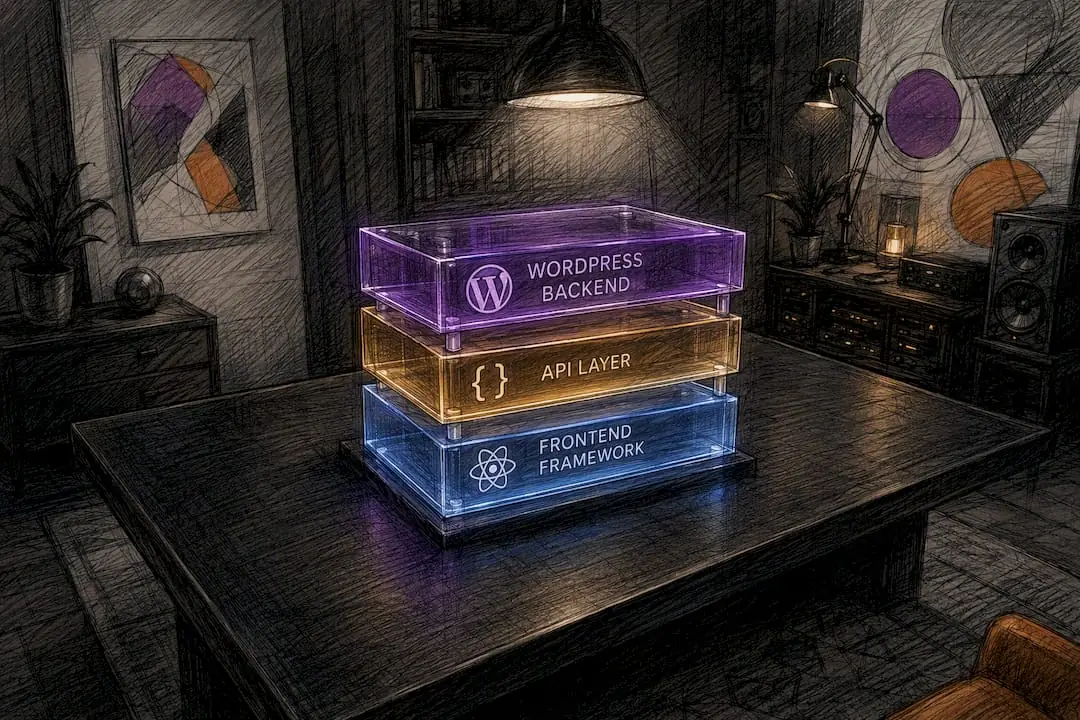
How is the architecture structured, and which rendering mode fits?
Four layers to plan for:
- WordPress backend, content, media, users, plugins, still running as normal.
- API layer, either the built-in REST API or the WPGraphQL plugin.
- Frontend framework, Next.js, Gatsby, Astro, or similar, doing the actual rendering.
- CDN/edge, serves the built pages fast, wherever your visitors are.
Rendering mode matters more than most teams expect going in.
| Mode | Best for | Trade-off |
|---|---|---|
| Static Site Generation (SSG) | Marketing pages, blogs, docs | Fast and cheap, but needs a rebuild to reflect new content |
| Server Side Rendering (SSR) | Personalised or frequently changing pages | Always fresh, but slower and needs a running server |
| Incremental Static Regeneration (ISR) | High page-count sites with occasional updates | Best of both, but adds caching complexity |
Whichever you pick, your API is a contract. Structure content at the field level with Advanced Custom Fields, version your field groups, and only expose what the frontend actually needs. Sloppy field structure now is the single biggest cause of headless projects grinding to a halt eighteen months later.
What benefits does headless WordPress actually deliver?
The gains are real, but they land differently depending on who’s asking.
- Developers get to use a modern framework, proper component libraries, and version control for the frontend, instead of fighting PHP template hierarchy.
- Marketers get faster pages (better Largest Contentful Paint scores) and the ability to push one piece of content to a website, an app, and a partner feed without re-typing it.
- CTOs get a smaller attack surface on the public-facing side, since the WordPress admin can sit behind a login wall or a separate subdomain entirely.
Custom UX that a theme simply can’t do, like an interactive product configurator sitting inside your content, becomes simple once the frontend isn’t shackled to PHP templates. These benefits show up fastest at scale, or where you’ve already got engineering capacity in-house; a five-page site with one part-time marketer won’t feel much of this.
What are the drawbacks of going headless?
Nobody sells you this part upfront, so here it is straight.
- Complexity, you’re now running two applications instead of one, with two deploy pipelines and two things that can break.
- Cost uplift, more developer hours, more hosting line items, more to maintain long term.
- Lost editorial preview, the “preview” button your editors love stops working out of the box; it needs rebuilding.
- Plugin compatibility gaps, anything that outputs its own HTML on the frontend (some forms plugins, some booking plugins) simply won’t work headless without extra effort.
- SEO migration risk, sitemaps, metadata, redirects, and structured data all need to be rebuilt, not assumed.
Pro Tip: Solve preview early by wiring your frontend to a draft API token before launch, not after your editorial team complains. And treat your SEO migration like a proper redirect audit project, not an afterthought.
Decoupling is not automatically faster or automatically better governed: running two pipelines means your DevOps team and your editorial team both take on more ongoing work, permanently.
Should you use the REST API or WPGraphQL?
Both ship content out of WordPress; they solve different problems.
The WP REST API is built in, needs no extra plugin, and is simple to cache at the edge because each endpoint returns a fixed shape. It’s a strong default for simple content models: blog posts, pages, a handful of custom post types.
WPGraphQL lets the frontend ask for exactly the fields it needs in a single request, which matters once your content model gets relational (posts linked to authors linked to categories linked to related products). Choose GraphQL when your model is complex or you’re leaning heavily on ACF; choose REST when the model is simple or your team has no GraphQL experience yet.
Quick checklist before you commit:
- How relational is your content model, really?
- Are you using ACF fields extensively? WPGraphQL for ACF makes that painless.
- Do you need to shape payloads precisely to avoid over-fetching?
- What’s your caching strategy, given REST caches more predictably out of the box?
Install WPGraphQL plus WPGraphQL for ACF if you go that route; REST needs nothing extra installed at all.
Which frontend framework should you actually pick?
This is where team skills matter more than any spec sheet.
- Next.js supports SSG, SSR, and ISR in one framework, and has the largest WordPress-specific ecosystem of any option here, including Faust.js for WordPress-flavoured tooling. Good default if you’re not sure yet.
- Gatsby leans hard into static generation with a mature plugin system for pulling WordPress data at build time. Solid for content-heavy sites that don’t change every hour.
- Astro ships minimal JavaScript to the browser by default, which suits content-heavy sites chasing lean page weight over interactivity.
- Faust.js isn’t a standalone framework so much as a WordPress-specific toolkit on top of Next.js, restoring preview mode and authentication patterns that plain Next.js doesn’t give you for free.
If your team already knows React and you need a mix of static and dynamic pages, Next.js is the sensible starting point; if editorial preview is your biggest worry, Faust.js on top of it closes that gap fastest.
How do you actually get started with a headless build?
Work through this roughly in order:
- Audit your current site. List every plugin and shortcode doing frontend work. Anything rendering its own HTML needs a headless replacement or a rebuild.
- Model your content as fields, not blobs. Move key content into ACF field groups instead of one big WYSIWYG blob.
- Choose REST or WPGraphQL based on the checklist above.
- Set up preview before your editors ask where it went.
- Wire up CI/CD and your CDN so content changes trigger a rebuild or revalidation automatically.
- Map your SEO output, meaning metadata, sitemaps, and structured data, from WordPress into the new frontend with WordPress SEO Automation.
- Test thoroughly, then launch.
Split this into three phases: audit (plugin list, content model, decision on API approach), build (frontend development, preview, SEO mapping), and launch (deploy pipeline, monitoring, redirect verification). Developers own the API setup, deploy pipeline, and rendering logic; editors own field structure sign-off, preview testing, and confirming metadata still reads correctly on every content type. Keeping those two lists separate saves a lot of finger-pointing later.
Where should you host and deploy a headless WordPress site?
Backend and frontend usually live in different places entirely.
- Backend hosting: a managed WordPress host such as WP Engine takes the server admin work off your plate, which matters once the backend’s only job is serving an API.
- Frontend hosting: Vercel, Netlify, or Cloudflare Pages are the three most common choices, each built around fast static deploys and edge delivery.
Once live, someone owns an ongoing checklist: webhooks or build triggers so new content actually publishes, cache invalidation rules, environment secrets handled properly (not left in a .env file in a public repo), preview authentication, and basic uptime monitoring plus backups on both sides.
For caching, ISR handles partially static sites well, persisted GraphQL queries give you more predictable cache keys, and Redis or object caching on the WordPress origin takes pressure off the database on high-traffic sites. Static generation isn’t a nice-to-have here; it’s what keeps a public-facing site fast without your WordPress origin sweating every request.
Headless, traditional, or hybrid: which one fits?
| Factor | Traditional WordPress | Headless WordPress | Hybrid |
|---|---|---|---|
| Traffic scale | Low to medium | High, performance-critical | Medium to high |
| Content complexity | Simple, page/post based | Relational, multi-channel | Mixed |
| Editor autonomy | High, familiar tools | Lower, until preview rebuilt | Moderate |
| Team skills needed | WordPress only | Frontend framework + API | Both, in smaller doses |
If you’re a small brochure site with one editor, staying traditional is the sensible choice: the cost band is low and governance stays exactly as it is today. If you need serious speed, multichannel publishing, or a custom frontend, headless earns its higher cost and heavier governance overhead. Hybrid, keeping WordPress traditional but rendering a handful of key landing pages headlessly, is a reasonable middle path when you want performance wins without retraining your whole editorial team at once.
What we’ve learnt building headless projects
Every headless project we’ve been near succeeds or fails on the plugin audit, not the framework choice. Teams pick Next.js or Astro first and discover three business-critical plugins render their own HTML three weeks before launch. Pro Tip: Run the plugin and shortcode audit before you write a line of frontend code, not alongside it.
Get a technical audit before you commit to a rebuild
If any of this has you nodding along but slightly nervous about the plugin audit part, that’s normal, and it’s exactly where a second pair of eyes earns its keep. AMW Media builds and audits WordPress projects, headless and traditional, for UK brands who’d rather find the landmines before launch than after.
We’ll look at whether your content model, your team’s skills, and your traffic actually justify going headless, rather than pushing you toward the more complicated build because it looks impressive in a case study. Sometimes the answer is a well-built custom WordPress site that stays traditional; sometimes it’s a proper headless rebuild with the preview and SEO groundwork done properly from day one. Either way, you get a plan you can actually staff and afford, with UK-based support once it’s live. Get in touch for a scoping call and we’ll tell you straight which path fits your project.
Sources
- What is Headless WordPress? | InspectWP
- WordPress as headless CMS | Advanced Custom Fields
- Headless WordPress tradeoffs explained | WordPress VIP
- WordPress
FAQ
What is a headless WordPress site?
It’s a WordPress installation used purely as a content backend, with a separate frontend application, often built in Next.js, Gatsby, or Astro, pulling content via the REST API or WPGraphQL and rendering the pages visitors see.
Is headless WordPress free?
WordPress itself, the REST API, and WPGraphQL are all free and open source, but building and hosting the separate frontend, plus the extra developer time, means a headless project almost always costs more overall than a traditional WordPress build.
Is WordPress outdated in 2026?
No. WordPress still powers a huge share of the web, and headless architecture is one of the reasons it hasn’t aged out: pairing it with a modern frontend framework keeps it competitive on speed and developer experience.
Is headless WordPress worth it?
It’s worth it when you need genuine performance gains, multichannel content delivery, or a custom frontend a theme can’t provide; for a simple site with one editor and no engineering budget, a well-built traditional WordPress site is usually the better bet. An audit with AMW Media can settle which side of that line your project sits on.
Recommended
- What is web development? A plain-English guide for small businesses | AMW Media
- Step by step web design for small businesses: a guide | AMW Media
- how to design a website a practical guide for 2026 | AMW Media
Our free marketing audit looks at your site, your ads and your content, and comes back with a 30 day plan. No pitch deck.

Runs the business alongside Amir: contracts, onboarding and making sure every client knows what is happening and when. Meet the team.