
 Black Steel Doors
 Woodstock Campers
 Phillips Joinery
You can migrate a website without losing rankings. The condition is not complicated: capture your baseline before anything moves, enforce one-hop 301 redirects for every URL that changes, and run a tight 30-day monitoring window the moment you flip DNS. That is the whole game. Everything else in this guide is the detail that makes those three things actually happen.
Your 24-hour pre-migration micro-checklist:
- Triage your URLs into Tier 1 (top traffic and revenue), Tier 2 (moderate value), and Tier 3 (low value or candidates for consolidation).
- Capture your baseline, export Google Search Console impressions and clicks by page, pull a full crawl with Screaming Frog SEO Spider, and download your top landing pages and backlink sources from SEMrush.
- Name an on-call owner, one person who can approve redirect changes and escalate to dev within the hour during cutover.
Escalation template (paste into Slack or a ticket):
Search Engine Land’s migration guide puts it plainly: any redesign that changes URLs is a migration, and quiet losses happen when teams skip the baseline.
Key takeaways
A migration without a baseline, a one-hop redirect map, and a named monitoring owner will lose rankings, the checklist below is the minimum to prevent that.
| Point | Details |
|---|---|
| Baseline before anything moves | Export GSC, analytics by page, full crawl, and backlink sources before a single URL changes. |
| One-hop 301s for every changed URL | Every source URL must resolve to its final destination in a single redirect, chains dilute equity and burn crawl budget. |
| Staging noindex is non-negotiable | Use an X-Robots-Tag: noindex header on staging; removing it is step three of the launch runbook. |
| 30-day incident window with named owners | Assign SEO lead, Dev lead, and PM with defined alert thresholds and escalation paths from day zero. |
| AMW Media for hands-on migration support | AMW Media delivers baseline audits, redirect maps, staging validation, and 30-day monitoring for UK teams. |
What is a website migration, and what are the main types?
A website migration is any change that causes Google to re-index a meaningful portion of your URL set. That definition matters because it catches more than obvious domain moves. Switching CMS platforms, restructuring your URL hierarchy, consolidating content, or moving from HTTP to HTTPS all qualify. If the URL changes, the index entry changes, and without a redirect, the equity disappears.
Here is a risk-oriented taxonomy to help you size the effort before you start:
| Migration type | SEO risk | Key mitigation |
|---|---|---|
| Domain change (e.g. rebrand) | Very high | Full redirect map, Change of Address in GSC, backlink outreach |
| Protocol change (HTTP → HTTPS) | Medium | Sitewide 301s, update canonical tags, check mixed content |
| www / non-www switch | Low, medium | Server-level redirect, update GSC property, canonical audit |
| CMS / platform swap | High | URL parity check, metadata carry-over, redirect map for any URL changes |
| URL structure change | High | One-to-one redirect map, internal link update, sitemap refresh |
| Content pruning / merges | Medium | 301 to nearest surviving page, 410 for retired content |
| E-commerce platform migration | Very high | Product and category URL map, faceted URL audit, checkout flow test |
| International / hreflang swap | High | Hreflang tag rebuild, locale URL parity, GSC International Targeting check |
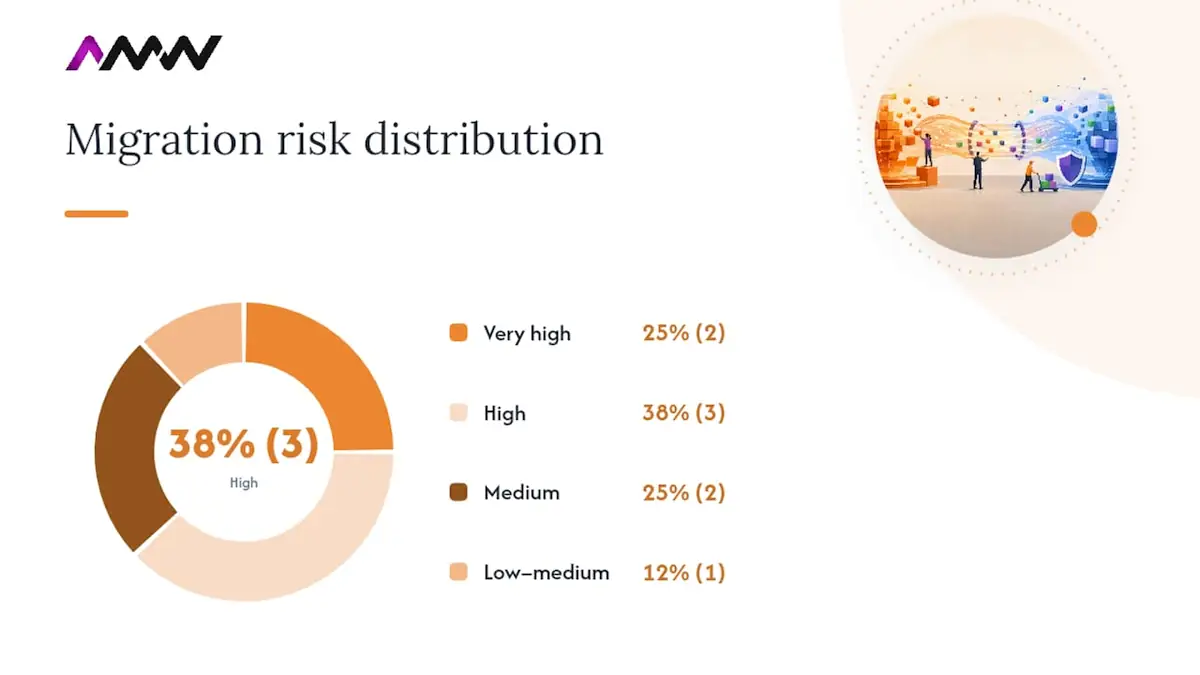
A full domain change sits at the top of the risk scale because it combines URL changes with a trust signal reset for the new domain. A website redesign that keeps all URLs intact carries almost no SEO risk at all. Know which row you are in before you write a single line of redirect rules.
Pre-migration planning: what to capture before anything moves
The single most common reason migrations lose rankings is not bad redirects. It is the absence of a baseline. Without one, you cannot prove whether a traffic drop is migration-related or seasonal, and you cannot prioritise recovery.
Baseline exports to capture before cutover:
- Full site crawl (Screaming Frog, all response codes, title tags, canonical tags, hreflang, internal links)
- Google Search Console: impressions, clicks, average position, and coverage by URL for the last 12 months
- Analytics: sessions, conversions, and revenue by landing page for the last 90 days and the same period the prior year
- Backlink profile: top linking domains and the specific URLs they point to (SEMrush organic research or Ahrefs)
- Top entry pages by session volume from your analytics platform
- XML sitemap snapshot (save the file, not just the URL)
- robots.txt snapshot
Microsoft Clarity session replays are worth pulling for your Tier 1 pages, they show which on-page flows drive conversions, which informs what you cannot afford to break. If your GSC history is thin (a new property or a gap in data), the Wayback Machine can reconstruct historical URL sets from cached snapshots.
Baseline data table template (export one row per URL):
Governance before you touch anything:
- Agree migration goals in writing: traffic retention target (e.g. no more than 10% drop in Tier 1 sessions at 30 days), crawl coverage target, backlink retention rate.
- Freeze the URL list. Any new page added after the freeze needs a separate sign-off.
- Assign triage tiers to every URL in the inventory.
- Get a signed Definition of Done before cutover: what does “migration complete” actually mean for your team?
The SEMrush migration checklist covers these pre-migration exports in detail and is worth bookmarking for the full team.
How do you build a redirect map that actually holds up?
Redirects are infrastructure. Treat them like any other deployable artefact: version-controlled, owned by a named person, and signed off before they go live. A redirect map that lives in someone’s personal Google Drive and gets updated by whoever has access is a liability.
CSV redirect map column schema:
| Source URL | Target URL | Type | Reason | Owner | Priority | Status |
|---|---|---|---|---|---|---|
| /old-page | /new-page | 301 | URL restructure | SEO lead | Tier 1 | Approved |
Triage tiers:
- Tier 1, pages with significant organic traffic, conversions, or referring domains. Map these one-to-one with exact target URLs. No wildcard rules.
- Tier 2, moderate value pages. Map individually where practical; use pattern-based rules only when the URL structure is systematic.
- Tier 3, low-value, thin, or duplicate pages. Redirect to the nearest relevant surviving page, or issue a 410 if the content is retired with no equivalent.
301 vs 302: the one rule that matters
Google’s redirect documentation is unambiguous: server-side permanent redirects (301 and 308) are the correct signal for a permanent move. Use a 302 only when you intend to revert. The common error is an accidental 302, a developer sets a temporary redirect during testing and it never gets changed. Google treats a 302 as temporary and may not transfer PageRank. Check every redirect in your map for the correct status code before launch.
Avoiding chains, loops and soft 404s
A redirect chain is A → B → C. Google will follow it, but each hop bleeds crawl budget and slows equity transfer. The one-hop rule: every source URL must resolve to its final destination in a single redirect. Run your map through Screaming Frog before launch to detect chains automatically. Wildcard rules are the most common source of soft 404s, a catch-all rule that redirects /old-category/* to the homepage sends every old product URL to a page that does not match the user’s intent, and Google will eventually classify those as soft 404s.
Apache (.htaccess) example:
Redirect 301 /old-page https://www.example.co.uk/new-page
Nginx example:
rewrite ^/old-page$ https://www.example.co.uk/new-page permanent;
Pro Tip: After deploying redirects, run an automated check using Screaming Frog’s “Redirect Chains” report. Set it to crawl your full redirect map CSV as a list, it will flag any chain, loop, or unexpected 302 before a single user hits the live site.
Siteimprove’s redirect governance guidance frames it well: map one-to-one where intent survives, triage by value, and monitor 404 and redirect-chain spikes during the post-launch incident window. That sequence is not optional, it is the difference between a migration that holds and one that bleeds traffic for months.
For a full domain change specifically, the domain migration SEO playbook covers the Change of Address process in Google Search Console, which runs alongside your redirect map and is easy to forget under cutover pressure.
How do you validate the new site before launch?
The staging environment is where you catch problems that would take weeks to diagnose in production. The non-negotiable rule: staging must be blocked from indexing at all times. Use an X-Robots-Tag: noindex HTTP header rather than relying on robots.txt alone, robots.txt is a suggestion; the header is a directive.
Staging environment rules:
- Set X-Robots-Tag: noindex at the server level, not just in the CMS.
- Password-protect staging with HTTP basic auth as a secondary layer.
- Set DNS TTL to 300 seconds (5 minutes) at least 48 hours before cutover so propagation is fast when you flip.
- Never use the production GSC property to test staging URLs.
Staging test checklist:
- Crawl staging with Screaming Frog and compare response codes against the production baseline crawl.
- Verify canonical tags point to production URLs, not staging domain.
- Check canonical HTTP headers (not just on-page tags) for any CMS-generated overrides.
- Validate hreflang tags: correct locale codes, reciprocal links between alternates, no self-referencing errors.
- Confirm XML sitemap is present, returns 200, and contains only the URLs you intend to index.
- Check robots.txt on staging blocks crawlers, and confirm the production robots.txt is ready to go live.
- Test all redirect rules from the approved map against staging URLs.
- Run a JavaScript rendering check, use Google Search Console’s URL Inspection tool on a staging URL (via a GSC property set up for staging) to confirm rendered HTML matches raw HTML.
- Check page speed on mobile using PageSpeed Insights or Lighthouse; flag any regression against the production baseline.
Source vs staging parity table (sign off before launch):
Use SEMrush Site Audit on the staging domain to catch broken internal links, missing meta descriptions, and duplicate title tags before they go live. Server log analysis on staging (even a short window) will show you which bots are hitting the staging domain despite your noindex header, a useful sanity check.
What does a solid launch runbook look like?
The launch hour is not the time to improvise. Every step needs an owner, a time box, and a rollback trigger. Here is the sequence:
Step-by-step launch runbook:
- T-2 hours: Final redirect map sign-off. Confirm staging noindex is live. Confirm DNS TTL is at 300 seconds.
- T-0 (DNS flip): Update DNS records. Note the exact time, you will need it for GSC and analytics correlation.
- T+5 minutes: Remove X-Robots-Tag: noindex and HTTP basic auth from the new server.
- T+10 minutes: Submit the new XML sitemap in Google Search Console.
- T+15 minutes: Switch analytics tracking to the new property if the domain has changed.
- T+20 minutes: Enable all redirect rules on the production server.
- T+30 minutes: Smoke test the top 20 Tier 1 URLs, check status codes, page load, canonical tags, and that redirects resolve in one hop.
- T+1 hour: Run a Screaming Frog crawl of the top 200 URLs. Flag any 404, redirect chain, or missing canonical.
- T+2 hours: Check GSC Coverage report for any immediate crawl errors. Check server logs for legacy URL hits.
The Webflow migration checklist is a useful reference for launch-day checks, particularly for CMS-driven sites where template changes can affect canonical and hreflang output globally.
Monitoring: days 0 to 30
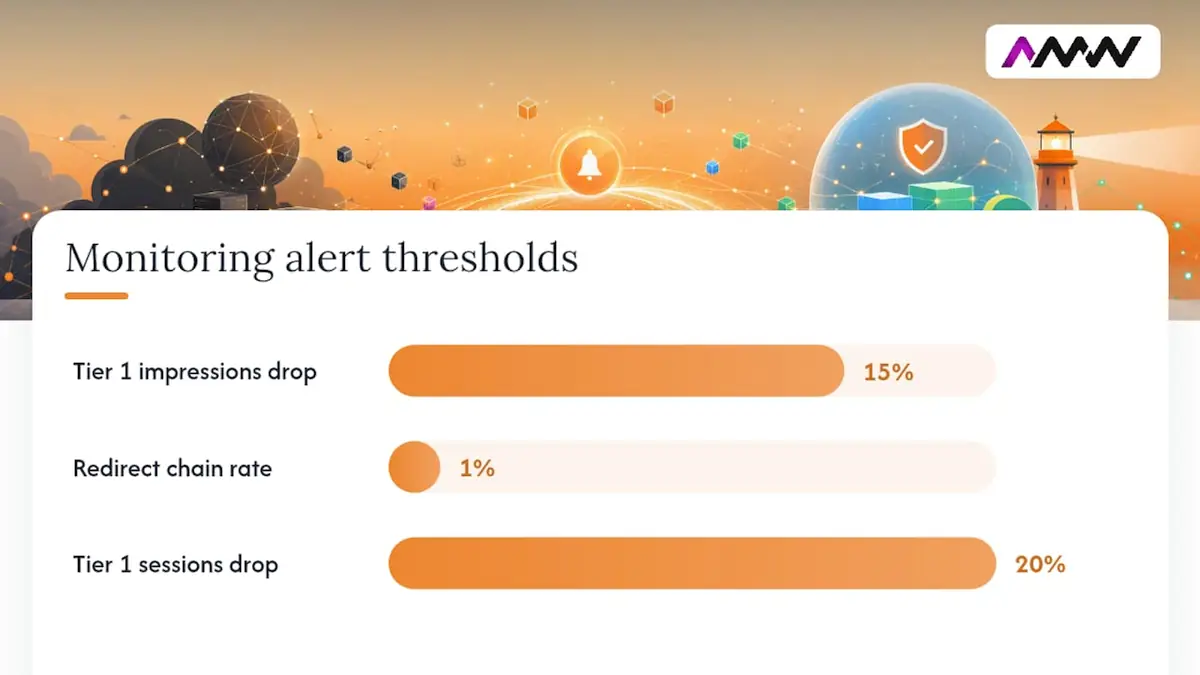
| Period | What to check | Suggested alert threshold | Owner |
|---|---|---|---|
| Day 0 to 3 | GSC Coverage errors, 404 spike in server logs | multiple new 404s from Tier 1 referrers | SEO lead |
| Day 0 to 7 | Impressions and clicks vs baseline (GSC) | More than 15% drop in Tier 1 impressions | SEO lead + PM |
| Day 0 to 7 | Redirect chain rate | More than 1% of redirected URLs forming chains | Dev lead |
| Week 2 to 4 | Organic sessions vs baseline (analytics) | More than 20% drop in Tier 1 sessions | SEO lead + PM |
| Week 2 to 4 | Legacy URL hits in server logs | Any Tier 1 legacy URL returning 404 | Dev lead |
| Week 2 to 4 | Backlink targets returning 200 | Any Tier 1 backlink target not resolving | SEO lead |
Recovery success at 30 days is not absolute parity with the baseline. It is a clear direction of travel: impressions recovering week-on-week, 404 rate declining, redirect chains at zero. Absolute parity often takes 60 to 90 days for large sites as Google re-crawls and re-ranks.
Key signal to watch: a spike in “Discovered, currently not indexed” URLs in GSC Coverage in the first week usually means Googlebot is finding new URLs but has not yet crawled them. That is normal. A spike in “Crawled, currently not indexed” is the warning sign, it means Google is visiting pages and choosing not to index them, which points to thin content, canonical errors, or soft 404s.
Post-launch governance: when is a migration actually finished?
Most teams declare victory at day 30 and move on. That is when the slow leaks start. Redirects accumulate without pruning, chains form as new pages get added, and the original redirect map becomes stale. Governance is what separates a migration that holds for two years from one that quietly degrades.
Audit cadence:
| Frequency | What to audit | Tool | Owner |
|---|---|---|---|
| Daily (first 30 days) | GSC Coverage, 404 rate, server log hits on legacy URLs | GSC, server logs | SEO lead |
| Monthly | Full crawl vs redirect map; internal link audit | Screaming Frog | SEO lead |
| Quarterly | Redirect pruning: chains, loops, redundant rules | Screaming Frog, server config | Dev + SEO |
| Quarterly | Intent check: do redirect targets still match source intent? | Manual review | SEO lead |
Governance checklist:
- Every new redirect added post-launch goes through the same sign-off process as the original map.
- Rollback rules: define in advance which metrics trigger a rollback (e.g. more than 30% Tier 1 traffic loss at 72 hours with no recovery signal).
- Change control: no URL changes without an SEO impact assessment.
- Redirects become standard operating procedure, not a one-off project.
When to convert temporary rules to permanent ones: if a 302 has been live for more than 30 days and there is no plan to revert, convert it to a 301. Leaving 302s in place indefinitely is one of the most common sources of slow equity loss.
Purposeful 410s: when you retire a page with no equivalent, a 410 (Gone) is cleaner than a 301 to the homepage. It tells Google the resource is intentionally removed, which speeds up de-indexing and avoids a soft 404 classification. Document every 410 in your redirect map with a reason and a date.
For ongoing SEO health post-migration, a strong long-term SEO strategy is what converts a successful migration into sustained ranking growth.
What goes wrong in migrations, and how do you fix it?
Most migration failures are not dramatic. They are quiet: a batch of redirects that never got added, a staging noindex that never got removed, a backlink target that now returns 404. Here are the most common failure modes and the recovery plays for each.
| Failure mode | Symptom | Where to look first |
|---|---|---|
| Missing redirects | 404 spike, traffic drop on specific pages | GSC Coverage, server logs, Screaming Frog crawl diff |
| Soft 404s | “Crawled, currently not indexed” in GSC | GSC Coverage, crawl of redirect targets |
| Redirect chains | Slow crawl, equity dilution | Screaming Frog Redirect Chains report |
| Staging noindex left live | Entire site drops from index | GSC Coverage, URL Inspection on key pages |
| Lost backlink targets | Referring domain links to 404 | Backlink tool (SEMrush), server logs |
| Broken internal links | Crawl errors, orphan pages | Screaming Frog internal link report |
| Hreflang mistakes | International traffic drop | GSC International Targeting, hreflang validator |
Recovery play 1: high-priority redirect miss
Owner: SEO lead + Dev lead. Immediate actions: identify the missing source URLs from server logs (look for 404s with referrers from search engines or high-value external sites). Add the missing 301 rules to the redirect map, get sign-off, and deploy within the hour. Submit the affected URLs for indexing via GSC URL Inspection. Monitor GSC impressions for those URLs daily for the next 14 days.
Recovery play 2: widespread soft 404s
Owner: SEO lead. Immediate actions: pull the “Crawled, currently not indexed” list from GSC Coverage. Crawl those URLs with Screaming Frog to check their redirect targets. If targets are irrelevant (e.g. homepage catch-all), remap to the nearest topically relevant surviving page. If the content no longer exists, issue a 410. Resubmit corrected URLs via sitemap.
Recovery play 3: staging noindex left live
Owner: Dev lead. Immediate actions: this is a P1 incident. Confirm the issue via GSC URL Inspection on multiple pages, if all return “noindex detected”, the header is still live. Remove the X-Robots-Tag: noindex header from the production server immediately. Do not wait for a deployment window. Once removed, use GSC’s “Request Indexing” on the homepage and top Tier 1 URLs to accelerate re-crawl.
One principle worth keeping front of mind: move first, improve later. Combining URL changes with wholesale content rewrites in the same cutover makes it nearly impossible to isolate what caused a ranking change. If you need to rewrite content, do it in a separate release after the migration has stabilised and your baseline comparison is clean.
AMW Media’s condensed agency playbook and anonymised case notes
Here is how a structured migration looks in practice, drawn from AMW Media’s agency process.
Anonymised case summary
Scope: mid-size UK e-commerce brand, approximately 4,800 indexed URLs, migrating from a legacy Magento build to a new Shopify Plus store with a full URL restructure.
Migration type: CMS platform swap plus URL structure change (very high risk).
Approach: six-week pre-migration phase with a full Screaming Frog baseline crawl, SEMrush backlink export, and a 4,800-row redirect map built and version-controlled in GitHub. Staging validation ran for three weeks with daily crawl diffs. Cutover was executed on a Tuesday morning (lower traffic, faster dev response time). A 30-day incident window with daily GSC checks followed.
By day 60, impressions had recovered to parity. Zero redirect chains at launch.
Owner matrix template:
| Task | Owner | Sign-off required | Tool |
|---|---|---|---|
| Redirect map build | SEO lead | PM + Dev lead | Google Sheets / GitHub |
| Staging crawl validation | SEO lead | SEO lead | Screaming Frog |
| Redirect deployment | Dev lead | Dev lead + SEO lead | Server config |
| GSC monitoring (daily) | SEO lead | None (escalate on threshold breach) | Google Search Console |
| Backlink outreach | SEO lead | PM | Email / outreach tool |
| Broken internal link fix | Dev lead | SEO lead | Screaming Frog |
Sample migration timeline:
- Weeks 1 to 2: Baseline capture, URL inventory, triage, stakeholder alignment.
- Weeks 3 to 4: Redirect map build, staging environment setup.
- Weeks 5 to 6: Staging crawl, validation, parity sign-off.
- Week 7: Cutover, launch runbook execution, smoke test.
- Weeks 8 to 11: 30-day incident window, daily monitoring, redirect fixes.
- Week 12: Governance handover, audit cadence agreed, Definition of Done signed.
Lessons learned and guardrails for UK organisations:
- Brief your hosting provider and CDN team before cutover, cache invalidation on launch day is a common source of stale redirects.
- If you use a CDN (Cloudflare, Fastly, AWS CloudFront), confirm redirect rules are applied at the origin, not just the edge layer, to avoid conflicts.
- GDPR cookie consent scripts can interfere with JavaScript rendering, test consent banner behaviour on staging before launch.
- Communicate the migration date to any external partners running paid campaigns to your site, so they can update destination URLs and avoid sending traffic to 404s.
For content decisions during migration, the content strategy foundations guide is a useful reference for deciding what to keep, merge, or retire.
What UK teams get wrong, and what to tell the board
Three things go wrong in UK organisations more than anywhere else in the migration process, and none of them are technical.
The three board-level points (one line each):
- Risk: a migration without a redirect map is a voluntary traffic loss event, budget for it properly or delay the launch.
- Cost: fixing a broken migration costs three to five times more than doing it right the first time, because recovery requires developer time, SEO audits, and backlink outreach simultaneously.
- Timeline: six weeks of pre-migration work is not padding, it is the minimum to build a defensible redirect map for a site above 500 URLs.
Common organisational traps:
Shifting scope is the most dangerous. A migration that starts as a CMS swap quietly becomes a full rebrand with new URLs, new content, and a new domain, all in the same release. Each addition multiplies the risk surface. The fix is a signed scope freeze, agreed before the redirect map is built.
Inadequate ownership is the second trap. Redirects need a named technical owner who can deploy a fix within the hour during the incident window. “The dev team” is not an owner. A named individual with a phone number is.
Treating redirects as an afterthought is the third. In too many projects, the redirect map is the last thing built, rushed in the week before launch. It should be the first technical deliverable after the URL inventory is agreed.
Suggested message for a board slide or stakeholder email:
For cross-team collaboration and governance frameworks, the digital strategy optimisation guide covers the coordination principles that apply directly to migration project management.
AMW Media handles the migration work so you do not have to
Website migration SEO is one of the highest-risk activities in digital marketing, and the gap between a well-run migration and a poorly run one is almost entirely in the preparation.
AMW Media’s migration service covers the full process: baseline audit and URL inventory, redirect map build and version control, staging environment validation, cutover runbook execution, and a 30-day monitoring and governance handover. The team brings the same structured approach used in the anonymised case above, with named owners at every stage and a signed Definition of Done before the project closes.
If you need specialist SEO support for a planned or in-progress migration, or if you need web design and build capability alongside the SEO work, get in touch with the AMW Media team. To get a fast estimate, include your current URL count, migration type (from the risk table above), and your target launch date. That is enough to scope the work and give you a realistic timeline.
Sources
The resources below are the canonical references the team should consult during a migration:
- Redirects and Google Search | Google Search Central | Documentation | Google for Developers
- The Complete Website Migration Checklist SEO-Friendly
- Website migrations: a plan to keep your traffic and SEO safe
FAQ
What is website migration SEO?
Website migration SEO is the practice of planning and executing a site migration so that organic search rankings, traffic, and indexing are preserved. It covers redirect mapping, baseline measurement, staging validation, and post-launch monitoring.
How long does it take to recover rankings after a migration?
Direction of travel typically improves within 30 days if redirects are correct and monitoring is active. Full ranking parity for large sites often takes 60 to 90 days as Google re-crawls and re-ranks the new URL set.
Do 301 redirects pass full SEO value?
Google treats 301 and 308 redirects as permanent moves and transfers PageRank through them, though some minor signal loss is possible over multiple hops. The one-hop rule minimises this, every source URL should resolve to its destination in a single redirect, as Google’s redirect documentation confirms.
What is the biggest risk in a website migration?
Missing redirects for high-traffic or high-backlink URLs is the most damaging single failure. A Tier 1 page returning 404 loses its ranking signal immediately, and recovery requires both a redirect fix and time for Google to re-crawl and re-index.
Can AMW Media manage a migration end to end?
Yes. AMW Media’s migration service covers baseline audits, redirect map build, staging validation, cutover runbook, and 30-day monitoring with governance handover. Contact the team with your URL count, migration type, and target launch date for a scoped estimate.
Local rankings are the first thing to wobble after a migration and the slowest to come back. If you are moving a site that depends on local search, our SEO work in Milton Keynes is the closest example of what that recovery looks like.
Recommended
- Website optimisation checklist: your 2026 UK guide | AMW Media
- How to boost website SEO: your 2026 guide | AMW Media
- Master your SEO strategy: guide for effective brand growth
- SEO trends in 2026: what UK marketers need to know | AMW Media
Our SEO manager runs the technical checks by hand, looks at who is beating you, and sends back the order to fix it in. Free, and you keep it either way.

Leads the WordPress, Shopify and custom builds, and the integrations that connect them to your CRM. Fast, accessible and yours to keep. Meet the team.