
 Black Steel Doors
 Woodstock Campers
 Phillips Joinery
This page gathers clear video storyboard examples across film, animation, adverts and educational video, plus free editable templates and a short how-to. Whatever you’re planning, whether a product film or a classroom explainer, you’ll find a layout to copy, the annotations to add, and enough of a process to start sketching your own board today.
TL;DR:
- Using detailed shot number, duration, camera movement, and audio notes for each panel ensures anyone can interpret the storyboard accurately without clarification.
- Effective storyboards for animation and action sequences rely on serial framing, movement arrows, timing marks, and continuity notes to communicate motion and pacing clearly.
- Commercial storyboards benefit from rapid animatics with rough timing and audio, helping identify pacing or messaging issues before costly production commitments.
- Internal videos and educational content should focus on simple, quick sketches with clear annotations, allowing for fast turnaround and easier revision.
- The choice of storyboard layout and fidelity depends on the project’s format, audience, and budget, with templates available for any aspect ratio or media type.
Table of Contents
- What makes a video storyboard example actually useful
- Film and animation storyboard examples worth studying
- Commercial and marketing storyboard examples
- Explainer and educational video storyboard examples
- Which storyboard template layout fits your project
- How to storyboard a video, step by step
- How studios turn a storyboard into a finished video
- Polished boards versus rough sketches: picking the right fidelity
- Hire AMW Media to build your storyboards and finished video
- Sources
- FAQ
What makes a video storyboard example actually useful
A good storyboard example isn’t the one with the prettiest drawings. It’s the one where a stranger could pick it up, read the panels and notes, and know exactly what to shoot without asking you a single question. That’s the whole test.
Each panel needs to carry a specific set of information, and most amateur boards skip half of it. According to BBC Bitesize’s storyboard planning guide, a useful storyboard includes the shot number and duration, the visual itself, technical codes for camera shots and movement, and audio codes. Miss any of those and the board stops being a planning tool and becomes a rough drawing with no instructions attached.
Here’s what every panel should carry, at minimum:
- Shot number — so the crew, editor and you are always talking about the same shot
- Duration — even a rough guess (3 seconds, 8 seconds) stops a scene running long
- Shot size and framing — wide, mid, close-up, over-the-shoulder
- Camera movement — static, pan, tilt, zoom, tracking, dolly, handheld
- Action — what actually happens in the frame, described in plain terms
- Audio — dialogue, voiceover, music cues, sound effects
- Transition — cut, dissolve, wipe, match cut into the next panel
- Production notes — props, lighting flags, VFX markers, anything the crew needs warned about
Statistic callout: The BBC’s own guidance lists close-ups, wide shots, pans, tilts, zooms, tracking and dolly moves as the specific technical codes worth recording on every board, not just the tricky shots.
The bit people underestimate is the writing outside the frame. A panel can be a stick figure and an arrow, and it’ll still work perfectly well if the notes beside it say “3 sec, slow zoom in, VO: ‘and that’s when everything changed’”. Strip those notes away and even a beautifully drawn frame leaves the camera operator guessing what happens next, which is exactly the point BBC Bitesize’s production guidance makes about annotation mattering more than artwork.
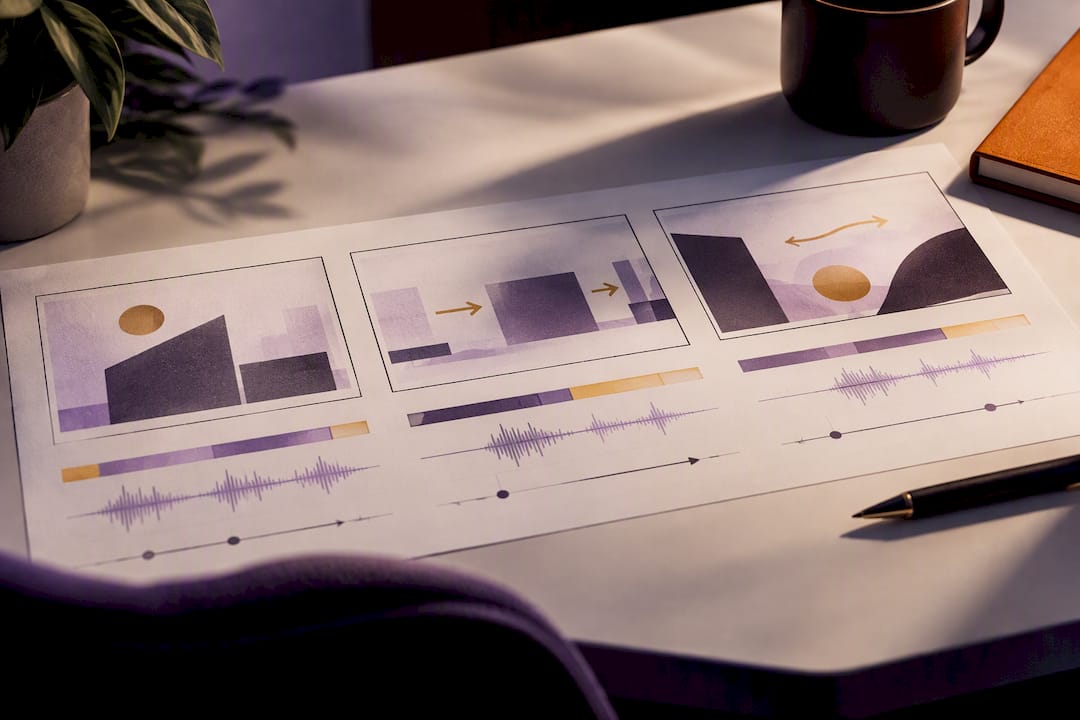
Pro Tip: Before you draw a single frame, write your audio and duration notes first. Once the timing and dialogue are locked, the visual choices tend to fall into place much faster.
Film and animation storyboard examples worth studying
Archival storyboards aren’t museum pieces. They’re a masterclass in solving the exact problems you’ll face on your own shoot, just at a bigger budget. Here are the patterns worth lifting from well-documented boards:
- Whip pans between characters in dialogue scenes — study how the panel arrows show direction and speed, not just the destination frame.
- Tracking shots across multiple panels — a single camera move often needs three or four linked frames to show how the framing changes mid-shot.
- Serial framing in chase or action sequences — consecutive panels repeat the same composition with small shifts, so the eye reads motion before the footage even exists.
- Character turnaround sketches in animation boards — multiple angles of the same character sketched small in the margin, so animators keep proportions consistent shot to shot.
- Establishing shots paired with a tighter reaction panel — the classic wide-then-close pairing that tells an editor exactly what cut is coming.
- Storyboards for effects-heavy sequences — notes about scale, light direction and reference footage sit right next to the sketch, because the drawing alone can’t carry that information.
- Timing marks on action beats — small numbers or tick marks under a panel showing beat-to-beat pacing rather than just total shot length.
- Continuity notes between panels — arrows or short text flags tracking props, costume or position so nothing jumps between shots.
Animation boards do something live-action boards don’t have to. Because nothing exists until it’s drawn and moved, every panel has to work harder to show progression.
Storyboards for animation must communicate a developing sequence rather than a set of isolated illustrations, because they’re planning the serial images that create the illusion of life itself. That amplified need for seriality is what separates an animation board from a live-action one, according to BFI’s analysis of storyboarding, which draws on archival examples including Animal Farm.
Well-documented boards also encode movement, depth, rhythm and space, letting a crew feel how a scene should progress before a single frame is shot, a point the same BFI piece makes using examples from The Empire Strikes Back and The Birds. If you want to go deeper than this article can cover, BFI’s storyboard archive is worth an afternoon. The lesson isn’t to copy the drawing style. It’s to copy what the arrows, numbers and pacing marks are doing underneath it.
Commercial and marketing storyboard examples
Advert storyboards live under time pressure that film boards rarely face. You’ve usually got 15 to 30 seconds to hook someone, show a product, build a shred of proof, and land a call to action, and every second costs money once cameras roll. That’s exactly why the animatic exists.
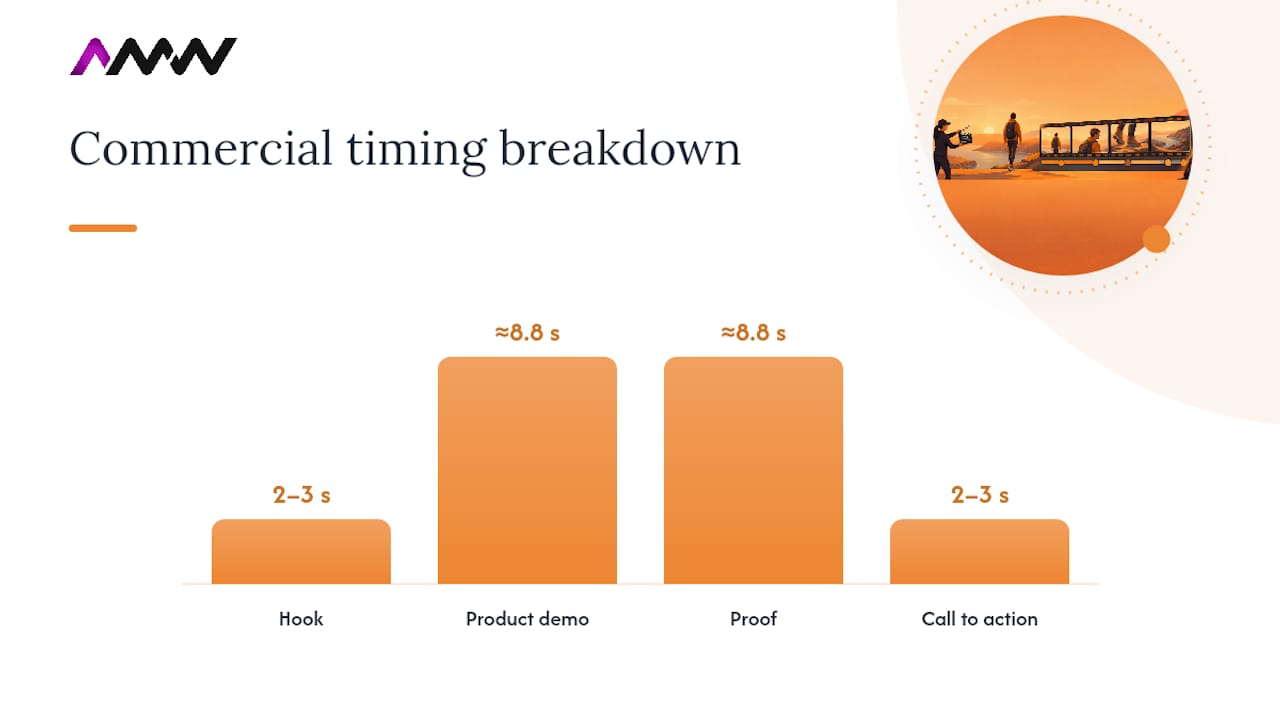
An animatic strings storyboard frames together with rough timing and temp audio, giving you a moving, timed preview of the advert before you’ve booked a single actor or location. BFI cites the Guinness “April Fool” advert as a case where this kind of low-cost visualisation tested a commercial’s timing and messaging before committing to full production. It’s a decision-saving tool more than a creative one: catching a pacing problem in an animatic costs nothing, catching it on set costs a reshoot.
Commercial boards typically follow a similar beat structure, even across different products:
- The hook — first 2 to 3 seconds, has to stop the scroll or the channel-flip
- Problem or context — a few seconds establishing why the viewer should care
- Product reveal — the moment the product actually appears on screen
- Proof or benefit — a demonstration, a stat, a testimonial beat, anything that earns trust
- Call to action — logo, tagline, website, or app name, landing in the final 2 to 3 seconds
If you’re building boards for a paid social campaign rather than broadcast, it’s worth reading up on how branded content translates into finished campaigns before you lock your beat structure, since social attention spans compress that hook window even further.
Explainer and educational video storyboard examples
Classroom and internal training videos don’t need cinematic boards. They need boards you can finish in ten minutes and hand to someone else without a briefing call.
- Panel-per-shot format — one box, one shot, no clever transitions between frames to slow you down.
- Sequence markers — note clearly where the video starts and ends, since training videos often get trimmed or reordered later.
- Audience and response notes — write down who’s watching and what you want them to do after (click a link, follow a process, answer a question).
- Simple audio flags — voiceover text or a one-line note on background music is enough; you don’t need full audio codes.
- A ten-minute time box — set a timer and force yourself to finish the whole board before it goes off.
BFI’s Screenonline education resource recommends exactly this: classroom exercises built around short, quick storyboard tasks that focus on shots, audio and audience rather than drawing ability. For educational and internal comms, clarity beats polish every time, and a ten-minute sketch produces a genuinely usable board for a training video or classroom project.
These simple boards also work well for internal comms, onboarding videos or process explainers where the goal is understanding, not persuasion. If you’re weighing up where a short explainer fits into a wider content plan, this piece on video content and brand engagement is a useful next read.
Which storyboard template layout fits your project
Not every project needs the same grid. Pick the layout based on how the finished video will be watched, not just what looks tidy on the page.
- Single-frame rows — one panel per row with columns alongside for shot number, action, camera movement, dialogue, sound and duration. Works well for film, product videos and anything with a linear script.
- Two-up frames — pairs of panels side by side, useful when you’re comparing a before/after or showing two camera angles of the same beat.
- Vertical, mobile-first frames — tall 9:16 panels that match how the finished video will actually be watched on a phone. Essential for social ads and Reels-style content, where a 16:9 board will mislead you about what’s actually in frame.
- Animatic-friendly sheets — panels with a timeline strip underneath, so you can mark exact durations and line up temp audio before you build the animatic itself.
A workable template needs columns for shot number, frame, shot size and angle, action, camera movement, dialogue or voiceover, sound and music, transition, duration and production notes, a structure BFI and BBC’s combined storyboard guidance backs across both education and production contexts.
| Project type | Best layout | Aspect ratio to set |
|---|---|---|
| Film or narrative short | Single-frame rows | 16:9 |
| Animation | Single-frame rows with turnaround sketches | 16:9 |
| Social ad or Reel | Vertical, mobile-first | 9:16 |
| Square feed post | Two-up frames | 1:1 |
| TV or online commercial | Animatic-friendly sheets | 16:9 |
| Classroom or training video | Simple panel-per-shot | 16:9 or 1:1 |
Free, editable storyboard templates are widely available as downloadable spreadsheet or slide files. Customising one is quick: duplicate the template, adjust the frame boxes to your target aspect ratio (16:9, 1:1 or 9:16), then add or remove columns depending on whether audio notes or VFX flags matter for your project. Bab love Growth’s guide to visual storytelling is a decent companion read if you want more on how visual sequencing supports a brand’s wider messaging.
How to storyboard a video, step by step
Storyboarding isn’t a single task, it’s a short sequence of decisions, each one narrowing down the last. Here’s the order that actually works:
- Break the script into beats. Read through and mark every point where the shot, location or camera angle needs to change. Note the rough total run time so you know how many panels you’re realistically drawing.
- Decide your fidelity level. A pitch deck or client presentation might need clean, detailed frames. An internal explainer or a rough campaign test can survive on stick figures. Match the effort to the audience, not to how good you feel about your drawing.
- Choose your layout. Pick single-frame rows, two-up frames or a vertical mobile-first sheet based on the template guidance above, and set your aspect ratio before you draw anything.
- Number every shot and estimate duration. Even rough numbers (2 sec, 5 sec, 8 sec) stop a sequence quietly running three minutes over.
- Sketch the frame and add movement arrows. Draw the composition, then mark pans, tilts, zooms or tracking moves with a simple arrow and a one-word label.
- Write the annotations. Dialogue, sound effects, music cues and production notes go beside or below the frame, never left to memory.
- Assemble a timed animatic. String the panels together with temp audio and rough timing so you can watch the whole thing move before committing a crew or budget to it.
- Run a review pass. Watch the animatic with anyone who needs to sign off, and flag any beat that drags or confuses.
- Freeze the complex shots first. VFX-heavy or multi-location shots need locking down early, since they’re the ones that cause scheduling headaches if they change late.
- Turn the board into production notes. Hand the finished storyboard to whoever’s shooting or editing, with every shot number matched to a clear instruction.
Pro Tip: Don’t redraw a panel just because the sketch looks rough. If the annotations are clear and the shot number matches your shot list, a wobbly stick figure does the same job as a polished illustration.
Working through beats and duration this way naturally produces a shot list alongside your storyboard, and it’s worth reading a fuller breakdown of what happens after storyboarding in this guide to video production for small businesses and creators if you’re planning your first proper shoot.
How studios turn a storyboard into a finished video
Once a storyboard’s approved, the real production work starts, and it looks less like art and more like project management. A typical studio workflow takes each storyboard shot and maps it against a task list covering locations, props, cast and any VFX flags, then builds a rough-audio animatic to lock pacing before booking anything expensive, a process reflected in AMW Media’s project work.
Two habits save more time than anything else on set:
- Consistent file naming and version control — label every storyboard revision (v1, v2, final) so nobody shoots from an outdated board by accident.
- A quick aspect-ratio test before the shoot, not after — export a one-minute animatic, then trim versions at 16:9, 1:1 and 9:16 to check the key action still sits inside frame and audio cues still line up, a method detailed in AMW Media’s social video aspect ratio guide.
Statistic callout: That aspect-ratio check exists for a reason: a frame composed for 16:9 very often loses the key action entirely once it’s cropped to 9:16, and catching that in a one-minute test animatic is far cheaper than catching it after a full shoot day.
DIY templates work well for internal videos, classroom projects and quick social tests. Hiring a studio makes more sense once budgets, cast or multiple locations are involved, where one missed detail costs real money to fix.
Polished boards versus rough sketches: picking the right fidelity
Polished, detailed boards earn their cost when a client needs to approve a concept before a big spend, or when a VFX-heavy shot needs precise planning. Rough sketches win everywhere else: internal videos, classroom exercises, quick social tests, anything where speed matters more than presentation.
The rule of thumb for small teams is simple. If more than two people need to sign off before filming, invest in cleaner frames. If it’s just you and a camera tomorrow morning, a stick figure and a clear duration note will get you there just as fast, and probably faster.
— Amir
Hire AMW Media to build your storyboards and finished video
If reading through all this has you thinking “I’d rather just hand this to someone”, that’s a fair call, particularly once a project involves a real budget, a shoot day, or a client who wants to see something polished before signing off. AMW Media handles the whole chain from storyboard through to finished film, covering video production and photography, social ad edits, and product films, so you’re not stitching together a template, an animatic tool and an editor separately.
A DIY template gets you a plan. A studio gets you a plan someone’s actually tested against a camera, a budget and a deadline, which matters most once you’re juggling locations, cast or a launch date that isn’t moving. Whether you need a product film, a social ad campaign, or a straightforward explainer video, the process starts the same way: get in touch, talk through the brief, and get a storyboard turned into a finished video without the trial and error. Have a look at recent projects for a sense of the finished result, then get in touch to talk about your project.
Sources
- From Star Wars to George Orwell: why storyboarding matters | BFI
- Storyboard production – Planning – BBC Bitesize
- Guinness: April Fool | Replay (BFI)
FAQ
How do I create a video storyboard?
Break your script into individual shots, sketch each one in a numbered panel, and add notes for duration, camera movement, dialogue and sound. Follow the step-by-step workflow above and you’ll have a working board within an hour for most short videos.
What are the 7 steps of storyboarding?
Definitions vary depending on who’s teaching it, but a common version runs: break the script into beats, choose your fidelity and layout, number the shots, estimate duration, sketch the frames with movement arrows, add annotations, then assemble a timed animatic for review. The full ten-step process above covers a fuller production version.
Can ChatGPT generate storyboards?
AI tools can help draft the beat structure or written shot descriptions for a storyboard, but they can’t reliably judge camera movement, timing or composition the way a person watching real footage can. Most people still sketch or lay out the actual frames themselves, then use AI only to speed up the written notes.
Where can I find a free video storyboard template?
Free, editable storyboard templates are widely available as spreadsheet or slide files that you can duplicate and adjust to any aspect ratio. Studios such as AMW Media also build custom storyboards and animatics as part of a full video production project if you’d rather skip the template stage entirely.
Recommended
- Creative content production steps for marketing success in 2026
- Types of creative content: 10 formats that drive results
- Creative campaign process: Step-by-step guide for growth
Our free marketing audit looks at your site, your ads and your content, and comes back with a 30 day plan. No pitch deck.

Founded AMW Media in 2024 and runs strategy, paid media and the CRM builds. The reason everything here is in house and measured in revenue. Meet the team.