
 Black Steel Doors
 Woodstock Campers
 Phillips Joinery
A good product photography brief is a one-to-two page document that tells the photographer what the product is, where the images will be used, how they should look and what you need back, with a shot list in a simple spreadsheet. You don’t need photography jargon. You need to be clear. Do that, and you’ll skip most of the reshoots, the awkward “that’s not quite what I pictured” emails and the invoice that mysteriously grew.
We make a lot of brand imagery at AMW Media, and the shoots that go wrong almost never go wrong on the day. They go wrong in the week before, when nobody wrote anything down. This guide walks you through what to put in your brief, how to build the shot list, what to say about style, and the legal bits UK businesses tend to forget.
TL;DR
- Cover four things: the product (with every variant and accessory), where the images will be used, the look you want, and the logistics (dates, samples, approvals).
- Build the shot list as a spreadsheet, one row per image, rather than a long essay. It stops angles and variants slipping through the cracks.
- Send reference images. Three to six examples of the look you like beat three paragraphs of adjectives.
- Agree licence terms in writing: under UK law, copyright in commissioned photos stays with the photographer unless a signed agreement says otherwise.
- Your images must not mislead. The ASA expects pack shots and serving suggestions to be honest about what the customer actually gets.
Table of Contents
- Why a brief is worth ten minutes of your time
- What goes in a product photography brief
- The shot list: a spreadsheet beats an essay
- Product photography guidelines: setting the house style
- A worked example: a fictional candle brief
- The legal bits UK businesses forget
- What about AI-generated product images?
- Our perspective: the brief is where the shoot is won
- Need a hand with the shoot itself?
- Common mistakes (and quick fixes)
- Your pre-shoot checklist
- FAQ
- Sources
Why a brief is worth ten minutes of your time
Picture a photographer receiving the message: “We need photos of our new range, make them look premium.” Premium to whom? On a white background or on a marble worktop? Eight products or eighty? Do you need a square crop for Instagram, a tall one for a banner, and a clean cut-out for Amazon?
The photographer can guess, and some guesses will be good. But every guess is a coin toss with your budget. A brief swaps the coin toss for a plan. It helps in three practical ways:
- Accurate quotes. A photographer who knows the number of products, images per product and the retouching level can price properly rather than padding for the unknown.
- Fewer reshoots. Missing angles, forgotten variants and wrong crops are cheap to fix on the day and expensive afterwards.
- Faster approvals. When everyone agreed the target beforehand, feedback becomes “does it match the brief?” rather than “I just don’t love it.”
And a reassuring point: a brief is a conversation starter, not an exam. You don’t need every answer before you get in touch. A rough idea and a link to the product page is enough for a good photographer or studio to help you tighten the scope and spot pitfalls. If you want a general template for any creative job, our creative brief examples and one-page template is a good companion to this article.
What goes in a product photography brief
Most useful briefs share the same bones. Top-ranking guides tend to list background information, goals, deliverables, reference imagery, creative direction and a style guide, and that matches our experience. For product work, here is how we’d order it.
1. A short introduction to the business and the goal
Two or three sentences. Who you sell to, what the shoot is for and what “success” looks like. “We’re launching a new skincare line online in March and need images that make a £28 serum look as trustworthy as the big brands” tells a photographer far more than “we need product photos.”
2. Product identity
List every item being photographed, and be annoyingly specific:
- Product names and SKUs (or whatever you call them internally)
- Variants: colours, sizes, flavours, finishes
- Accessories or parts that come in the box
- Anything fragile, reflective, transparent, very dark or very white, because those are the ones that take longer to light
- Whether you’re supplying one sample or several (and whether they’re pristine, because yes, the dented one at the back of the warehouse will show)
3. Where the images will be used
This drives almost every other decision. Be clear about whether the pictures are for:
- Your website product pages and category pages
- Marketplaces such as Amazon or eBay, which have their own image rules
- Social media, where crops and styling are different
- Paid ads
- Print: catalogues, packaging, trade show displays
- Email and newsletters
A hero image for a homepage banner needs space around the product for text. A marketplace image usually needs a clean, plain background with the product filling the frame. Tell the photographer both are needed and they’ll shoot with both in mind, rather than you discovering later that the crop doesn’t work.
4. Visual style
This is where people either write a novel or nothing at all. Do neither. Use words sparingly and pictures generously:
- Send three to six reference images you like, with a line on what you like about each (“the soft shadow”, “the warm tones”, “the way the hand holds the product”).
- Add one or two you don’t like. It’s surprisingly useful.
- Mention your brand colours, fonts or existing imagery so the new shots sit comfortably next to the old ones.
Photographers often build mood boards from the examples clients send, and it’s one of the quickest ways to line up expectations before anyone picks up a camera.
5. Deliverables
What do you actually want in your inbox afterwards?
- Number of final images per product
- File formats (JPEG for web, TIFF or PNG for print or cut-outs)
- Sizes and aspect ratios (square, 4:5, 16:9, whatever you need)
- Whether you want transparent or white background versions
- Naming convention for files, so your team isn’t hunting through “IMG_4382”
- How retouched you want them (basic tidy-up, or full colour matching and compositing)
6. Logistics
Dates, location, who’s on site, how samples get there and back, who signs off the images and how many rounds of revisions are included. If your boss will want a say, get them in the approval chain now, not after the edits are done.
7. Budget and licence
Give a budget range if you can. It isn’t a trap. It helps the photographer propose the right approach instead of the one that’s either too thin or beyond your means. Then cover usage, which gets its own section below.
The shot list: a spreadsheet beats an essay
People search for a “product photography shot list” because this is the part that stops things being forgotten. The most practical format is a plain spreadsheet, with one row per image you want. Photographers tend to prefer it to a long descriptive document because it leaves no room for ambiguity about angles and variants.
Here is a simple structure you can copy into Google Sheets or Excel:
| Ref | Product / variant | Shot type | Angle / detail | Background | Aspect ratio | Used for | Notes |
|---|---|---|---|---|---|---|---|
| 01 | Linen throw, sage | Packshot | Front, flat | White | 1:1 | Website, marketplace | Fold neatly, no creases |
| 02 | Linen throw, sage | Detail | Close-up of weave | Neutral | 4:5 | Website, Instagram | Show texture |
| 03 | Linen throw, sage | Lifestyle | Draped over armchair | Living room | 16:9 | Homepage banner | Leave space on left for text |
| 04 | Linen throw, sage | Scale | Held by model | Neutral | 4:5 | Product page | Show size against body |
| 05 | Linen throw, all colours | Group | Stacked, fanned | White | 1:1 | Category page | All five colours, same order as swatches |
A few habits make the list work harder:
- Standard shots first, creative shots second. Lock down the must-haves (front, back, side, top, detail, packaging) for every product, then add the lifestyle or styled images.
- Use the same set of angles for every product. A catalogue where the shoes face left in one image and right in the next looks sloppy even if you can’t say why.
- Mark priorities. If time runs short, which images matter most? Put an A, B or C next to each row.
- Include scale and context shots. Customers can’t pick a product up. A hand, a coin or a worktop for size reference answers a question before it becomes a returns email.
- Don’t forget the unglamorous ones. The label, the ingredients panel, the underside, the inside of the box. Customers look for those.
If you’re not sure what shots you need, look at three competitors’ or favourite brands’ product pages and count how many images they show. That’s usually a decent baseline, and you can improve on it.
Product photography guidelines: setting the house style
If you shoot more than once, a short set of guidelines saves you rewriting the brief each time. Think of it as the standing rules, with the brief covering what changes each shoot. The guidelines should cover:
- Backgrounds: pure white, off-white, a brand colour, or styled surfaces. Specify which ones for which uses.
- Lighting mood: bright and airy, warm and cosy, dark and dramatic. Reference pictures do the heavy lifting here.
- Shadows: soft natural shadow, hard shadow, or none (floating cut-out).
- Cropping and spacing: how much space around the product, where it sits in the frame, and safe areas for text overlays.
- Props: what’s allowed, what isn’t, and the rule that a prop which isn’t included in the purchase should be obvious or flagged (more on that below).
- People: hands, models, diversity of representation, and whether you have consent and releases.
- Retouching: dust and fingerprints out, yes. Changing the colour or the shape of the product, no.
- File handling: formats, resolution, naming, where files are stored and who has access.
Our article on photography for brands goes into why consistent imagery builds recognition over time, and it’s worth a skim before you write your own style notes. If creative direction is the fuzzy bit for you, our guide to what creative direction actually is might help.
A worked example: a fictional candle brief
Here’s a short brief for an imaginary brand, so you can see the pieces fitting together. The business is made up, but the structure is one you can lift as is.
Business and goal. Ember & Oak sells hand-poured candles online. We’re launching an autumn range of four scents and need images for the website, Instagram and a seasonal email. Goal: look giftable and high quality, and lift conversion on product pages.
Products. Four scents (Smoked Pine, Fig Leaf, Amber Rain, Clove & Orange), each in a 200g jar and a 60g travel tin. Eight products in total. Each comes in a kraft box with a matchbook. Please photograph with lids both on and off.
Usage. Website product pages (square, white background), homepage banner (landscape, space for text on the right), Instagram feed (4:5) and Stories (9:16), plus one email header. Usage is digital only for 24 months, UK and EU.
Style. Warm, soft, autumnal. See attached mood board: images 1, 3 and 5 for lighting, image 2 for the styled wood surface, and image 4 as an example of what we don’t want (too glossy, too cold).
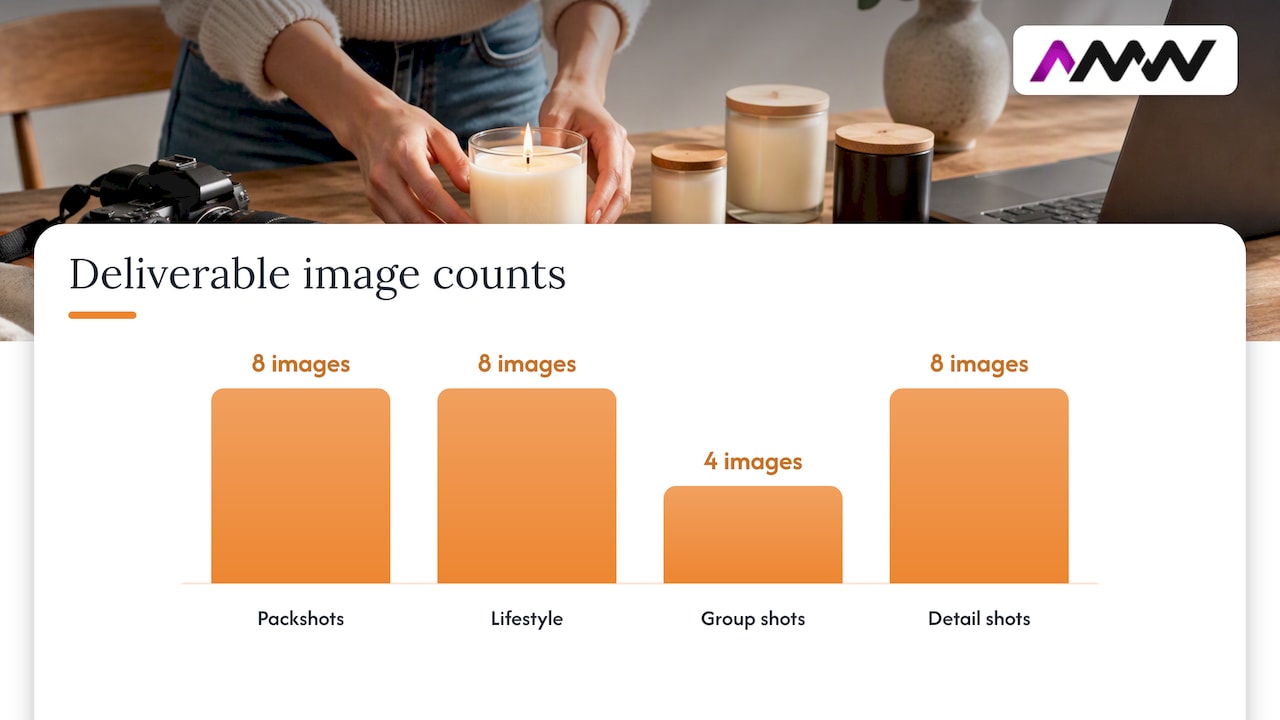
Deliverables. Eight white-background packshots, eight lifestyle shots, four group shots, eight detail shots (flame, wax surface, label). Edited JPEGs at 3000px on the long edge, plus transparent PNG cut-outs of the packshots. File names: scent-size-shot-number.
Logistics. Samples delivered to the studio on 4 November, two spares of each in case of damage. Shoot day 11 November. Two people approve: the founder and the marketing lead. One round of edits included, delivered within five working days.
Do and don’t. Show the candle lit in lifestyle shots only. Don’t add props that suggest the product includes them, such as a vase or fresh flowers, unless captioned as styling.
That’s about 250 words, and the photographer now knows nearly everything needed to quote and shoot.
The legal bits UK businesses forget
This is the dull part that can cost real money, so it’s worth five minutes.
Who owns the pictures?
Many business owners assume that paying for a shoot means they own the photos. In the UK, it doesn’t work that way by default. The Intellectual Property Office’s copyright notice on digital images is aimed at small businesses and explains the basics. As a rule, the creator holds the copyright unless it has been assigned in writing. GOV.UK’s general guidance on copyright also says you cannot copy or use copyright material without permission.
So put this in your brief and your agreement:
- Usage: website, social, paid ads, print, packaging, marketplaces, anything else.
- Duration: a set period or in perpetuity.
- Territory: UK only, Europe or worldwide.
- Exclusivity: can the photographer resell the same images to someone else?
- Ownership: are you buying a licence, or having copyright assigned to you in a signed document?
- Edits and derivatives: can your team crop, retouch or use the images in new layouts without asking?
If you’re not sure how your agreement stacks up, a solicitor with intellectual property experience is the person to ask, not a blog post (including this one).
Do your images mislead?
Product photography is advertising, and the Advertising Standards Authority (ASA) cares about what pictures imply. The ASA’s guidance on products and packaging notes that although packaging itself is generally outside the CAP Code, the presentation of a pack shot in marketing is not. One ruling that shows the issue clearly is the ASA ruling on Parsley Box Ltd, which concerned a press ad where the photograph of a meal appeared with extra items that raised the question of what was actually included.
The lesson for your brief is simple:
- If a prop, side dish or accessory isn’t part of what the customer receives, make that clear in the image or its caption.
- Don’t retouch the product into something it isn’t: smoother, bigger, a different colour or a cleaner finish than the real thing.
- If you use before-and-after images to show what a product does, keep proof they’re genuine. The ASA has specific advice on before and after photos.
Put a line in your brief: “Retouching must not alter the product’s true colour, size or finish. Flag any styling props not included in the sale.” It’s one sentence and it keeps you and the photographer on the right side of the rules.
What about AI-generated product images?
You’ll have wondered: why brief a photographer when a tool can conjure a perfect candle on a marble worktop in seconds? Fair question, and it’s one many brands are asking.
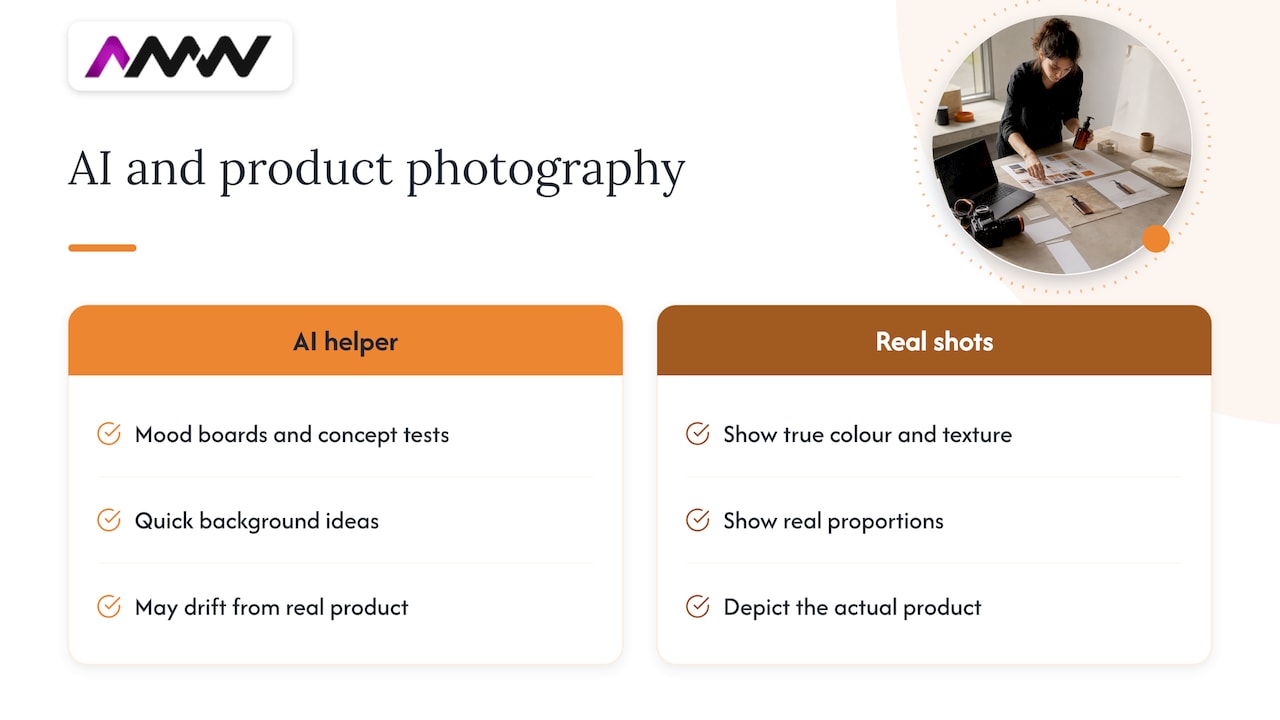
AI can be handy for rough mood boards, background ideas and quick concept tests. For the final product shots, we’d be cautious. A customer is buying the real thing, so the image has to show the real thing: its true colour, texture and proportions. A generated image can drift from the actual product, which is both a customer-service problem and, as above, a potential misleading-advertising one.
There’s also the human side. A BBC report on a Fenland media business that said it would close described demand drying up over a year amid an influx of AI, a reminder of how raw the topic is for creative professionals. And big brands are experimenting too: H&M said it would use digital clones of models in some social media posts and marketing, with permission from the models. Where the law on AI and copyright goes next is still being discussed, and the government’s copyright and AI consultation shows the framework is under review.
Our practical take: use AI as a helper, not a replacement for the product itself. If you want to go deeper, we wrote about the role of AI in content creation for ambitious brands. And if you do plan to use AI-assisted editing, say so in the brief so the photographer knows the boundaries.
Our perspective: the brief is where the shoot is won
We’ve sat on both sides of this table, as the people writing briefs for clients’ campaigns and as the people receiving them. Here’s what we’ve learned.
The best brief is the one that gets written. We’d rather get a scruffy one-pager with five reference images than a beautifully formatted twelve-page document that arrives the day before the shoot. If you’re unsure, send what you have and we’ll fill in the gaps together.
Start from the sale, not the camera. We ask clients where the image will do its job: a product page where someone’s deciding whether to buy, an ad that has about a second to stop a thumb, a catalogue spread. The answer shapes the framing, the lighting and the number of shots, far more than any technical choice.
Join up the photography with everything else. Product images feed your website, your social posts, your ads and your search listings. A shoot planned alongside those channels is cheaper and more useful than a shoot planned in isolation. Our walkthrough of creative content production steps shows how we think about that, and our piece on product data fixes for ecommerce SEO covers why good images and good product pages belong together.
Be honest about the product. A beautiful picture that sets the wrong expectation turns into a return, a bad review or a complaint. The best-looking shot is the one that makes the right customer say “yes, that’s exactly what I wanted.”
Expect a bit of back and forth. A brief isn’t a contract written in stone. Sometimes the first test shot shows that the matt jar needs a different light, or that the lifestyle idea works better outdoors. Leave room for that.
— Amir
Need a hand with the shoot itself?
If you’d rather not write the brief alone, that’s something we do every day. AMW Media produces photography and video content for brands, and we can help you work out the shot list, style and deliverables before anyone touches a camera. You can see what we offer on our services page, browse recent projects, or read more about professional photography services for business. We don’t publish prices for these services, so the quickest route is to tell us what you’re planning and we’ll take it from there.
Common mistakes (and quick fixes)
| Mistake | What happens | Fix |
|---|---|---|
| “Make it look premium” and nothing else | Photographer guesses, you dislike the guess | Send reference images and say what you like about each |
| Forgetting variants | Missing colours or sizes, partial reshoot | List every SKU in the spreadsheet |
| No usage details | Crops don’t fit banners, ads or marketplaces | State every channel and aspect ratio up front |
| Sending a battered sample | Scratches and dents show in close-ups | Send clean samples plus a spare |
| Vague approval process | Edits drag on for weeks | Name the approvers and the number of revision rounds |
| Silence on licence | Dispute over reuse, or unexpected extra fees | Agree usage, duration and ownership in writing |
| Over-retouching | Product looks different in real life | Limit edits to cleaning and colour accuracy |
Your pre-shoot checklist
Before you send the brief, run through this list:
- Have I described the business and the goal in a few sentences?
- Is every product, variant and accessory listed?
- Have I said where each image will be used, with sizes and crops?
- Are there three to six reference images, plus one or two to avoid?
- Is the shot list in a spreadsheet, with priorities marked?
- Are deliverables, formats and file names stated?
- Do I have dates for sample delivery, the shoot and edits?
- Do I know who approves, and how many revision rounds are included?
- Is the licence written down, covering usage, duration, territory and exclusivity?
- Have I said that retouching must not misrepresent the product?
Tick all ten and you have a brief most photographers would be glad to receive.
FAQ
How long should a product photography brief be?
One to two pages is plenty for most shoots, plus the shot list spreadsheet. Longer isn’t better if it hides the important details. If you can’t cover it briefly, start with the product list, the intended uses and your reference images, then add detail through a conversation.
Do I need to know photography terms to write a brief?
No. Describe the product, where the images will appear and the feel you want, and let the photographer translate that into lighting and lenses. Reference images are far more useful than technical vocabulary, and a good photographer will ask questions where something is unclear.
Who owns the photos after a commissioned shoot?
In the UK, the photographer normally holds the copyright unless it is assigned to you in a signed written agreement, as the IPO’s copyright notice explains for small businesses. Whether you get a licence or full ownership, agree it before the shoot and spell out usage, duration, territory and exclusivity. For anything complicated, check with a solicitor.
What’s the difference between a shot list and a brief?
The brief explains the why: the goal, audience, style, usage and logistics. The shot list is the what: a row-by-row list of each image to be captured, with angle, background, crop and purpose. You need both, and the shot list usually sits inside or alongside the brief.
Can I use props in product photos?
Yes, but be careful about what they imply. If a prop or serving suggestion isn’t included in the purchase, make that clear, as the ASA’s guidance on pack shots makes plain that how a product is presented in marketing still matters. A short caption such as “props not included” is often enough.
Sources
- Copyright notice: digital images, photographs and the internet, GOV.UK
- Using somebody else’s intellectual property: Copyright, GOV.UK
- Copyright and Artificial Intelligence, GOV.UK consultation
- Remit: Products and packaging, ASA
- ASA Ruling on Parsley Box Ltd
- Before and after photos, ASA
- Chatteris media company to close over ‘influx of AI’, BBC News
- H&M to use digital clones of models in ads and social media, BBC News
Recommended
- Marketers: 4 Copy Ready Creative Brief Examples and One Page Template
- Photography for brands: what it is and why it matters
- Professional Photography Services for Business
Our free marketing audit looks at your site, your ads and your content, and comes back with a 30 day plan. No pitch deck.

Founded AMW Media in 2024 and runs strategy, paid media and the CRM builds. The reason everything here is in house and measured in revenue. Meet the team.