
 Black Steel Doors
 Woodstock Campers
 Phillips Joinery
Your ecommerce conversion rate is the share of website sessions that end in a purchase, calculated as transactions divided by sessions, multiplied by 100. Most online stores convert at rates generally ranging from low to moderate single digits, with top performers doing noticeably better. If you’re calculating this using total purchases as your conversion event, which is the standard approach, you now have a benchmark to measure yourself against.
TL;DR:
- Benchmarks vary by category: arts and crafts averaged 5.81%, while fashion averaged 1.86%, so compare matching sectors, channels, and year over year periods.
- Validate GA4 purchase tracking with unique transaction IDs, value, and currency; reports can take about 24 hours, so use DebugView for immediate tests.
- Baymard found costs revealed late drive 39% of checkout abandonment, while forced account creation causes 19%; show shipping early and offer guest checkout.
- Fix checkout friction first, then test mobile usability, payment options, and landing pages separately; compare results by device and traffic source.
Table of Contents
- What is the formula for ecommerce conversion rate?
- What are typical ecommerce conversion rate benchmarks?
- How do you measure ecommerce conversion rate accurately?
- Which changes improve ecommerce conversion rate the most?
- What’s a practical 90-day plan to raise conversion rate?
- How do we approach conversion improvement at AMW Media?
- Can personalisation lift your ecommerce conversion rate?
- Do pricing and promotions actually move conversion rate?
- What mobile-specific changes improve conversion rate?
- What mistakes quietly reduce ecommerce conversion rate?
- What actually moves the needle fastest?
- How we help you turn these fixes into revenue
- FAQ
- Sources
What is the formula for ecommerce conversion rate?
The standard formula is simple: sessions that result in a purchase, divided by total sessions, times 100. If your store had 10,000 sessions last month and 250 of them ended in a sale, your conversion rate is 2.5%.
That said, “conversion rate” can mean different things depending on what you’re trying to measure. Here’s where it gets useful to have more than one number:
- Session conversion rate: transactions divided by sessions, the most common version and the one most benchmarks quote.
- User conversion rate: orders divided by unique users, useful for spotting how often the same visitor needs multiple sessions before buying.
- Checkout conversion rate: how many people who start checkout actually finish it, which isolates friction in your payment flow.
- Add-to-cart rate: how many sessions include adding a product to the basket, a leading indicator for product page performance.
One practical note: always check whether your sessions or users figure has been filtered for bot and spam traffic. Unfiltered data can quietly deflate your real conversion rate and send you chasing problems that don’t exist.
What are typical ecommerce conversion rate benchmarks?
Benchmarks move around more than most guides admit, so treat any single figure as a starting point rather than a target carved in stone. According to IRP Commerce’s ecommerce market data, overall session conversion rose from 1.85% in August 2025 to 2.23% in August 2026, a year-on-year increase of roughly 20%.
Conversion rates vary sharply by category. Arts and crafts retailers reported conversion around 5.81%, while fashion sat closer to 1.86%, according to IRP Commerce. That gap tells you something important: a fashion store converting at 2% might be performing brilliantly for its sector while a craft store at the same rate is underperforming badly.
A few reasons benchmarks shift so much from one source to another:
- Product price point: lower-cost impulse purchases convert at higher rates than considered, expensive items.
- Traffic source mix: paid search traffic tends to convert differently from organic or social traffic.
- Seasonal timing: comparing December to July without adjusting for seasonality will mislead you every time.
- Definition differences: some reports measure orders per user rather than per session, which changes the number without changing performance.
Always compare like-for-like periods, same month, year-on-year, and segment by channel before drawing conclusions about your own store.
How do you measure ecommerce conversion rate accurately?
Good optimisation starts with good measurement. Without clean tracking, you’re optimising against noise.
Google’s own ecommerce documentation sets out the recommended events for GA4 that give you a full picture of the buying journey:
- add_to_cart: fires when a shopper adds an item to their basket, your earliest signal of purchase intent.
- begin_checkout (sometimes called initiate_checkout): fires when checkout starts, letting you measure drop-off between cart and payment.
- purchase: the conversion event itself, and the one that needs the most careful setup.
The purchase event needs specific parameters to report correctly: transaction_id (to avoid double counting and support refund tracking), value and currency. Google’s documentation notes that value should exclude shipping and tax if you want item revenue to match product revenue, and currency must be set whenever value is present.
Expect a lag of around 24 hours before purchase data fully populates standard GA4 reports, according to LovesData’s GA4 events guide. Use Realtime or DebugView for immediate checks while testing, and export to BigQuery when you need deeper cohort analysis later.
A quick QA checklist before you trust your numbers:
- Confirm the purchase event fires once per order, not once per page reload.
- Check transaction_id is unique and populated every time.
- Verify currency is set correctly if you sell internationally.
- Test the full journey yourself in DebugView before relying on live reports.
LovesData also warns against over-tracking. Piling on dozens of custom events muddies the signal that actually matters, so stick to the lean set above before adding anything else.
Pro Tip: Run one real test purchase through DebugView every time you change your checkout flow, not just when you first set up tracking.
Which changes improve ecommerce conversion rate the most?
Not every fix is worth the same effort. Some changes move the needle hard; others barely register.
Checkout friction is the biggest lever most stores have. Baymard Institute’s research on cart abandonment finds that forced account creation causes 19% of checkout abandonments, and fixing checkout usability issues has produced average conversion improvements of around 35% in their testing. Removing the forced-account step, surfacing shipping costs early and shortening forms are the three highest-leverage changes you can make without touching your product or pricing at all.
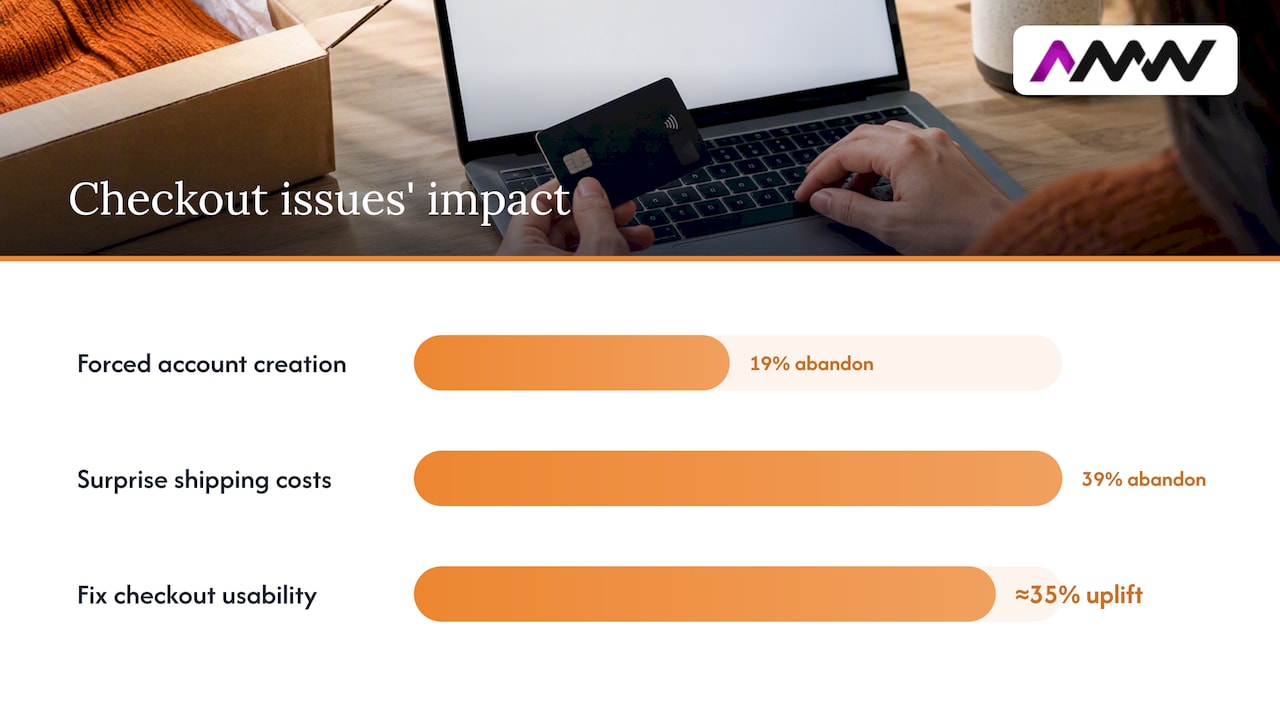
Surprise costs are the single biggest abandonment trigger. Baymard’s research found that extra costs revealed late in checkout, like shipping fees or taxes, cause 39% of checkout abandonments. If your shipping fee appears for the first time on the payment page, you’re handing customers a reason to leave at the worst possible moment.
Beyond checkout, a handful of areas consistently reward attention:
- Speed and mobile performance: compress images, enable caching, and trim anything blocking the critical rendering path on your landing pages.
- Product page clarity: clear pricing, genuine reviews, and well-lit images do more for conversion than clever copywriting tricks.
- Scarcity and urgency cues: use them only when genuinely true, low stock warnings that turn out to be fake erode trust fast.
- Segmented testing: measure conversion by device and traffic source separately, because a fix that helps desktop users can do nothing for mobile.
Baymard’s own worked example shows how recovering even a slice of UX-driven abandonment can translate into a six-figure annual revenue uplift for a midsize store, a reminder that checkout fixes are rarely small in their effect even when they look small on the page.
What’s a practical 90-day plan to raise conversion rate?
Turning advice into action needs a timeline. Here’s a sequence that builds from quick wins to deeper experiments:
- Days 1 to 14: show shipping costs upfront, enable guest checkout, fix any broken calls to action, and confirm the purchase event fires with correct transaction_id, value and currency.
- Weeks 3 to 8: run A/B tests on checkout variants, add at least one alternative payment method, and enlarge mobile buttons and form fields that are fiddly to tap.
- Months 2 to 3: test pricing and discount structures, trial different landing-page templates for your top traffic sources, and export GA4 data to BigQuery for cohort analysis.
A simple way to estimate the payoff: multiply your monthly sessions by your current conversion rate to get current orders, then multiply by your average order value to get revenue. Recalculate using a conversion rate half a percentage point higher and the difference is your recoverable revenue.
Pro Tip: Run the maths on your own traffic and average order value before you start, it tells you whether a project is worth prioritising this quarter.
How do we approach conversion improvement at AMW Media?
We start every conversion project with measurement, not design opinions. Before suggesting a single layout change, we confirm GA4 events are firing correctly and that purchase data is reliable enough to judge a test against.
Once tracking is solid, our priorities follow the evidence rather than guesswork: optimizing your business processes for maximum efficiency and profit can help operationalize these conversion improvements across teams, as described in How to optimise Your Business Processes for Maximum Efficiency and Profit.
- We build landing pages that load fast and match the ad creative that sent the visitor there, so there’s no jarring gap between promise and page.
- We set up purchase and checkout events with the correct parameters so every experiment has a trustworthy baseline.
- We connect analytics to CRM systems where it matters, so conversion data feeds into the same place as customer records.
- We test changes in a sequence, measurement first, urgent friction second, pricing and landing-page variants third, rather than changing everything at once and guessing what worked.
If you’re building out landing pages for paid campaigns, our guide on PPC landing pages that match ads and load fast covers the technical side in more depth.
Can personalisation lift your ecommerce conversion rate?
Showing the right product to the right shopper at the right moment is one of the few tactics that consistently outperforms generic store design, when it’s done with real data rather than guesswork.
Product recommendations based on browsing or purchase history work because they shorten the path to a decision. A shopper who’s already looked at running shoes doesn’t need your homepage, they need three more pairs that match what they were looking at. Dynamic content, like showing different hero banners to returning customers versus first-time visitors, does something similar by skipping the introduction for people who already know your store.
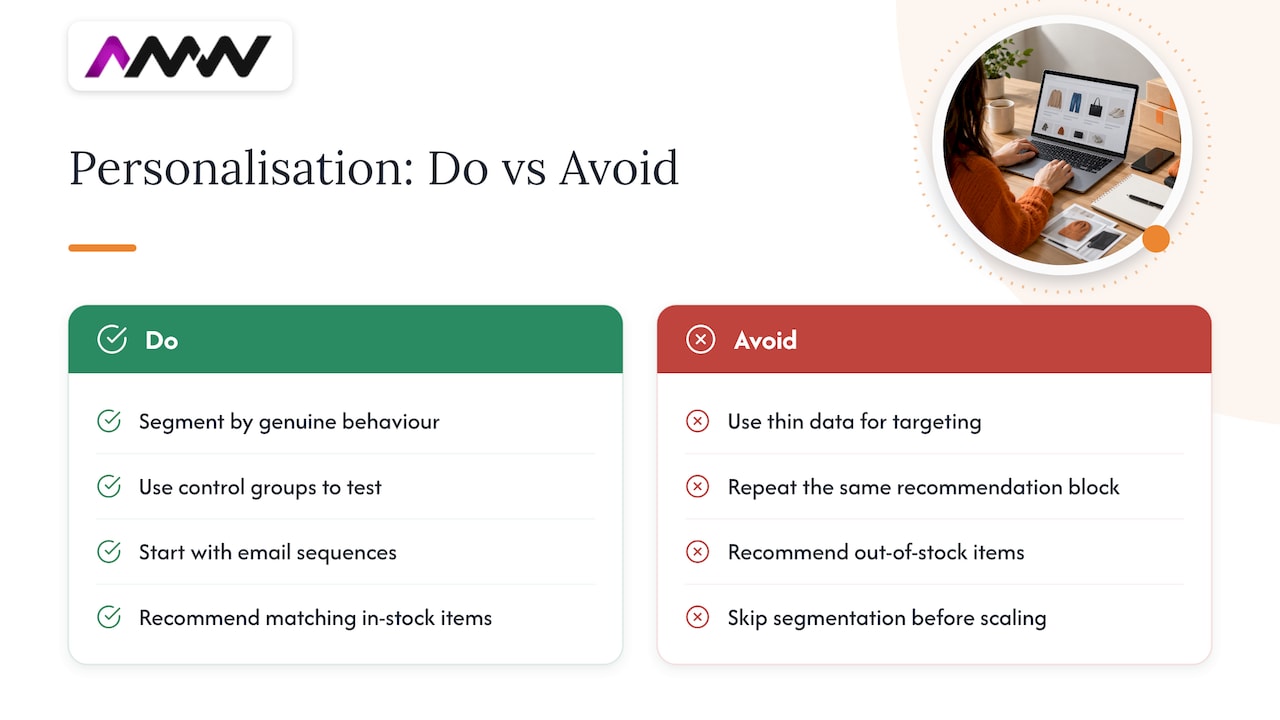
Where personalisation tends to go wrong is when it’s built on thin data or run without a control group. Recommending items that are out of stock, or repeating the same “customers also bought” block regardless of context, trains shoppers to ignore it entirely. The fix isn’t more personalisation, it’s better-targeted personalisation: segment by genuine behaviour (cart abandoners, repeat buyers, high-value customers) rather than broad demographic guesses.
Email is often the easiest place to start, since you already have purchase history to work from. A simple abandoned-cart sequence or a “back in stock” alert does more for conversion than a fully dynamic homepage built without the data to support it. Get the segmentation right before investing in anything more elaborate.
Do pricing and promotions actually move conversion rate?
Price is one of the few variables that changes conversion rate on contact, but not always in the direction people expect.
Discounts clearly lift short-term conversion. Retail Focus reported a Black Friday week average conversion of 4.6% in 2024, well above typical year-round benchmarks, which shows how much a clear, time-bound promotion can shift buying behaviour. The catch is that discount-driven spikes don’t always predict normal-week performance, and training your audience to wait for sales can quietly erode full-price conversion the rest of the year.
Psychological pricing (£19.99 instead of £20) still works in many categories, but it’s worth testing rather than assuming. The same goes for bundle pricing and free-shipping thresholds: a £5 increase in average order value needed to unlock free shipping can lift both conversion and order value at once, if the threshold is realistic for your typical basket.
The safest approach is to treat pricing as a testable variable, not a guess. Run price and promotion changes as proper experiments, segmented by traffic source, so a Black Friday-style spike doesn’t get mistaken for a permanent improvement.
What mobile-specific changes improve conversion rate?
Mobile shoppers behave differently from desktop shoppers, and a site that merely “works” on mobile usually isn’t converting as well as it could.
The basics matter more than they get credit for: buttons large enough to tap without zooming, forms that trigger the right keyboard type (numeric for card numbers, email keyboard for email fields), and autofill enabled wherever possible. Every extra field or awkward tap is a chance for someone to give up on a small screen in a way they wouldn’t on a laptop.
Page speed matters even more on mobile than desktop, since connections are often slower and patience is shorter. Compressing images, lazy-loading content below the fold, and trimming anything that blocks the critical rendering path all help pages feel instant rather than sluggish.
Sticky add-to-cart buttons and simplified navigation (a bottom bar rather than a hidden hamburger menu) reduce the number of taps between browsing and buying. Checkout should default to one-page or clearly staged steps, with guest checkout available by default rather than buried behind an account prompt. None of this is exotic, it’s just easy to overlook when a site was designed desktop-first and mobile was treated as an afterthought.
What mistakes quietly reduce ecommerce conversion rate?
Some of the biggest conversion losses come from habits that look harmless until you measure them properly.
Forcing account creation before checkout is still common, despite Baymard’s research showing it causes 19% of checkout abandonments on its own.
Other frequent mistakes: running experiments without a large enough sample to mean anything, treating a single good week as proof a change worked, and ignoring mobile performance because desktop numbers look fine. Tracking errors cause their own quiet damage: a purchase event firing twice inflates your numbers, while one that fails silently can make a healthy store look like it’s underperforming.
The fix for most of these is the same: measure first, change one thing at a time, and give tests enough time and traffic before declaring a winner.
What actually moves the needle fastest?
In my experience, small checkout fixes beat full redesigns for return on effort almost every time. A redesign takes months and risks breaking things that already worked.
Measure before you optimise, otherwise you’re guessing with other people’s money. Pick one checkout friction point and test it this month rather than planning the perfect campaign for next quarter.
— Amir
How we help you turn these fixes into revenue
We build the groundwork this checklist needs: correct GA4 event tracking, fast landing pages that match your ads, and checkout-focused web design that removes the friction Baymard’s research points to.
- GA4 setup and QA: we implement and validate purchase, add_to_cart and checkout events so your conversion data is trustworthy from day one.
- Web design and development: we rebuild checkout flows and landing pages around the friction points that cost you sales.
- PPC landing pages: we match ad creative to landing page content so paid traffic doesn’t bounce on arrival.
If you’d like a second pair of eyes on your current setup, our services page covers the full range, or get in touch directly through our contact page for a short discovery call.
FAQ
What is the formula for calculating the conversion rate in retail?
The formula is transactions divided by sessions, multiplied by 100.
Is a 30% conversion rate good?
A very high conversion rate would be exceptional for a typical ecommerce storefront, where overall session conversion sits far lower, around 2.23% as of August 2026 according to IRP Commerce. A rate that high usually signals a narrower conversion event, such as checkout-step or email click-through, rather than full site-wide purchase conversion.
Is a 2.5% conversion rate good?
Whether it’s genuinely good depends on your category, since arts and crafts retailers reported conversion as high as 5.81% while fashion averaged 1.86%, according to IRP Commerce.
How to calculate conversion rate in digital marketing?
In digital marketing, conversion rate is calculated the same way as ecommerce: completed conversions (purchases, sign-ups or leads, depending on your goal) divided by total sessions or clicks, multiplied by 100. The key is defining your conversion event clearly and tracking it consistently with tools like GA4, using recommended ecommerce events such as purchase.
Sources
- Measure ecommerce | Google Analytics developer docs
- GA4 recommended events guide — LovesData
- How to reduce cart abandonment (data-backed UX strategies) — Baymard Institute
- Ecommerce Market Data and Ecommerce Benchmarks for August 2026 — IRP Commerce
Recommended
- Update Google Ads conversion tracking before June 2026
- Conversion optimisation: a practical guide for UK SMEs
- 90 Day YouTube Ads Strategy | Creative and First Party Data
- GA4 Not Tracking? UK Agencies Run These Five Checks in Five Minutes
Our free marketing audit looks at your site, your ads and your content, and comes back with a 30 day plan. No pitch deck.

Founded AMW Media in 2024 and runs strategy, paid media and the CRM builds. The reason everything here is in house and measured in revenue. Meet the team.