
 Black Steel Doors
 Woodstock Campers
 Phillips Joinery

Subject line testing means sending different subject lines to small, random slices of your list, seeing which one gets the better response, and sending the winner to everyone else. That’s the whole idea. The craft is in doing it so the result is real and not just a lucky Tuesday. This guide covers how to set up an A/B test, how many people you need, which number to trust, what length to try, and the mistakes that quietly ruin results.
TL;DR
- Test one thing at a time, keep the email identical apart from the subject line, and split your audience randomly.
- Open rate is the usual winner metric for subject line tests, but Apple Mail Privacy Protection inflates opens, so check clicks too.
- Aim for subject lines of roughly 30 to 50 characters as a starting point, put the important words first, then test lengths on your own list.
- Small lists give shaky results. If the gap between versions is tiny, call it a draw and move on.
- Your own data beats any industry benchmark. Use benchmarks to decide what to test, not what to believe.
Table of Contents
- What subject line testing actually is
- Why bother testing at all?
- How to run a subject line A/B test, step by step
- Small lists, big claims: how to read the result
- Which metric should decide the winner?
- What length should you test?
- What to test: ideas that are worth your list
- Our take: what we’d tell a friend
- Want a hand with the testing?
- Mistakes that quietly wreck subject line tests
- Keep it legal while you’re testing
- FAQ
- Sources
What subject line testing actually is
It’s a controlled comparison. You write two or more subject lines, send each to a different group of subscribers, and measure which one earns more opens or engagement. One email platform describes what a business can learn from this: which messages resonate with its audience, how to improve relevance and segmentation, and which approaches support clicks while reducing spam complaints.
You’ll hear it called A/B testing, split testing, or (when you try more than two versions) multivariate testing. For subject lines, A/B and split testing mean the same thing: send two versions to a smaller group, spot the better performer, then send the winner to the larger list.
If you’ve ever used a free subject line scoring tool, you’ll know the other flavour: paste in a line, get a score out of 100. Those are handy for catching obvious problems like shouty capitals or spammy phrasing. But they’re guessing based on general patterns. A proper test, as the same platform’s help guide points out, shows what your specific contact list prefers. That’s the part no generic tool can tell you.
Think of the scoring tools as a spell checker, and A/B testing as asking your readers directly.
Why bother testing at all?
Because the subject line is the one bit of your email everybody sees. If it fails, the lovely copy, the carefully chosen photo and the offer you spent a week negotiating never get read.
The less obvious benefit is cumulative. One test might lift opens a little. Fifty tests teach you how your audience thinks: whether they like plain and direct, curious and teasing, or specific and numbers-led. That knowledge feeds into everything else, from your newsletter topics to your ad copy.
It’s also a cheap way to be wrong. Testing swaps “I reckon” for “we saw”, and it stops the meeting where three people argue about whether to use an emoji.
If you want to see how strong email programmes put this into practice, our examples of email marketing campaigns that actually work is a good companion read.
How to run a subject line A/B test, step by step
The exact buttons differ between email platforms, but the workflow is remarkably consistent. One platform’s campaign setup, for instance, asks you to pick the element being tested, the sample size, the winning metric and the test duration. Each person in the sample gets only one version, and the winner goes to everyone left over.
Here’s the process in plain terms.
- Pick one question. “Does a question beat a statement?” is a question. “Which of these four random ideas is best?” is a mess. Test one variable at a time, as this platform’s help centre recommends, so you know what caused the difference.
- Write two clear variants. Make them different enough to matter. Swapping “your” for “our” teaches you nothing. Comparing a short, direct line against a longer, benefit-led one might.
- Keep everything else identical. Same sender name, same preview text, same content, same send time. The advice is to make test emails identical except for the subject line.
- Split randomly. Random assignment is what makes this a fair fight. It’s the same logic as a randomised trial: participants are randomly assigned to groups that get different versions of one variable. Don’t send version A to your newest subscribers and version B to your oldest, or you’re testing the audience, not the line.
- Choose your winning metric before you send. Deciding afterwards is how people talk themselves into the result they wanted.
- Set a sensible duration. Give it long enough for most of your openers to have opened. For most business lists, that means hours rather than minutes. A few hours to a day is common, but check how your own list behaves.
- Send the winner, then write it down. Keep a simple spreadsheet: date, the two lines, the audience, the result, what you learned. Future you will be grateful.
How big should the test group be?
There’s no single magic number, but there’s a useful rule of thumb. One industry write-up says larger samples generally give more accurate results, and for a list above 1,000 contacts it describes testing about 20% in total, 10% for each version, before sending the winner to the rest. It also gives 95% confidence as an example target.
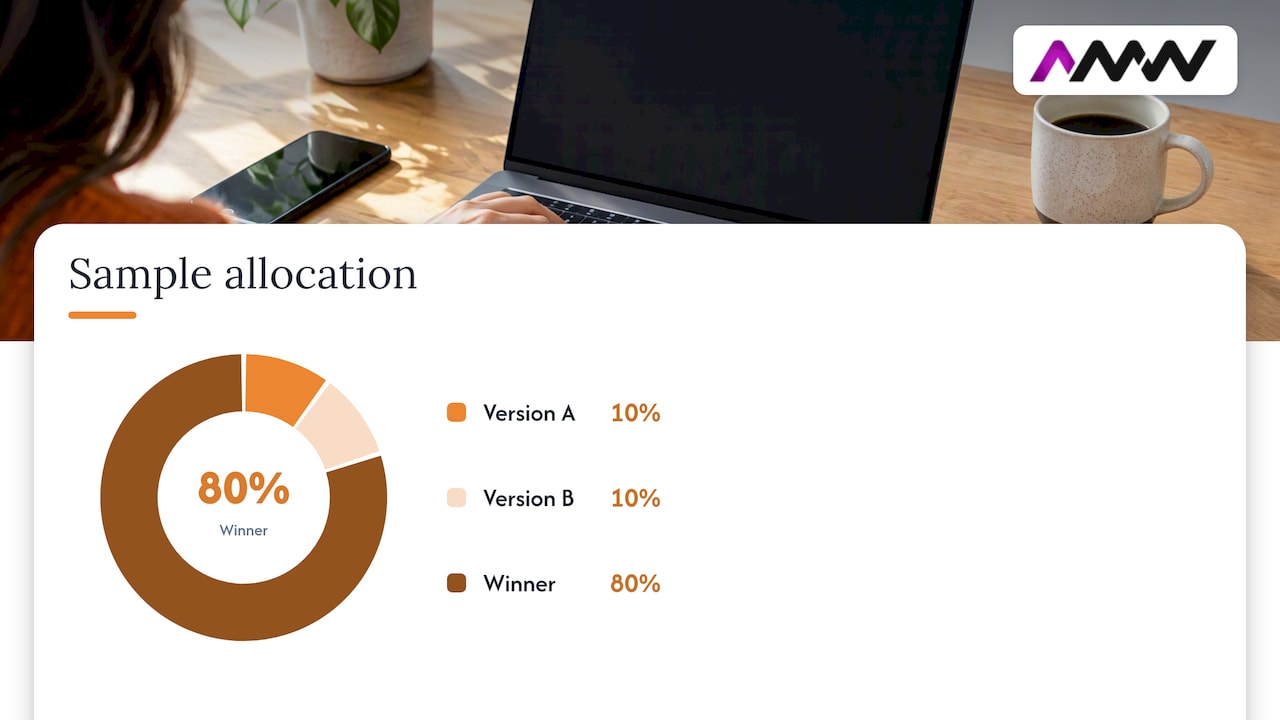
So on a list of 10,000, that’s 1,000 people per version, with 8,000 left for the winner. On a list of 1,200, you’d have around 120 per version, which is thin. That brings us to the awkward bit.
Small lists, big claims: how to read the result
A tiny gap between two versions is usually noise. If A gets a 31% open rate and B gets 30%, you haven’t discovered a secret. You’ve watched a coin land slightly differently.
Some platforms try to save you from this. One says a campaign result is statistically significant when each variation has more than 50 successful deliveries and the win probability is over 90%. It also cautions that this supports similar future decisions but doesn’t guarantee the same result for every audience, message or send time.
Another guide sorts results into four buckets: statistically significant, promising, not statistically significant, or inconclusive. A small apparent lead may not be reproducible, and an inconclusive result means too few responses, which might justify a bigger recipient pool or another round of testing.
What that means for you in practice:
- Clear winner: use it, and note the pattern.
- Narrow win: treat it as a hint. Run the same idea again in your next send.
- Dead heat: pick whichever you like better. Your audience doesn’t care, which is useful to know too.
- Small list: test bolder differences, because subtle ones won’t show up. Or pool results across several sends before drawing conclusions.
Which metric should decide the winner?
Match the metric to the thing you’re testing. Guidance for UK marketers is to use open rate for subject line tests, and click rate for tests of calls to action, layout or email copy. A subject line’s job is to get the email opened, so opens are the natural yardstick.
The Apple problem
Here’s the catch. Apple Mail Privacy Protection can prefetch tracking pixels, which means an email can be recorded as opened when no human has looked at it. One platform warns that open-rate winners may therefore include automatic opens as well as real engagement.
If a good chunk of your list reads on iPhones and Macs (and for many UK consumer lists, it does), your open rates are flattering. A few ways to stay honest:
- Look at clicks alongside opens. If version A “won” on opens but version B got more clicks, think hard before crowning A.
- Compare like with like. Both versions are inflated by the same effect, so a head-to-head still carries some signal, just a blurrier one.
- For important sends, consider testing the subject line and judging on a downstream action such as clicks, replies or sales, if your list is big enough to support it.
It’s the same idea we bang on about in our guide to analysing marketing results: pick the number that’s closest to the outcome you care about, not just the easiest one to measure.
What length should you test?
Everyone wants a magic character count. There isn’t one, but there are sensible ranges to test between, and the research is surprisingly consistent about the reasons.
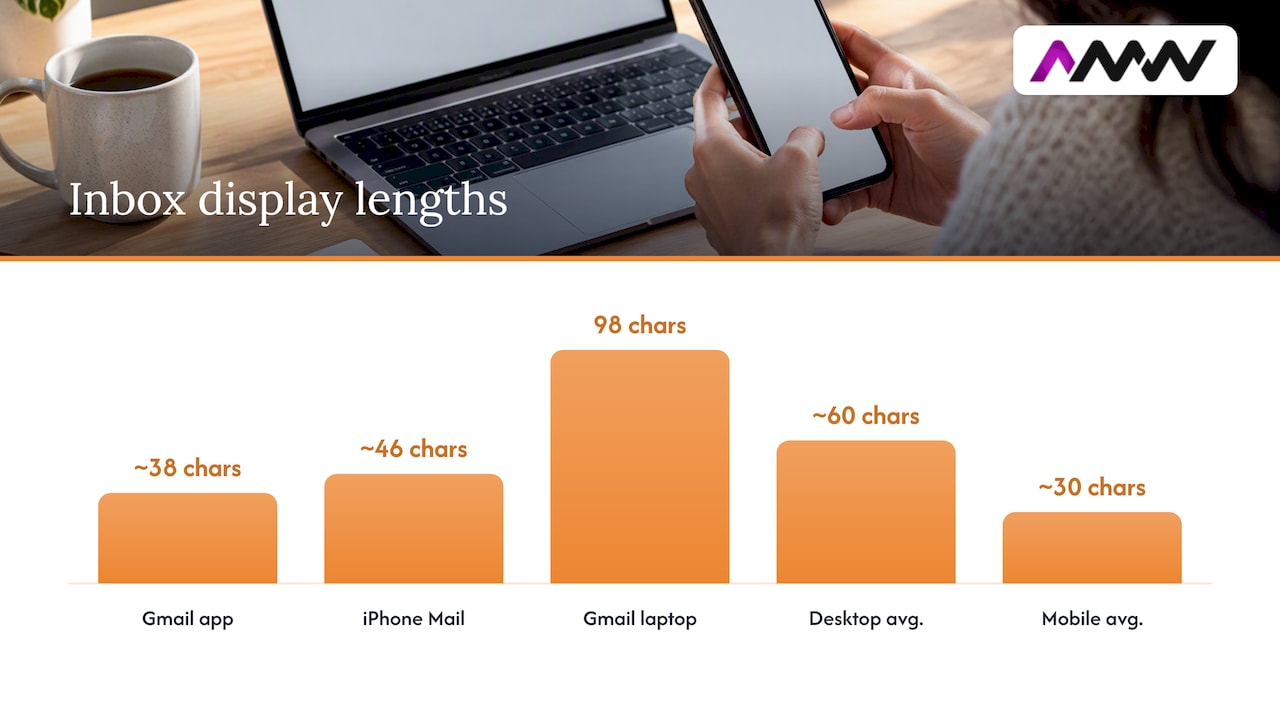
The core issue is display. Inboxes cut subject lines off, and where they cut depends on the device and the email app. One analysis gives examples of about 38 characters in the Gmail app, 46 in iPhone Mail and 98 in Gmail on a 15-inch laptop. The same piece puts average inbox display at about 60 characters on desktop and about 30 on mobile.
| Source | What it found or advises |
|---|---|
| Salesforce Trailhead | Keep to 50 characters or fewer, as providers may truncate longer lines |
| A UK email provider’s year of data | Optimum of 31 to 40 characters, probably because Outlook’s desktop preview pane shows roughly 50 |
| An analysis of 1,000 subject lines | Average length of 44 characters; suggests testing 30 to 50 characters and up to seven words |
| A UK email guide | Longer lines are linked with fewer opens; mobile shows around 30 to 40 characters; optimal length may differ by audience |
| An analysis of 1.6 billion emails (Q3 2022) | 29.9% average open rate at 20 characters or fewer, falling to 17.3% for 20 to 124 characters |
That last row looks dramatic, but read the small print: the authors themselves advise treating it as correlation, not causation, and testing with your own audience. Short subject lines might be sent by different kinds of senders to different kinds of lists. Don’t rewrite your whole programme because of one headline stat.
A practical way to test length
- Start with the sensible zone of roughly 30 to 50 characters.
- Put the important words in the first 30 or so characters. Mobile inboxes may show only around 33 to 43 characters, so anything after that might never be seen.
- Use preview text (the preheader) to carry extra context so the subject line doesn’t have to do everything.
- Then test small changes in length rather than extremes, and check how each version looks on both desktop and mobile before you send.
If your audience is mostly B2B readers on desktop Outlook during working hours, they may tolerate longer lines than a consumer list reading on phones at lunch. That’s exactly why you test.
What to test: ideas that are worth your list
Once you’ve got the process, the fun part is deciding what to try. Here are variables that tend to teach you something. Remember: one at a time.
- Question vs. statement. “Is your newsletter getting read?” against “Why your newsletter isn’t getting read”.
- Specific vs. vague. A number or concrete detail against a general promise.
- Personalisation. First name in the line or not. Some audiences love it, some find it a bit “Dear valued customer”.
- Urgency vs. none. “Ends tonight” against a calm description. Overused urgency trains people to ignore you, so test it sparingly.
- Length. Short and punchy against longer and descriptive, as above.
- Tone. Playful against plain. This is where light humour either lands or doesn’t.
- Benefit vs. curiosity. Tell them what they’ll get, or make them want to find out.
- Emoji or not. Cheap to test, and the answer varies a lot by audience.
- Sender name. Not strictly a subject line test, but it sits right beside it in the inbox, and it’s worth testing separately. A person’s name against a brand name is a classic.
A tip that saves headaches: craft your variants around themes you can clearly categorise. Instead of ten unrelated lines, run “curiosity” against “benefit” over several sends, with different wording each time. If curiosity wins three times out of four, that’s a pattern worth acting on.
Our take: what we’d tell a friend
We look at a lot of email programmes, and the most common problem isn’t bad subject lines. It’s testing without a plan. People run one test, see a 2% difference, declare victory and never test again. Or they test four things at once and can’t say what worked.
So our advice is boring, and it works. Pick a theme for the quarter, such as length, or tone, or specificity. Run a test on every campaign that goes to a decent-sized list. Log the results. After a few months you’ll have a house style that’s built on your readers’ behaviour, not your preferences.
Two more things we’d add. First, don’t let a clever subject line write a cheque the email can’t cash. A line that wins opens but disappoints on click is just a way of annoying people faster. Second, if your emails aren’t reaching the inbox in the first place, no subject line will rescue you. Sort out email deliverability issues before you start fine-tuning wording.
We also like clear reporting and no long contracts, so you can see what’s working and decide for yourself whether to carry on. Testing is the same philosophy in miniature: show the numbers, then decide.
Amir Wanas, founder of AMW Media
Want a hand with the testing?
If you’d rather have someone set this up properly, that’s what we do. Our team plans, writes, builds and reports on email campaigns and automated flows, with testing built in from the start, so you learn something from every send. Have a look at our email marketing services, or browse everything we offer on our services page.
Prices depend on the scope of the work, so we don’t publish a fixed rate. Tell us about your list and your goals and we’ll point you in the right direction.
Mistakes that quietly wreck subject line tests
Most bad tests fail for dull reasons. Check yours against this list.
- Changing more than one thing. If the preview text, the sender and the subject line all differ, you can’t say which one mattered.
- Non-random groups. Splitting by sign-up date or alphabetically builds bias into the result.
- Stopping too early. Picking a winner after twenty minutes favours people who check email constantly, not your whole list.
- Ignoring the list size. A 3% gap across 80 people per version is not a finding.
- Chasing opens over outcomes. A line that overpromises can win the open and lose the sale.
- Never repeating. One result is a clue. A pattern across several sends is evidence.
- Testing too often with the wrong rhythm. If you’re also experimenting with how often you send, keep those tests separate. Our guide to testing newsletter frequency shows how to do that without muddying the data.
If you run paid social too, the same discipline applies there. We cover it in Facebook A/B testing for marketers.
Keep it legal while you’re testing
Testing doesn’t change your obligations. In the UK, the ICO says direct marketing by electronic mail must comply with PECR and UK GDPR: marketing messages must identify the sender and give a valid way to opt out, and you must respect objections to direct marketing. That applies to every variant in your test, so keep your sender details clear and your unsubscribe link working in both versions. If you’re unsure whether you have the right permission to email a particular group, ask a data protection professional before you send.
FAQ
How many subject lines should I test at once?
Two is the best place to start, because each version gets a bigger share of your audience and the result is easier to read. If your list is large, you can try three or four, which is a multivariate-style test, but each extra version needs enough people to be meaningful. Keep the difference between them to one idea.
What is the best subject line length?
There’s no universal answer, but most of the research points to somewhere around 30 to 50 characters, with the key words in the first 30 or so. Phones show far less than laptops, so check your previews on both. Then test small changes in length on your own list, because your readers may behave differently from the averages.
How long should I wait before choosing a winner?
Long enough for most of your engaged readers to have seen the email, which usually means several hours at least, and often a day for B2B lists. Choosing in the first few minutes favours people who check their inbox constantly. Look at when your opens normally level off and set the test duration to match.
Can I A/B test with a small email list?
Yes, but be realistic about what it can tell you. With only a few hundred subscribers, small differences are usually noise, so test bolder changes and treat narrow wins as hints. Repeating the same idea across several sends helps you build confidence over time.
Are open rates still reliable for subject line tests?
They’re still useful, but less clean than they used to be. Apple Mail Privacy Protection can register automatic opens, which inflates the numbers. Use opens as the main signal for the subject line, then sense-check against clicks before you declare a winner.
Sources
- Subject line testing guide, what a business can learn
- Best practices for email subject lines
- Email marketing A/B testing explained
- Create an A/B test campaign, help guide
- How to A/B test an email campaign, help centre
- Understanding statistical significance in campaigns
- Guide to A/B testing email marketing campaigns
- Integrating experimental design into everyday practice, King’s College London
- 4 email A/B testing best practices, TechTarget
- Craft winning email subject lines, Salesforce Trailhead
- 5 lessons from 365 days of subject lines
- The best length for your email subject lines
- How long should your email subject line be?
- ICO previously asked questions on direct marketing
Recommended
- Examples of email marketing campaigns that actually work
- Newsletter Frequency: Test Weekly vs. Fortnightly, Track Disaffection
- Email deliverability issues: diagnose and fix them fast
Our free marketing audit looks at your site, your ads and your content, and comes back with a 30 day plan. No pitch deck.

Founded AMW Media in 2024 and runs strategy, paid media and the CRM builds. The reason everything here is in house and measured in revenue. Meet the team.