
 Black Steel Doors
 Woodstock Campers
 Phillips Joinery
Stop emails going to spam by doing three things first: fix your authentication records (SPF, DKIM, and DMARC), check whether your domain or IP is on a blacklist, and pull back any sudden volume spikes. Run a free deliverability check on MXToolbox right now, it takes about two minutes and will flag the most common showstoppers before you read another word.
Quick action checklist:
- Run an MXToolbox deliverability check to scan authentication and blacklists in one go
- Verify your SPF record returns a pass (and has no more than 10 DNS lookups)
- Confirm DKIM is signing outbound mail and the selector resolves correctly
- Check your DMARC policy is published and receiving aggregate reports
- Pull your last 7 days of bounce logs and flag any 5xx codes
- Open Gmail Postmaster Tools and check your domain reputation score
- Review complaint rate, Google’s threshold is roughly 0.1%, with 0.3% as a hard ceiling
- Send a test message via mail-tester.com to get an instant inbox placement score
The rest of this guide walks through every cause, every fix, and realistic timelines for each. But if the checklist above already points to a problem, jump straight to the relevant section.
Key takeaways
Fixing email deliverability issues starts with authentication: SPF, DKIM, and DMARC are the foundation, and no other fix matters until those are clean.
| Point | Details |
|---|---|
| Authentication comes first | Fix SPF, DKIM, and DMARC before investigating any other cause, a broken auth record overrides everything else. |
| Delivered does not mean inboxed | A 250 OK SMTP response only means the server accepted the message, not that it reached the inbox. |
| Complaint rate threshold | Google flags senders above 0.1% complaint rate; above 0.3% expect aggressive filtering. |
| Warmup takes 4 to 8 weeks | New IPs and domains need a gradual ramp starting with engaged subscribers only. |
| AMW Media for expert help | AMW Media offers full deliverability audits, authentication fixes, and ongoing monitoring as part of its email marketing service. |
Eight checks you can run in under 15 minutes
Think of this as your triage list. Work through it top to bottom and stop the moment you find a showstopper.
1. Authentication pass/fail Run MXToolbox’s deliverability tool. A red flag on SPF, DKIM, or DMARC is a showstopper. Fix it before anything else.
2. DMARC policy status Look up your DNS TXT record for _dmarc.yourdomain.com. If it is missing entirely, or set to p=none with no rua tag, you have no visibility into authentication failures. Add a rua address immediately.
3. Blacklist status MXToolbox checks the major lists automatically. Spamhaus and Barracuda listings cause near-total blocking at most providers. A listing here is a showstopper.
4. Recent bounce spikes Log into your sending platform (Klaviyo, Mailchimp, or similar) and pull a 7-day bounce report. A sudden spike in 5xx codes, particularly 550 5.1.1 (user unknown) or 550 5.7.1 (policy rejection), signals either list decay or an active block. A 421 response means the receiving server is throttling you temporarily; back off volume immediately.
5. Complaint rate Gmail Postmaster Tools shows your domain’s complaint rate.
6. Sending volume change Did you send a significantly larger campaign than usual in the past 48 hours? A sudden volume spike is one of the fastest ways to trigger throttling or a block, especially on a shared IP.
7. DNS changes in the past 72 hours A forgotten DKIM CNAME after a DNS migration, or a second SPF TXT record accidentally added, causes immediate authentication failures. Check your DNS change log.
8. Sample inbox test Send a test message to a personal Gmail and Outlook account. Did it land in the inbox, promotions tab, or spam? This is the fastest real-world signal you have. For a scored result, use mail-tester.com or GlockApps.
What “delivered” actually means (and why it is not the same as inbox placement)
Most marketers use “delivered” and “inbox placement” interchangeably. They are not the same thing, and confusing them is one of the most common reasons email deliverability issues go undiagnosed for weeks.
Delivered means the receiving mail server accepted your message and returned a 250 OK SMTP response. That is it. The message could be sitting in spam, in a junk folder, or silently discarded after acceptance. Delivered is a server handshake, not a placement guarantee.
Inbox placement is whether the message actually appeared in the recipient’s primary inbox. Mailbox providers, Gmail, Outlook, Yahoo, Apple Mail, make that decision after accepting the message, based on a combination of signals evaluated in real time.
Those signals, in rough order of weight, are:
- Authentication: SPF, DKIM, and DMARC. A DMARC pass requires either SPF or DKIM to pass and align with the From domain. Without alignment, even a technically valid signature can fail.
- Sender reputation: both domain reputation and IP reputation, tracked separately by most providers.
- Engagement: opens, clicks, replies, and moves to inbox. Gmail weights engagement heavily. Microsoft (Outlook/Hotmail) is particularly sensitive to delete-without-read and spam-folder moves.
- Content patterns: HTML structure, image-to-text ratio, link domains, and subject line signals.
- Provider-specific rules: Gmail uses machine learning models trained on engagement. Apple’s Mail Privacy Protection (MPP) inflates open rates by pre-loading pixels, which means open rate is no longer a reliable engagement signal, use clicks and replies instead.
SMTP code families to know:
- 4xx codes are temporary deferrals. The sending server will retry. A 421 usually means throttling, the receiving server is telling you to slow down.
- 5xx codes are permanent rejections. A 550 means the message was refused and will not be retried. You need to act.
- 451 is a common greylisting response, the server wants you to retry after a short delay, which legitimate mail servers do automatically.
The most common causes of poor deliverability
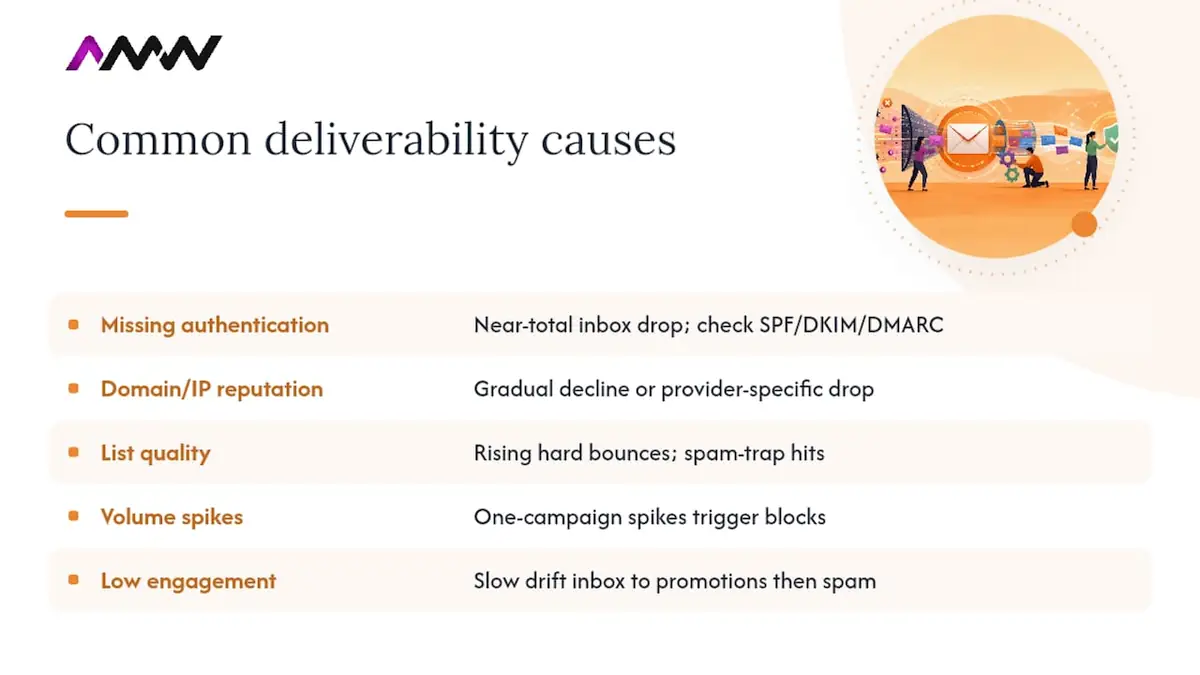
Knowing what to look for saves hours of guessing. Sudden cliff drops in inbox placement almost always point to authentication failure, a new blacklist listing, or a volume spike. A slow, gradual decline over weeks usually means list quality decay or falling engagement. New domains and IPs fail almost exclusively because of missing authentication or no warmup.
Broken or missing authentication The symptom is a sudden, near-total drop in inbox placement across multiple providers simultaneously. Check SPF, DKIM, and DMARC first. A second SPF TXT record (a common post-migration mistake) causes a permerror, which many providers treat as a hard fail.
Damaged domain or IP reputation Gradual decline, or a sudden drop at one provider but not others. Check Gmail Postmaster Tools for domain reputation. For Microsoft, use Smart Network Data Services (SNDS) or the Outlook Postmaster portal to see complaint and trap data.
List quality problems Bouncing to addresses that no longer exist, or hitting spam traps (addresses seeded by blacklist operators), damages reputation fast. The symptom is rising hard bounce rates and blacklist listings appearing without an obvious sending mistake.
Sudden volume spikes Sending five times your normal volume in one campaign is a classic trigger for throttling and blocks, especially on shared IPs. Receiving servers use volume patterns as a reputation signal.
Low engagement If recipients consistently ignore your mail, providers learn to deprioritise it. Gmail’s filters are particularly sensitive to this. The symptom is a slow drift from inbox to promotions tab, then eventually to spam.
Content triggers Image-heavy emails with little text, all-caps subject lines, excessive urgency phrases, broken HTML, missing or buried unsubscribe links, and links to domains with poor reputations all increase spam risk. Content issues rarely cause deliverability problems on their own, but they amplify existing reputation problems.
Blacklist listings Spamhaus, Barracuda, and SORBS are the most impactful. A Spamhaus SBL or XBL listing will block mail at most major providers. Check via MXToolbox or MultiRBL.
Provider-specific filtering Microsoft is notoriously sensitive to complaint signals and delete-without-read behaviour. Yahoo and AOL (both now under the same infrastructure) enforce DMARC strictly. Apple’s iCloud mail applies its own reputation signals.
Step-by-step diagnostics: the order that actually works
Work through this in sequence. Skipping to content checks before confirming authentication is a common time-waster.
Step 1: Authentication checks
Run MXToolbox deliverability first. It checks SPF, DKIM, DMARC, and major blacklists in a single report. A pass on all three authentication checks means you can move to step 2. A fail means stop here and fix it.
Also check your DMARC aggregate reports (rua) if you have been collecting them, look for:
- Senders that appear in your reports but are not in your SPF record (rogue or forgotten sending services)
- High volumes of SPF or DKIM failures from your own domain
- The disposition field showing quarantine or reject on messages you intended to deliver
A minimal DMARC aggregate report entry looks like this:
<record>
<row>
<source_ip>198.51.100.42</source_ip>
<count>312</count>
<policy_evaluated>
<disposition>quarantine</disposition>
<dkim>fail</dkim>
<spf>pass</spf>
</policy_evaluated>
</row>
</record>
This tells you: 312 messages from IP 198.51.100.42 were quarantined because DKIM failed (even though SPF passed). DMARC requires alignment, so a SPF-only pass from a misaligned domain still fails. That IP needs its DKIM configuration checked.
Step 2: Blacklist and reputation checks
After authentication, check blacklists via MXToolbox or MultiRBL. Then open Gmail Postmaster Tools and Microsoft SNDS. Look at:
- Domain reputation (Gmail: Good / Medium / Low / Bad)
- IP reputation
- Spam rate trends over the past 30 days
Step 3: List and engagement checks
Pull your bounce and complaint data from your ESP. Flag:
- Hard bounce rate above 2%
- Complaint rate above 0.1%
- Any addresses that have not opened or clicked in 12+ months
Step 4: Content and inbox tests
Send a test via GlockApps or mail-tester.com. These tools show your spam score, flag content issues, and report inbox vs spam placement across multiple providers simultaneously.
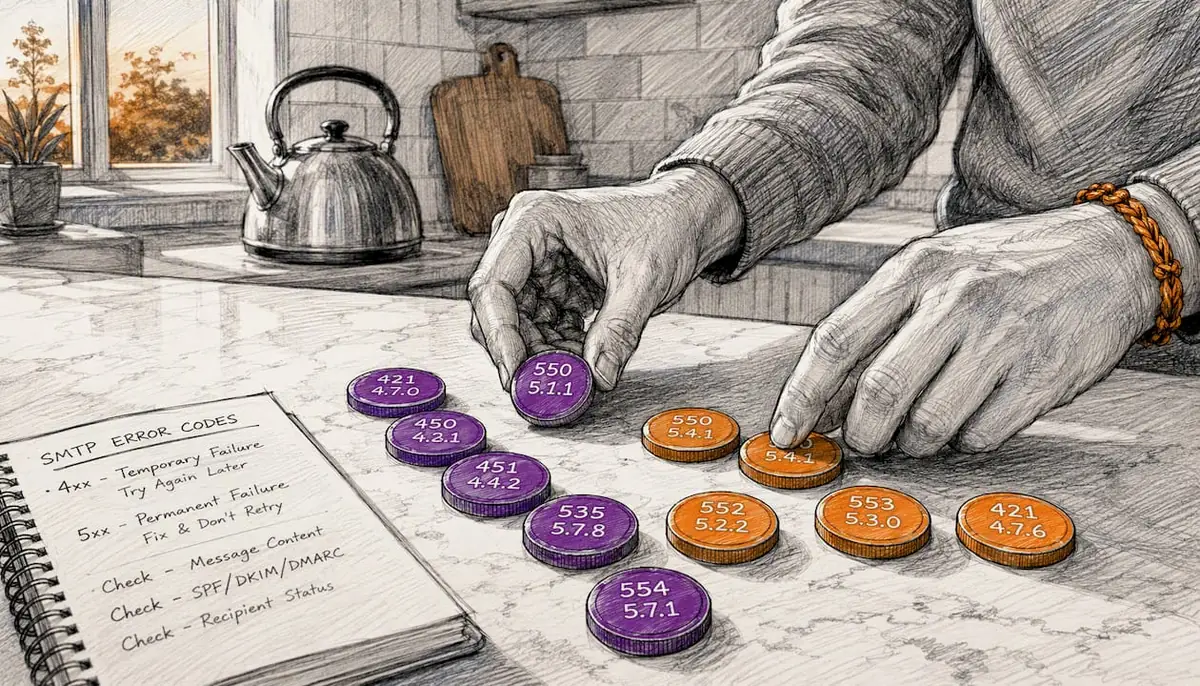
Common SMTP codes and what to do:
| SMTP Code | Meaning | Immediate action |
|---|---|---|
| 250 OK | Accepted | No action needed |
| 421 | Temporary throttle | Reduce sending rate; retry later |
| 451 | Greylisting / temp fail | Retry automatically; check volume |
| 550 | Permanent rejection | Check blacklists and auth; suppress address |
| 550 | User not local | Remove address from list |
| , | Mailbox full / quota | Suppress or retry after delay |
| , | Mailbox name invalid | Hard bounce; remove immediately |
When to escalate: Contact your ESP’s deliverability team or an external specialist when you have confirmed clean authentication and no blacklist listings but inbox placement remains poor, when you have multiple simultaneous blacklist listings, or when you are managing transactional email at scale and a fix has not moved metrics after two weeks.
Concrete fixes for every common cause
Authentication fixes
SPF: Your SPF record must resolve in 10 or fewer DNS lookups. Every include: statement counts. Use an SPF flattening tool if you are over the limit. Never publish two SPF TXT records for the same domain, combine them into one.
DKIM: Use a 2048-bit key minimum. If you are rotating keys, publish the new selector in DNS and allow 48 hours for propagation before switching. Keep the old selector active for at least 72 hours after the switch to cover messages in transit.
DMARC: Start at p=none with a rua address to collect reports. Once reports show clean alignment (typically 2 to 4 weeks), move to p=quarantine. After another clean period, move to p=reject. This phased approach, recommended by DMARC.org, prevents legitimate mail from being rejected while you are still finding unauthenticated sending sources.
Reputation and blacklist fixes
- Identify the listing via MXToolbox or the blacklist’s own lookup tool.
- Suppress the segment of your list most likely responsible (recent large sends, re-engagement campaigns).
- Submit a delisting request. Spamhaus requires a completed form and evidence of remediation. Barracuda has a self-service removal tool.
- After delisting, send only to your most engaged segment for 2 to 3 weeks before resuming normal volume.
List hygiene
Run your list through a verification service (ZeroBounce, NeverBounce, or similar) before any large send. Set up double opt-in for new subscribers. Suppress anyone who has not engaged in 12 months, send a re-engagement email first, then remove non-responders. For email marketing campaigns that need to rebuild engagement, segment by recency and start with your most active recipients.
Content fixes
- Keep your HTML clean. Test it in Litmus or Email on Acid before sending.
- Aim for a text-to-image ratio of at least 60:40.
- Place your unsubscribe link prominently, buried or missing unsubscribe links are a direct spam trigger.
- Avoid link shorteners that obscure destination domains.
- Do not attach files to marketing emails. Link to a hosted download instead.
- Subject lines: avoid all-caps, excessive punctuation, and phrases like “Act now” or “Limited time offer” stacked together.
Infrastructure: shared vs dedicated IPs and warmup
On a shared IP, your reputation is partly determined by other senders on the same pool. A dedicated IP gives you full control but requires warmup from scratch. For volumes below roughly 50,000 emails per month, a reputable shared IP pool (from a provider like Klaviyo or a similar ESP) is usually the better choice. Above that threshold, a dedicated IP with a proper warmup plan makes sense.
Sample IP warmup ramp (dedicated IP, starting from zero):
- Days 1 to 3: 200 to 500 emails per day, engaged subscribers only
- Days 4 to 7: 1,000 to 2,000 per day
- Days 8 to 14: 5,000 to 10,000 per day
- Days 15 to 21: 20,000 to 40,000 per day
- Days 22 to 30: scale toward target volume
New domains face a significant inbox placement penalty during the first 30 days. Warmup applies to domains as well as IPs, start with engaged users and build volume gradually.
Also confirm your reverse DNS (PTR record) resolves to a hostname that matches your sending domain. Many providers check this and will defer or reject mail from IPs with no matching PTR.
Pro Tip: If you use multiple sending systems, a marketing ESP, a transactional platform, and perhaps a CRM, map every one of them to your SPF record and confirm each has its own DKIM selector. A forgotten CRM integration sending unauthenticated mail is one of the most common causes of DMARC failures that look inexplicable until you check the aggregate reports. Tools like Paid Lens can help you map sending sources across your marketing stack.
Re-engagement email template (adapt to your brand):
Subject: Still want to hear from us?
Hi [First Name],
We noticed you have not opened our emails in a while, no hard feelings. If you still want updates from us, just click below to stay subscribed. If not, we will remove you automatically in 7 days.
[Yes, keep me subscribed]
Thanks,
[Brand Name]
How long do fixes take, and what might they cost?
Realistic timelines matter. Telling your director “it will be fixed by Friday” after a blacklist listing is usually wrong.
Authentication fixes: Implementation takes a few hours for an experienced developer. DNS propagation takes up to 48 hours. Deliverability improvement after a clean auth setup typically shows in Gmail Postmaster Tools within 3 to 7 days, though full reputation recovery takes longer.
Blacklist removal: Self-service delisting (Barracuda, some Spamhaus listings) can happen within 24 to 48 hours. Spamhaus SBL listings tied to spam trap hits may take 2 to 4 weeks and require demonstrated remediation. Reputation recovery after removal: allow 4 to 8 weeks of clean sending.
Warmup (new IP or domain): 4 to 8 weeks for moderate volumes (up to 100,000 per month). Higher volumes need longer ramps.
Reputation recovery after sustained engagement problems: 8 to 12 weeks of disciplined sending to engaged segments before metrics stabilise.
Indicative costs (GBP, for reference only, not quotes):
- Freelance deliverability consultant: £75 to £150 per hour
- Agency deliverability audit and remediation retainer: £500 to £2,000 per month depending on scope
- ESP deliverability add-ons (dedicated IP, advanced reporting): £50 to £300 per month depending on provider and volume
- List verification service: typically £0.001 to £0.005 per address
When external help makes commercial sense: repeated blacklist listings despite internal fixes, multi-vendor environments where authentication is complex, transactional email at scale where every missed message has a direct revenue cost, or any situation where two weeks of internal effort has not moved the metrics.
Measuring ROI: calculate the number of additional messages reaching the inbox after a fix, multiply by your email-to-conversion rate, and multiply by average order or lead value. Even a modest improvement in inbox placement on a list of 50,000 can represent meaningful additional revenue per send.
Every figure is published: email marketing is quoted on your list size and the sequences you need, and the full rate card is on our pricing page, where you can tick what you need and see the total before you speak to anybody.
How AMW Media investigates a deliverability incident
When a client contacts AMW Media with a deliverability problem, the first step is scope: how long has the issue been present, which providers are affected, and what changed in the 72 hours before it started? That single question eliminates roughly half of the possible causes immediately.
The agency workflow:
- Intake and scope: gather sending history, recent DNS changes, ESP platform, and any bounce or complaint data the client can export.
- Forensic checks: parse DMARC aggregate reports to identify failing senders, run MXToolbox and blacklist checks, analyse email headers from affected messages to confirm authentication chain.
- Remediation: fix authentication records in priority order (SPF first, then DKIM, then DMARC policy progression), suppress high-risk list segments, and if a warmup is needed, build a ramp schedule matched to the client’s sending volume and ESP.
- Monitor and iterate: set up Gmail Postmaster Tools and Microsoft SNDS monitoring, review aggregate reports weekly for the first month, and adjust sending cadence based on engagement signals.
An anonymised example: a B2B SaaS company came to AMW Media after noticing a sharp drop in open rates over two weeks. The fix took four hours to implement. Within ten days, Gmail Postmaster domain reputation had moved from “Low” back to “High.” The client’s open rate recovered to pre-incident levels within three weeks.
When to handle it yourself vs. when to call the agency: if the checklist in this guide points to a single, clear cause (a missing DKIM record, a blacklist listing with an obvious source), a competent marketing manager or developer can usually resolve it. When the cause is unclear after a full diagnostic pass, when multiple providers are affected simultaneously, or when the sending environment involves several platforms and teams, that is when specialist support pays for itself quickly.
For email marketing strategy that builds deliverability into the campaign planning process from the start, rather than treating it as a fire to put out, the approach is different, and worth reading about separately.
A contrarian view on deliverability advice
The truth is that SPF and DKIM are not hard to configure correctly the first time. What breaks them is change: a DNS migration where someone forgets to carry over a CNAME, a new marketing tool added to the stack without updating the SPF record, a DKIM key rotation done without an overlap period.
The real skill in deliverability is not knowing what SPF does. It is building a process so that every DNS change, every new sending tool, and every list acquisition goes through a deliverability check before it goes live. Most teams do not have that process. They have a checklist they run when something breaks.
The second thing most guides get wrong is the engagement piece. Authentication gets you through the door. Engagement determines whether you stay. Providers like Gmail are running machine learning models on recipient behaviour, and those models do not care that your SPF record is perfect. If your recipients are consistently ignoring your mail, you will drift toward spam regardless of your technical setup. The fix there is not a deliverability fix. It is a content and segmentation fix. Sending less mail to more engaged people almost always outperforms sending more mail to everyone.
The third underrated point: complaint rate is a lagging indicator. By the time your complaint rate shows a problem in Postmaster Tools, the damage is already done. The leading indicator is engagement rate. Watch it weekly, not monthly. Our Milton Keynes marketing page starts with a better question than comparing monthly fees: what would you leave out of the first proposal?
AMW Media’s email deliverability and marketing service
Fixing a deliverability incident is one thing. Keeping it fixed while running campaigns that actually grow your business is another.
AMW Media’s email marketing service covers the full picture: technical remediation (authentication, blacklist removal, warmup planning), ongoing monitoring via Gmail Postmaster and SNDS, and the creative and strategic work that keeps engagement rates healthy so deliverability stays strong. The team holds Google and Meta certifications and has hands-on experience across ESP platforms including Klaviyo, Mailchimp, and custom automation setups.
If your emails are going to spam and you want a team to diagnose and fix it properly, get in touch with AMW Media and we will start with a full deliverability audit.
Useful tools and resources
- MXToolbox Deliverability Check: checks SPF, DKIM, DMARC, and major blacklists in one report. Use this first.
- Gmail Postmaster Tools: shows domain reputation, IP reputation, and spam rate for mail sent to Gmail. Use for ongoing monitoring.
- Microsoft SNDS / Outlook Postmaster: complaint and spam trap data for mail sent to Outlook and Hotmail. Essential if Microsoft is a significant portion of your list.
- Dmarc: official documentation on DMARC policy setup and phased enforcement. Use when configuring or progressing your DMARC policy.
- mail-tester.com / GlockApps: inbox placement tests across multiple providers with spam scoring. Use before any major send.
- Spamhaus / MultiRBL: blacklist lookup tools. Use when MXToolbox flags a listing and you need to identify the specific list and submit a removal request.
Sources
- What is Email Deliverability? Definition, How to Improve | Proofpoint US
- DMARC Overview
- Email Deliverability Tool, Check Your Deliverability Report
- Email Deliverability Diagnostic Guide: Fix Spam Fast
FAQ
How do I fix email deliverability issues fast?
Start with an MXToolbox deliverability check to confirm SPF, DKIM, and DMARC are passing, then check blacklist status and pull your recent bounce and complaint data. Fix authentication failures first, they are the most common cause and the fastest to resolve.
What affects email deliverability?
The main factors affecting email delivery are authentication (SPF, DKIM, DMARC), sender reputation (domain and IP), recipient engagement, list quality, and content signals. Provider-specific rules at Gmail, Outlook, and Yahoo also play a role.
How can I improve email deliverability?
Fix authentication records, keep your list clean by suppressing hard bounces and non-engagers, send to your most engaged segments first, and monitor complaint rates in Gmail Postmaster Tools. Consistent, relevant sending to people who want your mail is the long-term answer.
How do I test my email deliverability?
Send a test message through mail-tester.com or GlockApps for an instant spam score and inbox placement result across multiple providers. For ongoing monitoring, use Gmail Postmaster Tools and Microsoft SNDS to track reputation trends over time.
Recommended
- Why email marketing matters for your business growth | AMW Media
- Email Marketing Services That Convert | AMW Media London | AMW Media
- Email marketing strategies to engage and grow your business | AMW Media
- Examples of email marketing campaigns that actually work | AMW Media
Our free marketing audit looks at your site, your ads and your content, and comes back with a 30 day plan. No pitch deck.

Runs the content calendars and the community side of every social account, and keeps clients posted on what is going out and when. Meet the team.