
 Black Steel Doors
 Woodstock Campers
 Phillips Joinery
TL;DR:
- SaaS is the dominant cloud-based software delivery model where applications are hosted by providers and accessed via subscriptions. It uses shared infrastructure, automatic updates, and web access to lower costs and improve flexibility for businesses. Custom SaaS suits unique needs and requires careful planning of permissions, integrations, and scalability for successful implementation.
Software as a Service, universally known as SaaS, is a cloud-based software delivery model where applications are hosted by a provider and accessed over the internet via a subscription, with no local installation required. By 2023, SaaS had become the dominant software deployment method globally, replacing the old model of buying a disc, installing it, and praying your computer did not crash. For businesses and individuals navigating digital transformation, understanding SaaS is no longer optional. It shapes how teams collaborate, how marketing runs, and how software gets built and maintained.
What is SaaS and how does it actually work?
SaaS is defined as software delivered over the internet, hosted entirely by the provider, and paid for through a recurring subscription rather than a one-off licence purchase. The provider manages the servers, the databases, the security patches, and the updates. You simply open a browser and log in.

The underlying technology relies on cloud infrastructure. Providers host their applications on platforms such as Amazon Web Services, Google Cloud, or Microsoft Azure. These platforms handle the heavy lifting of storage, computing power, and uptime, so the SaaS vendor does not need to run its own data centres.
Multi-tenancy: one platform, many customers
Most SaaS products use a multi-tenant architecture. This means a single instance of the software serves thousands of customers simultaneously, with each customer’s data kept separate and private. Think of it like a block of flats: everyone shares the same building and infrastructure, but nobody can walk into your flat uninvited. This model lets providers keep costs low and push updates to all customers at once, rather than patching each installation individually.
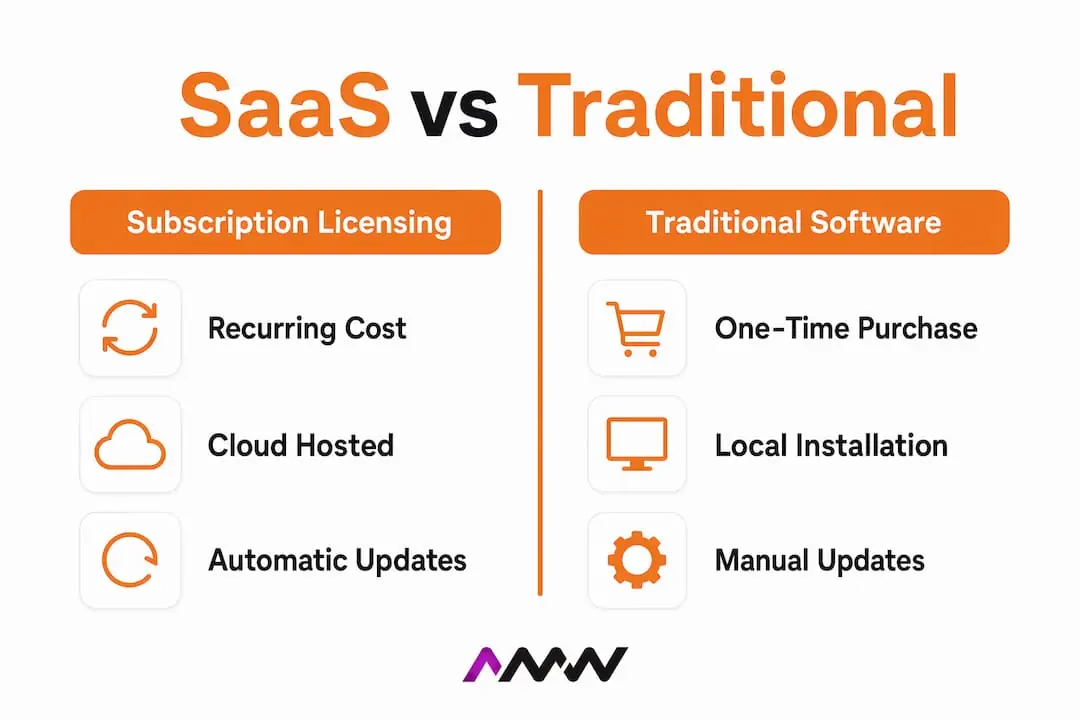
Subscription licensing versus traditional software
Traditional software required a large upfront payment for a perpetual licence. SaaS replaces that with a monthly or annual subscription, which spreads cost over time and removes the need for capital expenditure on software. The trade-off is that you never “own” the software outright. You pay for continued access, which suits businesses that want predictable costs and always-current software.
Users access SaaS applications through standard web browsers or lightweight client apps, meaning any device with an internet connection becomes a valid workstation. This is why remote and hybrid teams adopted SaaS so rapidly.
- No local installation: software runs in the browser, not on your hard drive
- Automatic updates: the provider pushes improvements without disrupting your workflow
- Provider-managed security: encryption, backups, and compliance are handled at the platform level
- Pay-as-you-go pricing: scale your subscription up or down as your team grows or shrinks
- Access from anywhere: a laptop in London or a tablet in Edinburgh works equally well
Pro Tip: Before committing to any SaaS subscription, check the provider’s Service Level Agreement for uptime guarantees. A 99.9% uptime promise sounds impressive, but it still allows roughly 8.7 hours of downtime per year.
What is custom SaaS and when is it justified?
Custom SaaS is a custom software product built to your organisation’s specific requirements, delivered via the cloud on a subscription basis, rather than adapted from an off-the-shelf solution. Off-the-shelf SaaS covers the needs of most businesses, but some workflows, compliance requirements, or competitive advantages simply cannot be squeezed into a generic product.
The clearest justification for custom SaaS is when your processes are unique. A logistics firm with a proprietary routing algorithm, a healthcare provider with strict data residency rules, or a financial services company needing custom audit trails will all find that standard SaaS products force painful workarounds. The financial decision to build custom SaaS depends on whether five-year licensing and workaround costs exceed the cost of building and maintaining a custom platform.
How custom SaaS is actually built
Custom SaaS is rarely built entirely from scratch. The standard approach blends proprietary business logic with existing managed services, such as authentication providers, payment processors, and cloud databases. This hybrid method cuts build time significantly and reduces risk. A founder who insists on building every component from the ground up will spend three times the budget and miss the market.
Build timelines for a minimum viable product typically range from 2 to 12 weeks, assuming the scope is clearly defined before a single line of code is written. That caveat matters enormously. Most project overruns stem from insufficient discovery and unclear scope, not from coding complexity.
Key technical considerations
- Role-based permissions: who can see, edit, or delete which data? Getting this wrong creates both security gaps and frustrated users.
- Row-level audit logs: a complete record of who changed what and when. Regulators love these; developers often forget them until it is too late.
- API integrations: your custom platform will need to talk to payment gateways, CRMs, and third-party data sources. Plan these connectors early.
- Billing infrastructure: subscription management, trial periods, and invoicing logic are notoriously fiddly. Use an established billing service rather than building your own.
- Scalability planning: design the database and architecture to handle ten times your current expected load from day one.
Invisible architecture decisions, such as row-level audit logs, role-based permissions, and API data transformation, are the critical differentiators between a custom SaaS product that scales and one that collapses under pressure.
| Scenario | Off-the-shelf SaaS | Custom SaaS |
|---|---|---|
| Standard CRM or project management | Strong fit | Unnecessary cost |
| Unique compliance requirements | Poor fit | Justified |
| Proprietary workflow logic | Workarounds needed | Justified |
| Early-stage startup testing ideas | Strong fit | Too slow to build |
| Established business with competitive IP | Adequate | Strong fit |
Pro Tip: Run a five-year cost comparison before committing to custom SaaS. Add up your current licensing fees, the cost of workarounds, and the productivity lost to clunky processes. If that number exceeds the build and maintenance estimate, custom SaaS is the rational choice.
How SaaS is transforming marketing and business operations
SaaS has fundamentally changed how marketing teams operate. The old model required expensive on-premises software, IT support, and long implementation cycles. SaaS replaced that with browser-based tools that a marketing manager can set up in an afternoon.
SaaS marketing is a growth system that owns the customer promise before the sale and the value outcome after it. This is a crucial distinction. SaaS marketing is not just about generating leads. It covers acquisition, activation, retention, and expansion across the entire customer lifecycle. A business that treats SaaS marketing as pure lead generation leaves significant recurring revenue on the table.
Common SaaS applications in marketing
- CRM platforms: track every customer interaction, automate follow-ups, and give sales teams a single source of truth
- Email marketing tools: segment audiences, personalise campaigns, and measure open and click rates without touching a server
- Analytics platforms: connect website behaviour, ad spend, and revenue data in one dashboard
- Social media management tools: schedule posts, monitor mentions, and report on engagement across multiple channels
- Marketing automation: trigger personalised communications based on user behaviour, removing manual effort from repetitive tasks
For a deeper look at how these tools connect, the examples of SaaS tools every business should know in 2026 covers the practical landscape well. Understanding automation in marketing also helps clarify how SaaS tools fit into a broader operational picture.
SaaS tools give marketing teams the ability to test, iterate, and scale without waiting for IT departments or budget cycles. A campaign that would have taken six weeks to set up on legacy software can now launch in six hours. That speed compounds over time and becomes a genuine competitive advantage for businesses willing to build the right stack.
The subscription model also changes the financial relationship with software. Marketing budgets shift from capital expenditure to operational expenditure, making it easier to justify new tools and easier to cancel ones that underperform. This flexibility suits the pace at which marketing channels and tactics evolve.
What are the benefits and challenges of adopting SaaS?
SaaS adoption delivers clear, measurable benefits for most businesses. The most significant is the removal of upfront infrastructure costs. There is no server to buy, no IT team to hire for installation, and no version to maintain. The provider handles all of that, and the cost is built into the subscription.
Accessibility is the second major benefit. Any team member with login credentials and an internet connection can access the same tools, whether they are in the office, at home, or on a train between Manchester and London. Automatic updates mean every user always has the current version, which eliminates the version-mismatch problems that plagued on-premises software for decades.
The challenges businesses should not ignore
SaaS is not without its complications. Data security is the most common concern, and it is a legitimate one. When your data lives on a third-party server, you are trusting that provider’s security practices. Reputable providers invest heavily in encryption, access controls, and compliance certifications, but businesses in regulated industries must verify these credentials carefully before signing up.
Internet dependency is a practical constraint. If your connection drops, your access drops with it. Businesses in areas with unreliable connectivity, or those running operations that require offline access, need to account for this limitation.
B2B SaaS sales cycles present a specific challenge for vendors. The average B2B SaaS sales cycle runs to 211 days, driven by the intangible nature of cloud services, multiple decision-makers, and the ongoing financial commitment of a subscription. That length demands a marketing and sales approach built around education, trust-building, and long-term nurturing rather than quick conversions.
| Factor | SaaS advantage | Consideration |
|---|---|---|
| Upfront cost | Low, subscription-based | Ongoing cost accumulates over time |
| Maintenance | Provider-managed | Limited control over update timing |
| Accessibility | Any device, anywhere | Requires reliable internet |
| Security | Provider-certified | Data held by third party |
| Scalability | Adjust subscription as needed | Pricing can rise with team size |
Pro Tip: When evaluating SaaS tools, ask the vendor for their SOC 2 Type II report. This independent audit confirms their security controls are documented and actually operating as described.
For businesses building their own SaaS marketing strategy, automated marketing strategies that use SaaS tools effectively can significantly reduce the manual effort involved in customer acquisition and retention.
Key takeaways
SaaS is the dominant software delivery model because it removes infrastructure burden, reduces upfront cost, and gives businesses access to always-current tools through a predictable subscription.
| Point | Details |
|---|---|
| SaaS definition | Cloud-hosted software accessed via subscription, with no local installation or maintenance required. |
| Custom SaaS justification | Build custom when unique workflows, compliance needs, or competitive logic outweigh five-year licensing costs. |
| SaaS marketing scope | Effective SaaS marketing covers the full customer lifecycle: acquisition, activation, retention, and expansion. |
| Hidden architecture matters | Permissions, audit logs, and API connectors determine whether a custom SaaS product scales or fails. |
| B2B sales cycle reality | B2B SaaS sales average 211 days, requiring sustained education and trust-building rather than short campaigns. |
SaaS is more interesting than it looks
I have worked with businesses at every stage of SaaS adoption, from teams discovering cloud tools for the first time to founders building custom platforms from the ground up. The pattern I see most often is this: businesses underestimate SaaS and then over-rely on it.
The underestimation phase looks like this. A team adopts a SaaS tool, gets excited by how easy it is to set up, and then never configures it properly. They use 20% of the features, pay for 100% of the subscription, and wonder why it is not delivering results. SaaS tools are only as good as the processes built around them.
The over-reliance phase is subtler. A business builds its entire operation on a stack of SaaS subscriptions, each solving one problem, none talking to the others. Data sits in silos. Reports require manual exports. The team spends more time managing tools than doing actual work. This is where custom SaaS or proper automation becomes worth the investment.
My honest view on custom SaaS is that most businesses consider it too early or too late. Too early looks like a startup spending six months building a platform before validating that anyone wants the product. Too late looks like an established business that has spent three years paying for five separate SaaS tools that do not integrate, when a single custom solution would have paid for itself in year two.
The SaaS marketing point is the one I feel most strongly about. Treating SaaS marketing as a lead generation exercise is a waste of the model’s potential. The subscription model means your revenue compounds when customers stay and expand. Every pound spent on retention and activation delivers more long-term value than the same pound spent on acquisition alone. Build the full lifecycle system, not just the top of the funnel.
Amir
How AMW Media can support your SaaS and digital growth
If SaaS is reshaping how your business operates, the next step is making sure your digital presence keeps pace.
AMW Media works with ambitious businesses to build the digital infrastructure that sits alongside their SaaS stack. From custom web design and development that integrates cleanly with your existing tools, to social media management that turns your SaaS-powered marketing into consistent audience growth, the team brings both technical understanding and creative execution to every project. Adopting SaaS tools for the first time or looking to build something custom: AMW Media can help you get more from the investment. Get in touch to talk through what your business actually needs.
FAQ
What does SaaS stand for?
SaaS stands for Software as a Service. It describes a cloud-based delivery model where software is hosted by a provider and accessed by users over the internet through a subscription.
How is SaaS different from traditional software?
Traditional software requires a one-off purchase and local installation on each device. SaaS is accessed via a browser, updated automatically by the provider, and paid for through a recurring subscription with no installation needed.
What is custom SaaS development?
Custom SaaS development is the process of building a custom, cloud-hosted software product matched to a specific business’s unique workflows, compliance requirements, or competitive logic, rather than adapting an off-the-shelf solution.
What is SaaS marketing?
SaaS marketing is a growth system covering the entire customer lifecycle, from acquisition and activation through to retention and expansion, with the goal of building recurring revenue rather than simply generating leads.
Is SaaS secure for business data?
Reputable SaaS providers invest in encryption, access controls, and compliance certifications such as SOC 2 Type II. Businesses in regulated industries should verify a provider’s security credentials and data residency policies before committing.
Recommended
- Examples of SaaS tools every business should know in 2026 | AMW Media
- Technology & SaaS Marketing Agency | AMW Media
- SaaS & Business Automation Solutions London | AMW Media | AMW Media
- What is blogging for business? a 2026 growth guide | AMW Media
Our free marketing audit looks at your site, your ads and your content, and comes back with a 30 day plan. No pitch deck.

Founded AMW Media in 2024 and runs strategy, paid media and the CRM builds. The reason everything here is in house and measured in revenue. Meet the team.