
 Black Steel Doors
 Woodstock Campers
 Phillips Joinery

Multilingual SEO is the job of making each language version of your website findable by the right people, in the right country, without your pages fighting each other in search. The basics come down to four things: a clean URL structure, hreflang tags that link your versions together, translation that has been properly localised, and a technical set-up that lets Google crawl all of it.
That sounds like a lot. It isn’t, once you see the moving parts. Let’s go through them like we’re sitting across a table with a cuppa.
TL;DR
- Give every language version its own URL. Subdirectories (
/fr/) are the simplest route for most UK SMEs, though country domains and subdomains also work. - Use hreflang annotations so Google knows which version is meant for which language or region. Every version must point to every other version, and to itself.
- Translate, then localise: spelling, currency, units, payment methods and tone all matter, not just the words.
- Don’t rely on a translation plugin alone, and don’t auto-redirect visitors by IP address.
- Check your technical basics first. Hreflang can’t rescue a site that Google struggles to crawl.
Table of Contents
- What multilingual SEO actually is
- Step one: choose your URL structure
- Step two: hreflang, the bit everyone dreads
- Step three: translate, then localise
- Step four: get the technical basics right
- Our take: start smaller than you think
- Common multilingual SEO mistakes
- How to check your work
- Where AMW Media can help
- A quick example of how it fits together
- FAQ
- Sources
What multilingual SEO actually is
A multilingual website is simply one that offers content in more than one language. Multilingual SEO is how you make sure each of those versions turns up in search for people who speak that language.
You’ll also hear “multiregional”. That’s a slightly different beast: one language, several countries. A UK shop that also sells to the US, Australia and Ireland in English is multiregional. A UK shop with French and German pages is multilingual. Plenty of businesses are both at once, for example French for France and French for Canada.
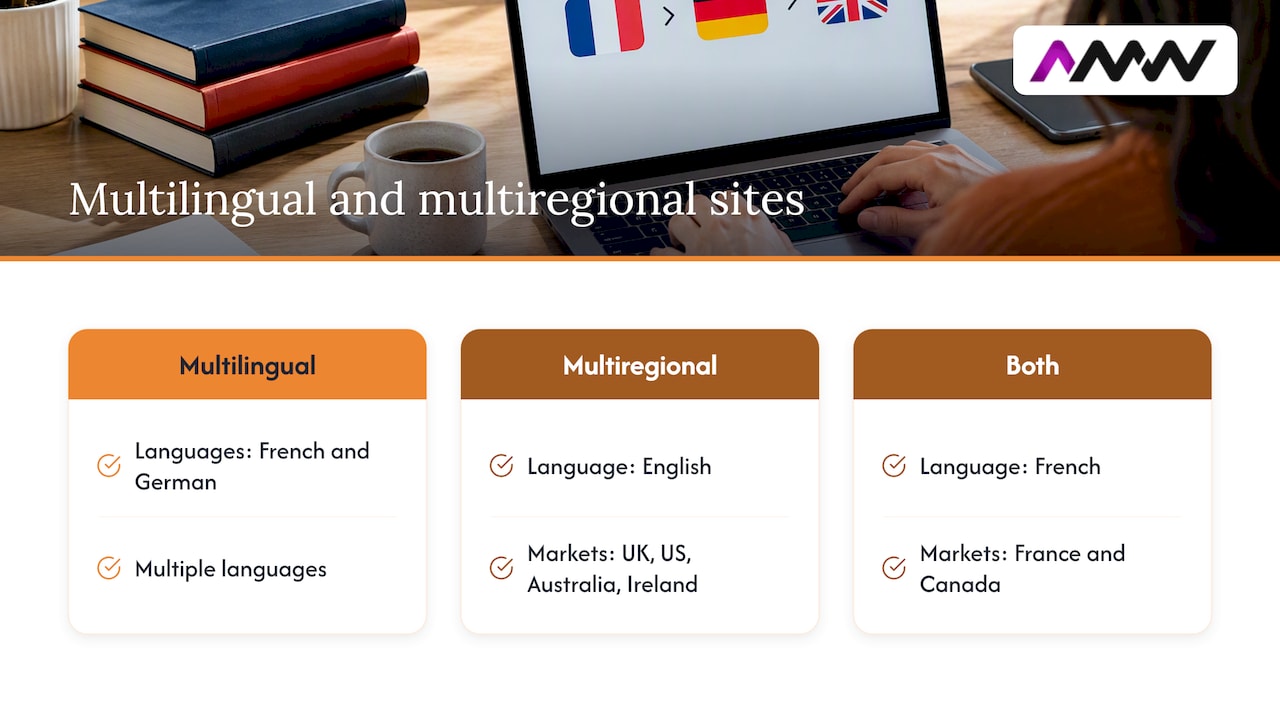
Why bother? Because search is local in a way people forget. Someone in Lyon searching in French is not going to click an English page if a French one is sitting right below it. If you don’t have a French page, you don’t get the click. If you have one but Google can’t tell it’s for French speakers, you may not get it either.
Do you actually need it?
Before you commission anything, be honest about demand. Government guidance suggests considering translation if you know your customers expect it, or if exports to that market are likely to be a significant part of your sales. That’s a sensible filter.
A quick sanity check:
- Are you already getting enquiries, orders or traffic from a particular country?
- Do you ship, deliver or serve customers there?
- Can you handle replies, customer service and returns in that language?
- Are competitors in that market publishing in the local language?
If the answer to the third question is no, pause. A beautifully translated site that sends enquiries into a black hole is worse than no site at all.
Step one: choose your URL structure
Each language or regional version needs its own URL. Google’s guidance is to use separate URLs for different language versions rather than swapping content on the same address based on who’s visiting. You have a few ways to do it:
| Structure | Example | Good for | Watch out for |
|---|---|---|---|
| Country domain (ccTLD) | example.fr |
Strong country targeting, local trust | Separate domains to buy, maintain and build authority on |
| Subdomain | fr.example.com |
Separate hosting or teams per market | Often treated as more separate from the main site; extra set-up |
| Subdirectory | example.com/fr/ |
Most SMEs: one domain, one set of authority | Needs good site architecture; less obvious country signal |
| URL parameter | example.com?lang=fr |
Not much, honestly | Messy, hard to maintain, easy to get wrong |
The guidance behind these options is in Google’s page on managing multilingual and multiregional sites, which also lists the pros and cons of each in more detail.
Our usual leaning
For a UK small or mid-sized business testing a handful of new markets, subdirectories are normally the easiest to live with. One domain, one hosting set-up, one analytics property, and the authority you’ve already built carries across. If you’re a larger brand with separate market teams, or you want a strong local identity in a particular country, country domains can make sense.
Whatever you pick, pick it once. Moving structure later means redirects, re-indexing and a bumpy few months. Don’t use URL parameters if you can avoid it.
Keep the language in the URL, not just the content
Translate your slugs too, where it makes sense. /fr/chaussures-de-course/ tells a French reader (and Google) more than /fr/running-shoes/ does. It’s a small thing, but it’s the sort of detail that makes a site feel native.
Step two: hreflang, the bit everyone dreads
Hreflang is an annotation that tells search engines: “this page has siblings in other languages or regions, and here they are”. Google explains that doing so helps point users to the most appropriate version of your page by language or region.
It looks scarier than it is. A single tag has two jobs: say which language (and optionally region) a version is for, and say where it lives.
The codes
Hreflang values use ISO 639-1 language codes, optionally combined with ISO 3166-1 Alpha 2 region codes. So:
enis English, any regionen-GBis English for the United Kingdomfris French, any regionfr-CAis French for Canadade-ATis German for Austria
A classic slip is writing en-UK. The right code for the United Kingdom is GB, so it’s en-GB. Also remember you can’t target a region without a language: GB alone won’t work.
An example
Say you have an English page, a French page and a German page. In the <head> of each page you’d add something like this:
<link rel="alternate" hreflang="en-GB" href="https://example.com/en/" />
<link rel="alternate" hreflang="fr" href="https://example.com/fr/" />
<link rel="alternate" hreflang="de" href="https://example.com/de/" />
<link rel="alternate" hreflang="x-default" href="https://example.com/" />
That identical block goes on every version. Which brings us to the golden rules.
The rules that trip people up
- Every version links to every other version, and to itself. Google calls these return links. If page A points to page B but B doesn’t point back, the annotations may be ignored. The Search Central documentation covers this requirement.
- Use full, absolute URLs. Include the protocol and domain, not relative paths.
- Be consistent. The URL in your hreflang tag should match the canonical URL of that page.
- Annotate page by page. Hreflang works at page level, not site level. Your “About us” in French points to your “About us” in English, not to the English homepage.
- Add
x-defaultfor a fallback. It marks the page for users who don’t match any of your listed languages, often a language selector or your main homepage. Google introduced it for international landing pages such as a country picker.
Three ways to implement it
Google supports three methods, and you only need one:
- HTML link tags in the
<head>. Fine for small sites. - HTTP headers. Useful for non-HTML files such as PDFs.
- XML sitemap entries. Often the tidiest option for larger sites, because everything lives in one file rather than being repeated on every page.
Pick one and stick with it. Mixing methods is a good way to create contradictions you’ll spend an afternoon hunting for.
What hreflang does not do
It isn’t a translation tool, and it isn’t a language detector. Google uses its own systems to work out what language a page is in, so hreflang is best thought of as a signal about which version is intended for which audience. It won’t make a badly translated page rank, and it won’t turn English text into French. If your “French” page is still mostly English, hreflang is lipstick on a very confused pig.
Step three: translate, then localise
This is where most of the real work, and most of the real wins, live.
Government export guidance draws a clear line: translation is simply changing content from one language to another, while localisation adapts the site to what a specific market expects. You need both.
What localising covers
- Spelling and vocabulary. The same guidance gives the example of a UK brand changing “colour” to “colour” for the US market. The same goes for Portuguese in Brazil versus Portugal, or Spanish in Mexico versus Spain.
- Currency and pricing. Show prices in the local currency, formatted the local way. £1,200 in the UK is 1.200 £ or 1 200 £ in plenty of European conventions, and people notice.
- Payment methods. Customers in different countries trust different ways to pay. The business.gov.uk page on localising lists local payment methods as one of the main areas to adapt.
- Product categories and attributes. Shoe sizes, clothing sizes, units of measurement and even the way categories are named can differ by country.
- Dates, phone numbers and addresses. Boring but quickly noticed.
- Tone and imagery. Humour, formality and examples that land in Manchester can fall flat in Munich.
Keywords are not translated, they are researched again
This is the big one. The literal translation of your top English keyword is often not what local people actually type. A German searcher may use a completely different compound word, or an English loanword, or a regional term. Run keyword research in each language, ideally with a native speaker, and write the page around what people really search for.
If you want a refresher on how keyword research and content fit into the broader picture, our guide on what SEO is and how it works covers the fundamentals.
Humans, machines and the in-between
Machine translation has got a lot better, and for first drafts it’s genuinely handy. But for pages that make you money, get a human who is a native speaker to review or write them. Professional translation makes a site easier for customers to understand and use, and trust is what turns a visit into an enquiry.
A sensible split many businesses use:
- Human-written or fully reviewed: homepage, service or product pages, checkout, legal pages, anything with a call to action.
- Lightly reviewed: blog content and supporting articles.
- Left in the original language for now: low-value pages that don’t justify the cost yet. Just don’t hreflang-link pages that don’t have a real equivalent.
A word on translation plugins
Plugins are a quick way to get multiple languages live, and for a small brochure site they can be perfectly fine. The catch, according to the government’s guide on understanding e-commerce platforms, is that your platform needs to cope with different languages, currencies and cultures as you expand, and basic translation add-ons alone may not do it. Before you commit, check that whichever tool you use:
- Creates real, crawlable URLs for each language (not JavaScript-only swaps).
- Lets you edit titles, meta descriptions, image alt text and URL slugs per language.
- Outputs correct hreflang tags automatically.
- Doesn’t lock your translations inside a service you can’t leave.
Step four: get the technical basics right
Hreflang is the glamorous bit of international SEO. The unglamorous bit is making sure Google can find, crawl and index your pages at all.
Don’t redirect people automatically
It’s tempting to detect a visitor’s country and bounce them to the “right” version. Resist. It can block search crawlers from seeing all your versions, and it annoys real people, such as a French speaker on holiday in London. Show a small, clear language or country switcher instead, and let people choose.
Watch your canonicals
Canonicalisation is the process of selecting the representative URL for a piece of content. In a multilingual set-up, each language version should normally have a canonical pointing to itself. A frequent error is setting every translated page’s canonical to the English original, which tells Google to ignore the translations entirely. If something looks off, Google’s page on fixing canonicalisation issues suggests starting with the URL Inspection tool to see which page Google chose as canonical.
Other things to tick off
- Sitemaps: include all language versions, or have one sitemap per language.
- Internal links: link French pages to other French pages, not back to English ones.
- Metadata: translate titles and descriptions. A French page with an English title tag is a surprisingly common sight.
- The
langattribute: set the page’s language in the HTMLlangattribute for accessibility and clarity. - Speed: a slow site in London is a slow site in Paris, only with fewer patient visitors.
- Local signals: local addresses, phone numbers and reviews help where relevant.
If you’re not sure whether your site is crawl-ready, start with our rundown of technical SEO basics. It’s worth fixing those things before you multiply your pages by three.
Our take: start smaller than you think
Here’s where we’d gently push back on the “go global” excitement. We work with ambitious UK brands every day, and the most common multilingual mistake we see isn’t a missing hreflang tag. It’s launching six languages at once, with thin translations, and no plan for keeping them up to date.
Our advice looks like this:
- Pick one market first. The one where you already have demand, delivery and people who can answer the phone.
- Do the money pages properly. Services, key products, contact and checkout. Get native-quality copy and proper keyword research.
- Build the structure to scale. Choose your URL pattern and hreflang method now so adding market number two is a copy-and-adapt job, not a rebuild.
- Measure before expanding. Look at organic traffic, enquiries and conversion rates by language. Let the numbers tell you where the next investment goes.
- Keep reporting transparent. If you can’t see what each market is doing in your analytics and Search Console, you can’t make good decisions.
That’s also how we like to work: no long-term contract lock-in, clear reporting and a focus on results you can actually measure. Multilingual SEO is a long game, and it should be run like one, with evidence rather than hope.
Amir Wanas, founder of AMW Media
Common multilingual SEO mistakes
If you only skim one section, make it this one.
- Wrong codes.
en-UKinstead ofen-GB, or a country code on its own. - Missing return links. Page A points to B, but B doesn’t point back.
- Canonical clashes. Hreflang says one thing, canonical says another.
- Untranslated chunks. Menus, buttons, footers and form errors left in English.
- Duplicate pages with different URLs. If your UK and Irish English pages are identical, think about whether you really need both. If you do keep them, hreflang them properly.
- IP-based auto-redirects. They hide pages from crawlers and frustrate users.
- Blocking pages. A
robots.txtrule ornoindextag on a language folder that you forgot about. - Translating once and forgetting. When you update the English page, update the others, or the versions drift apart.
How to check your work
You don’t need fancy kit to do a first audit.
- Search Console. Add each language version (or use a domain property) and check coverage and performance. Filter by country to see where your impressions come from.
- View source. Open a page, search for
hreflang, and confirm the tags list every version, including itself. - A crawler. Desktop crawling tools can flag missing return links, wrong codes and canonical conflicts across the whole site in one go.
- Search it like a local. Use a browser profile or a friend in the target country and search for your main terms. Is the right version showing? Is the snippet in the right language?
- Check the humans. Ask a native speaker to click through the site and note anything that feels off. They’ll spot things no tool will.
Give it time. Search engines need to recrawl your pages before changes show up, so don’t panic after three days.
Where AMW Media can help
If you’re planning a site that needs to speak more than one language, the foundations matter most: a structure that’s built for it, clean technical SEO and content planned around real search demand. Our team builds and optimises websites for UK brands, from web design and development to technical, local and content-led SEO, and we hold Google, Meta, Shopify, WordPress and Framer partnerships. You can see what we offer on our services page or browse our recent projects. If you’d like a candid view on whether your site is ready for a second language, get in touch via amwmedia.co.uk.
A quick example of how it fits together
Imagine a UK-based homeware business, selling through its own online shop, that gets a steady trickle of orders from Ireland, France and the US. Here’s how the basics might apply.
- Ireland: same language, different market. An
en-IEversion might only be worth building if you need euro pricing, Irish delivery details and local terms. If not, oneenoren-GBpage may do for now. - France: a full French version in
/fr/with translated slugs, native-reviewed product pages, euro pricing and French delivery and returns information. Hreflangfrlinks each product to its English counterpart. - US: American spelling, dollar prices, US sizing and units, under
/en-us/, taggeden-US. - Everyone else: an
x-defaultpointing at the main English page or a country selector.
That’s three versions, one domain, one hreflang method and one analytics setup. It’s not glamorous, but it’s maintainable, which counts for a great deal. If you run a shop, our post on ecommerce SEO strategy and product data fixes is a useful companion, since product data is exactly where localisation tends to wobble.
FAQ
Is hreflang a ranking factor?
Not in the sense that adding it will boost your rankings. It’s a signal that helps Google serve the right version of a page to the right audience, which can improve clicks and reduce the wrong-language version appearing. Think of it as routing rather than ranking.
Do I need hreflang if my site is only in English?
Usually not. If you have one English version for everyone, there’s nothing to link together. You’d only need it if you create separate English versions for different regions, such as the UK and the US, with different spelling, pricing or content.
Should I use subdirectories, subdomains or country domains?
For most UK SMEs, subdirectories are the simplest: one domain, one set of authority and less to maintain. Country domains suit bigger brands wanting a strong local identity in a market, and subdomains suit separate teams or hosting. All three can work with Google, so choose the one you can maintain properly.
Can I just use a translation plugin?
For a small brochure site, a good plugin that creates real URLs and lets you edit metadata can be a reasonable start. For anything that drives revenue, have a native speaker review the copy and check the technical output. Government guidance on e-commerce platforms is clear that your platform must handle multiple languages, currencies and cultures as you grow.
How long does multilingual SEO take to work?
There’s no fixed timeline, and anyone who promises one is guessing. Pages need to be crawled and indexed first, then they build visibility over time, usually gradually. Track impressions and clicks by country in Search Console to see early movement.
Sources
- Localised Versions of your Pages, Google Search Central
- Managing Multi-Regional and Multilingual Sites, Google Search Central
- Introducing x-default hreflang for international landing pages, Google Search Central Blog
- What is URL Canonicalization, Google Search Central
- Fix Canonicalization Issues, Google Search Central
- How to adapt your website for export, business.gov.uk
- How to localise your online market place, business.gov.uk
- Understanding e-commerce platforms, business.gov.uk
Recommended
- Google Business Profile SEO: local ranking guide for UK small businesses
- Website optimisation checklist: your 2026 UK guide
- Master your SEO strategy: guide for effective brand growth
- Types of SEO strategies: a practical 2026 guide
Our free marketing audit looks at your site, your ads and your content, and comes back with a 30 day plan. No pitch deck.

Founded AMW Media in 2024 and runs strategy, paid media and the CRM builds. The reason everything here is in house and measured in revenue. Meet the team.