
 Black Steel Doors
 Woodstock Campers
 Phillips Joinery
Technical SEO is the work that makes search engines reliably find, render and index your pages so they can appear in search results and AI summaries. Get this right and your content has a fair chance of ranking. Get it wrong and even brilliant writing stays invisible. This guide walks through the checks that matter and ends with an audit checklist you can run today.
TL;DR:
- Target Core Web Vitals of LCP at 2.5 seconds or less, INP below 200 milliseconds, and CLS below 0.1 across pages, not only the homepage.
- Use robots.txt to control crawling, not index exclusion; a blocked page can still appear in results, while noindex prevents indexing when crawled.
- For duplicate pages, use a canonical tag for the preferred version, a 301 redirect for permanent replacements, and avoid conflicting sitemap or canonical signals.
- Crawl budget usually matters only for sites with tens of thousands of URLs; small, well linked sites often need no XML sitemap.
- Google indexes mobile pages, so inspect rendered content for important URLs and serve core information in HTML rather than relying entirely on JavaScript.
Table of Contents
- Technical SEO explained: scope and remit
- Why technical SEO matters for search and AI visibility
- Crawling: how search engines discover your URLs and practical checks
- Indexing and canonicalisation: controlling what appears in search
- Site architecture, URLs and sitemaps: organising content for crawlers and users
- Performance and Core Web Vitals: targets and practical fixes
- Mobile-first indexing and JavaScript rendering: testing and mitigation
- Structured data and sitemaps: JSON-LD, validation and when to add markup
- Technical SEO audit checklist: prioritised, actionable steps to run now
- AMW Media perspective: how an agency structures technical SEO projects
- How AMW Media can help with technical SEO
- FAQ
- Sources
- Authoritative documentation and validators to bookmark
Technical SEO explained: scope and remit
Technical SEO covers the infrastructure that lets search engines reach, understand and rank your pages. It is separate from content SEO, which deals with keywords, topics and the quality of your writing, and from on-page SEO, which covers titles, headings and internal copy. Technical SEO instead asks a blunter question: can a search engine even get to your page, read it properly and decide it is worth showing?
Think of it as the plumbing behind the website. Nobody notices it when it works, but everything else depends on it. A page stuffed with useful information is worthless to searchers if it returns a server error, loads a blank screen for crawlers, or carries a stray noindex tag nobody remembered to remove.
The main technical signals fall into a few buckets:
- Crawlability: whether search engine bots can discover and access your URLs.
- Renderability: whether the page displays its full content once loaded, including anything built with JavaScript.
- Indexability: whether a crawled page is actually allowed into the search index.
- Performance: how fast a page loads and how stable it feels while loading.
In a typical optimisation workflow, technical fixes usually come first. There is little point refining your keyword strategy on pages that search engines cannot read. Once the foundations are solid, content and on-page work can do their job properly.
Why technical SEO matters for search and AI visibility
A page that search engines cannot reach cannot rank, and it cannot be quoted by an AI summary either. Eligibility comes before everything else: no amount of good writing fixes a blocked crawl path or a stray noindex tag. Once a page is reachable, how it performs for real visitors becomes part of the signal mix too.
Google measures this through Core Web Vitals, which set concrete thresholds for loading speed and visual stability.
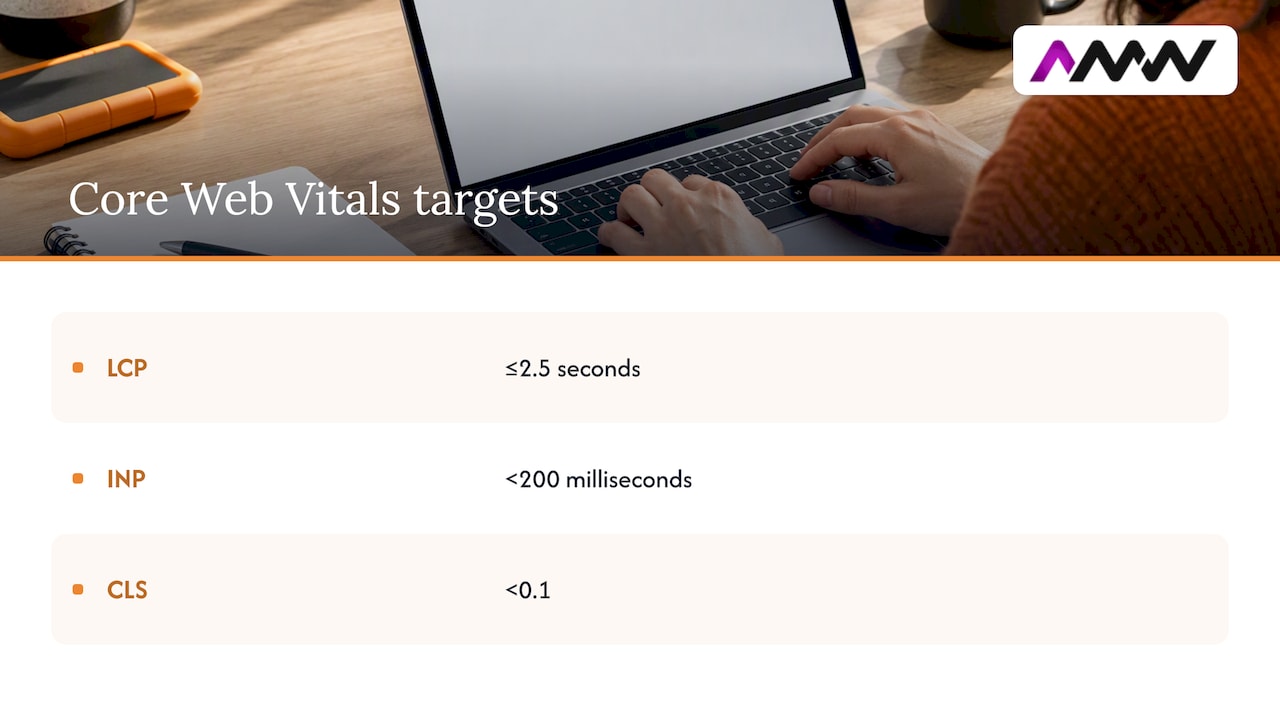
Core Web Vitals targets: Largest Contentful Paint (LCP) should sit at 2.5 seconds or under, Interaction to Next Paint (INP) under 200 milliseconds, and Cumulative Layout Shift (CLS) under 0.1, according to Google Search Central. Pages that clear these thresholds tend to offer a smoother experience, which supports both rankings and how AI tools evaluate content quality. Our AI SEO strategy guide covers how this plays out when content gets cited rather than just crawled.
Crawling: how search engines discover your URLs and practical checks
Search engines find pages mainly through links, both internal and external, and through sitemaps that list URLs directly. If a page has no links pointing to it and sits outside your sitemap, it might never get discovered at all.
Your robots.txt file sits at the root of your domain and tells crawlers which paths they can and cannot request. It is a common source of accidental damage: a blanket disallow rule left over from a staging site, or a misplaced slash, can quietly block an entire section from crawling.
Crawl budget, the number of pages a search engine is willing to crawl on your site within a given time, mostly matters for large sites with tens of thousands of URLs. A small brochure site rarely needs to worry about it, but an ecommerce catalogue with thousands of filtered product pages can burn through budget on low-value URLs instead of the pages that matter.
To check your crawl health:
- Open Google Search Console and review the Crawl Stats report for sudden drops or spikes.
- Fetch your robots.txt file directly in a browser and read every line.
- Use the URL Inspection tool to test whether a specific page is crawlable.
- If you have access, scan server logs for bot activity and repeated errors.
- Check for orphan pages, ones with no internal links pointing to them.
Pro Tip: Test your robots.txt changes in Search Console’s robots.txt tester before pushing them live. One wrong character can block your whole site.
Indexing and canonicalisation: controlling what appears in search
Blocking a crawler and keeping a page out of the index are two different jobs, and mixing them up causes real problems. Robots.txt controls crawling only. According to Google’s documentation, a page blocked in robots.txt can still appear in search results if other sites link to it, often showing up with no description because Google never crawled the content.
If you actually want a page kept out of the index, you need a noindex directive, either as a meta robots tag in the page’s HTML or as an X-Robots-Tag in the HTTP header for non-HTML files like PDFs.
For duplicate or near-duplicate content, canonicalisation tells search engines which version is the master copy. A few rules keep this clean:
- Use rel=“canonical” to point duplicate or near-identical pages to the preferred version.
- Use a 301 redirect when a page should permanently replace another, rather than just referencing it.
- Never send conflicting signals, such as a canonical tag pointing one way and a sitemap listing the other URL.
- Set canonical tags in the static HTML wherever possible, since Google treats redirects and canonical tags as the strongest signals and sitemap entries as weaker ones, per its guidance on consolidating duplicate URLs.
Site architecture, URLs and sitemaps: organising content for crawlers and users
Good architecture makes it easy for both crawlers and humans to understand how your pages relate to each other. A flat pile of disconnected URLs forces search engines to work harder than they should, and makes your site harder to use too.
A few habits make a real difference:
- Keep URLs short, readable and logical, such as /services/web-design rather than a string of parameters.
- Build topical hubs: group related pages and link between them so context carries through the site.
- Link consistently from your main navigation and relevant body content, not just from a buried sitemap page.
- Use an XML sitemap when your site is large, new, or has sections that are not well linked internally. According to Google Search Central, small, well-linked sites often do not need one at all.
- For multi-language sites, add hreflang tags so search engines serve the right language version to the right audience, rather than guessing.
A sitemap is not a substitute for solid internal linking. It is a backup discovery route, useful for catching pages your link structure might miss, not a first line of defence.
Performance and Core Web Vitals: targets and practical fixes
Speed and stability affect both user experience and how search engines assess your pages. The three Core Web Vitals thresholds give you concrete numbers to aim for rather than a vague sense that “the site feels slow.”
Core Web Vitals in 2026: LCP at 2.5 seconds or less, INP under 200 milliseconds, CLS under 0.1, as set out by Google Search Central. Hitting these numbers consistently across your pages, not just on your homepage, is what counts.
A handful of fixes tend to move the needle the most:
- Compress and resize images before upload, and serve modern formats like WebP where supported.
- Defer or remove non-critical JavaScript so it does not block the main content from rendering.
- Use HTTP/2 or HTTP/3 to let browsers fetch resources more efficiently.
- Set explicit width and height attributes on images and embeds to prevent layout shift.
- Cache static assets aggressively so repeat visits load almost instantly.
The GDS Way recommends setting a performance budget, a fixed limit on page weight or load time, and enforcing it through automated testing such as Lighthouse rather than checking manually after the fact. Pair lab data from Lighthouse with field data from real visitors to see how your site actually performs outside a controlled test. Our Core Web Vitals field guide covers this in more depth if you want to work through fixes in order.
Mobile-first indexing and JavaScript rendering: testing and mitigation
Google indexes the mobile version of your site by default, which means whatever your phone screen shows is what search engines judge. A desktop-only feature that disappears on mobile effectively does not exist for indexing purposes.
JavaScript adds a layer of risk here. If content only appears after scripts run, and something fails during rendering, crawlers may index a near-empty page.
A few checks and habits reduce that risk:
- Design responsively first, rather than bolting mobile support onto a desktop layout afterwards.
- Use progressive enhancement: serve core content in plain HTML, then layer JavaScript on top for interactivity, a practice Gov also recommends for resilience against assistive technology and partial script failures.
- Test specific URLs with the URL Inspection tool in Search Console to see the rendered HTML Google actually captured.
- Cross-check server logs for Googlebot requests that return errors or unexpectedly small page sizes.
- Where possible, use server-side rendering or pre-rendering for critical content and canonical tags, rather than relying entirely on client-side JavaScript.
Structured data and sitemaps: JSON-LD, validation and when to add markup
Structured data gives search engines explicit labels for what is on a page: this is a product, this is its price, this is a recipe with these ingredients. Google recommends JSON-LD as the preferred format because it is less error-prone than older alternatives and easier to inject dynamically across large sites.
Common use cases worth adding, where relevant to your content:
- Breadcrumb markup to show your page’s position in the site hierarchy directly in search results.
- Article markup for blog posts and news content, which can support richer result formatting.
- Product markup for ecommerce pages, covering details like availability and pricing.
Once markup is in place, validate it with a schema testing tool before publishing, and keep the pages carrying structured data included in your sitemap so search engines can find and re-crawl them as the content changes. Our step-by-step guide to shipping JSON-LD safely walks through the implementation and validation process in more detail.
Technical SEO audit checklist: prioritised, actionable steps to run now
A technical audit works best when you tackle it in order of impact rather than jumping around. Here is a sequence that covers the ground without wasting time on low-value items first.
High priority, fix these first:
- Confirm the whole site runs on HTTPS, with no mixed content warnings and a valid, current SSL certificate.
- Check for accidental noindex tags on pages that should be indexed, and vice versa.
- Review canonical tags across key pages for conflicts or missing entries.
- Test your top landing pages against Core Web Vitals thresholds using Lighthouse.
- Check how your most important pages render on mobile using the URL Inspection tool.
Medium priority, fix once the basics are solid:
- Audit your XML sitemap for outdated URLs, broken links and missing new pages.
- Review your internal linking structure for orphan pages with no links pointing to them.
- Check for duplicate content caused by URL parameters, such as tracking tags or filters, and consolidate with canonical tags or parameter handling rules.
- Review pagination on category and blog listing pages to confirm it is not creating thin duplicate pages.
- Validate structured data on your key templates with a schema testing tool.
Lower priority, worth scheduling but rarely urgent:
- Clean up redirect chains, where one redirect leads to another instead of the final destination directly.
- Review hreflang implementation if you run multiple language versions.
- Check 404 and 500 error pages are returning the correct HTTP status codes rather than a soft 200.
HTTP status codes matter more than most beginners expect. A 301 redirect passes ranking signals to the new URL properly, while a page that should return 404 but instead returns a 200 status confuses search engines into thinking broken content is valid. A 500 error on an important page, even a temporary one during a deploy, can cause a drop in crawl frequency if it happens repeatedly.
Pro Tip: Re-run Lighthouse and check Search Console’s Coverage report two to four weeks after making fixes. Indexing and crawl stats take time to update, so judging results too early just causes confusion.
Once fixes are live, measure the outcome rather than assuming it worked. Search Console’s Coverage and Core Web Vitals reports show whether indexing issues have cleared and whether performance scores have improved, while real user monitoring (RUM) data shows whether visitors on actual devices are experiencing the improvement, not just your test environment.
AMW Media perspective: how an agency structures technical SEO projects
When we take on a technical SEO project, it almost always starts with a discovery phase: crawling the site, pulling Search Console data and understanding what the business actually needs from its search visibility. From there we build a prioritised roadmap, fix issues in order of impact, and set up ongoing monitoring so gains do not quietly erode after launch.
DIY audits work well for small sites with straightforward platforms and a bit of technical confidence. Agency support tends to make more sense once a site has thousands of URLs, a custom-built front end, multiple languages, or a history of unexplained ranking drops that a quick checklist cannot diagnose.
Reporting should show the state before and after, tied to specific fixes rather than vague improvement. Most technical gains show up in Search Console within a few weeks of indexing catching up, though competitive terms can take longer to move.
— Amir
How AMW Media can help with technical SEO
We can run technical audits, fix performance and rendering issues, and monitor results to help improvements stick rather than fade after a few months. That covers the full loop: diagnosis, development fixes and the ongoing checks that catch regressions before they cost you rankings.
A typical first engagement starts with a full audit report and a prioritised roadmap, so you know what is wrong and what fixing it would involve before committing to anything bigger. From there the development work can be handled directly, since technical fixes often need hands-on changes to code, templates or server configuration rather than just advice.
If you would rather hand the whole thing to people who do this daily, take a look at our SEO services or get in touch to talk through what an audit would cover for your site.
FAQ
What is the 80/20 rule in SEO?
The rule of thumb in SEO suggests that a small share of your fixes or pages tends to drive most of your results, so prioritising high-impact items, like crawlability and indexing issues, before smaller tweaks gets you further with less effort. It is a general principle rather than a fixed measured ratio for every site.
Is SEO still worth doing?
SEO remains one of the more reliable ways to earn visibility in search results and AI summaries, since pages that cannot be crawled or indexed have no chance of appearing in either. Technical fixes in particular tend to have a lasting effect because they remove barriers rather than chasing short-term ranking tricks.
Can you give an example of technical SEO?
A common example is fixing a robots.txt file that accidentally blocks crawlers from an entire section of a site, or adding a missing canonical tag to stop duplicate product pages competing against each other. Another is improving Largest Contentful Paint by compressing images, which helps meet the Core Web Vitals threshold of 2.5 seconds or under.
What is the difference between SEO and technical SEO?
SEO is the broad discipline covering content, keywords, links and technical health, while technical SEO is specifically the infrastructure side: crawling, indexing, site speed and rendering. Content SEO can only succeed once technical SEO has made the page reachable and indexable in the first place.
Sources
- Core Web Vitals – Google Search Central
- Introduction to structured data – Google Search Central
- Crawling and indexing – Google Search Central
- How to optimise frontend performance – The GDS Way
- Gov
Authoritative documentation and validators to bookmark
A handful of official resources cover almost everything in this guide in more depth:
- Google Search Central: Crawling and Indexing for the full detail on robots directives and canonicalisation.
- Google Search Central: Core Web Vitals for current performance thresholds.
- Google Search Central: Structured Data for schema implementation guidance.
- Gov for building resilient, accessible front ends.
Recommended
- How to boost website SEO: your 2026 guide
- Website migration SEO: the checklist for SEO teams
- Master your SEO strategy: guide for effective brand growth
- Types of SEO strategies: a practical 2026 guide
Our free marketing audit looks at your site, your ads and your content, and comes back with a 30 day plan. No pitch deck.

Founded AMW Media in 2024 and runs strategy, paid media and the CRM builds. The reason everything here is in house and measured in revenue. Meet the team.