
 Black Steel Doors
 Woodstock Campers
 Phillips Joinery
Schema markup is structured data added to your pages so search engines can understand what your content actually is, not just what it says. On its own it makes you eligible for rich results like star ratings, FAQ dropdowns and product cards, and it helps AI tools read your site more accurately. It is not a ranking signal, though. Google has been clear that correct markup helps eligibility, not position.
TL;DR:
- Schema markup helps search engines understand the content as a specific entity with properties, enhancing eligibility for rich results.
- Google prefers JSON-LD format for its ease of maintenance, while Microdata and RDFa are less practical for ongoing updates.
- Proper implementation requires matching schema types to page intent and filling only genuinely available properties without misleading data.
- Valid schema is necessary but not sufficient; rich result appearance depends on content quality, search context, and proper site monitoring.
- Starting with high-impact pages like products, local business, and events, then expanding, minimizes errors and maximizes SEO benefits over time.
Table of Contents
- What is schema markup and how does structured data work for SEO?
- Which schema types actually matter for SEO?
- How do you add schema markup to a website step by step?
- How do you test and monitor schema markup for SEO?
- What are the best practices and common mistakes with schema markup?
- When does schema markup actually move the needle?
- How we deploy schema markup across client sites
- The sensible schema roadmap for 2026
- Get your schema markup done properly by Amwmedia
- Sources
- FAQ
What is schema markup and how does structured data work for SEO?
Structured data encodes three things: entities, their properties, and the relationships between them. A recipe page isn’t just “text about food” to a crawler once you mark it up. It becomes a Recipe entity with a cookTime property, an author relationship, and a list of ingredients the crawler can parse without guessing.
Search engines have always tried to infer meaning from unstructured HTML, and they’re decent at it. But inference is a best guess. Schema removes the guessing, providing clear narratives crucial for AI-ready content as emphasized by Storyline Pros. You’re handing Google (and increasingly, AI models like those behind Perplexity and ChatGPT’s browsing features) a labelled dataset instead of a wall of prose.
Three formats can carry this data: JSON-LD, Microdata, and RDFa. All three are technically supported, but they work very differently.
- JSON-LD sits in a single script block in the page’s
<head>or<body>, separate from your visible HTML. - Microdata uses HTML attributes (
itemscope,itemprop) woven directly into your existing tags. - RDFa is similar to Microdata but built for more complex, linked-data use cases, and it’s rarely seen outside academic or government publishing.
Google explicitly recommends JSON-LD as the preferred format, and there’s a practical reason implementers like it more than the alternatives: it doesn’t touch your visible markup. You can update, remove, or debug a JSON-LD block without risking a typo that breaks your page’s visual layout. Microdata requires tagging every relevant HTML element individually, which turns into a maintenance headache the moment a developer redesigns a template and forgets the attributes existed.
Once the markup is in place, search engines parse it during crawling and decide whether a page qualifies for enhanced display. This is the bit people misunderstand: passing validation confirms your data is readable. It says nothing about whether Google will actually show the rich result. Eligibility and appearance are two separate things, and conflating them is where a lot of frustrated webmasters go wrong when a “perfectly valid” FAQ schema never produces a rich snippet.
For the exact vocabulary you need (which properties are required, which are optional, what values are expected) the reference point is Schema, maintained jointly by Google, Microsoft, Yahoo, and Yandex. It’s not exciting reading, but it’s the dictionary everyone in this space is working from.
Which schema types actually matter for SEO?
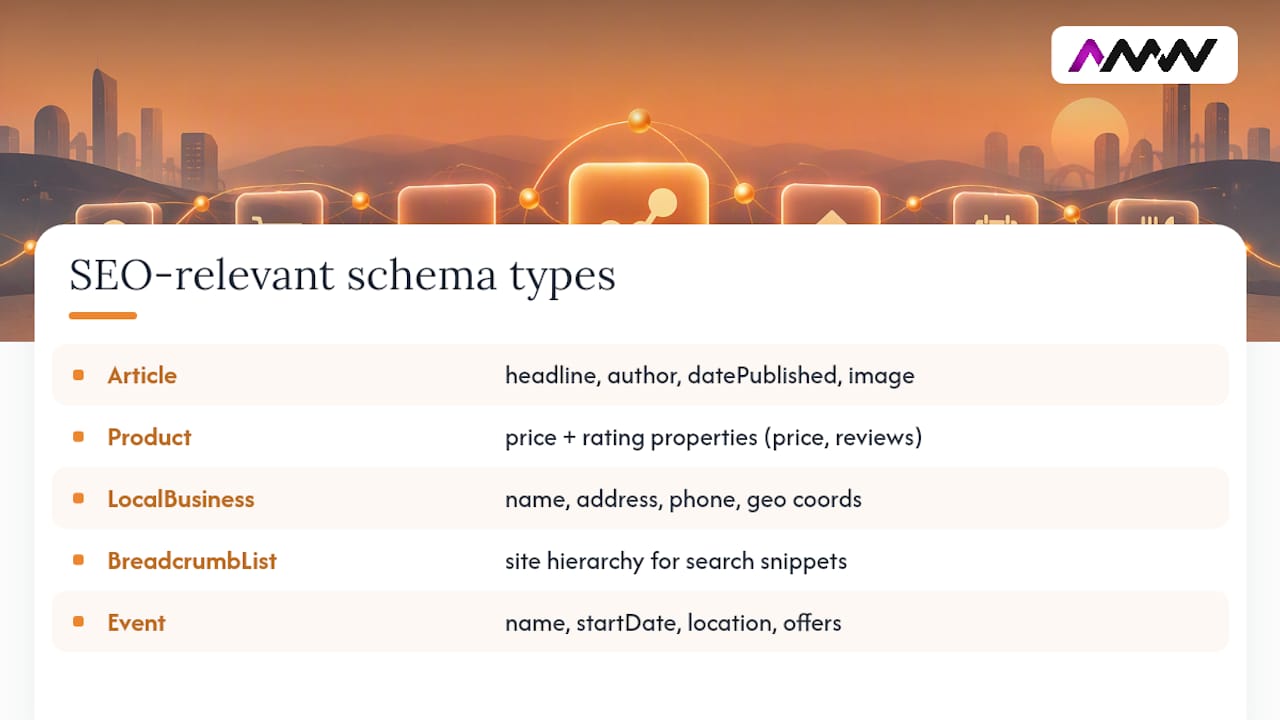
You don’t need every type schema.org lists. Most SEO work concentrates on a handful of types that map to real search features. Here’s what’s worth your time and what each one needs.
Article is for blog posts and news content. Google expects headline, image, datePublished, and author at minimum. Skip the author and you lose eligibility for author-attributed rich results entirely.
Product covers ecommerce listings. name, image, offers (with price and priceCurrency), and aggregateRating (if you have genuine reviews) are the properties that unlock price and star-rating snippets in search.
LocalBusiness (and its more specific subtypes, like Restaurant or Dentist) is the backbone of local SEO. This is where name, address, telephone, openingHours, and geo coordinates matter, because they feed directly into how Google matches your business to “near me” queries and Maps results. If you run a service business with a physical location or service area, this is arguably the highest-leverage schema type you can implement, more so than Article schema on your blog.
BreadcrumbList shows your site hierarchy directly in search results instead of a raw URL string. Simple to implement, low risk, decent CTR payoff.
Event needs startDate, location, and offers if tickets are involved. HowTo and Recipe need step-by-step or ingredient-level detail, and Google is notably strict here about matching visible content exactly.
Organization ties your brand entity together across properties, logo, social profiles, contact points, and it’s what feeds knowledge panel data.
A basic LocalBusiness snippet looks like this:
{
  "@context": "https://schema.org",
  "@type": "LocalBusiness",
  "name": "Example Café",
  "address": {
    "@type": "PostalAddress",
    "streetAddress": "12 High Street",
    "addressLocality": "Manchester",
    "postalCode": "M1 1AA",
    "addressCountry": "GB"
  },
  "telephone": "+44 161 000 0000",
  "openingHours": "Mo-Fr 08:00-17:00"
}
For pages listing several items (a category page with ten products, say), use an array under @graph rather than stacking separate script tags. It’s cleaner and easier for crawlers to parse consistently.
How do you add schema markup to a website step by step?
Getting schema live without breaking anything comes down to sequencing. Skip a step and you end up debugging live errors in Search Console weeks later.
- Match the type to page intent. A service page gets
ServiceorLocalBusiness, a blog post getsArticle, a listing getsProduct. Don’t force a type that doesn’t fit the content just because it sounds more impressive. - Map your CMS fields to schema properties. If you’re on WordPress, Shopify, or a custom build, identify which existing fields (title, publish date, price, address) can populate the schema automatically rather than being hardcoded.
- Generate the JSON-LD with explicit typing. Dates need ISO 8601 format (
2026-03-12, not “12th March”). URLs need to be absolute, not relative. Prices need to be numeric strings, not “£49.99 approx”. - Test in code first. Paste the JSON-LD into a code editor or a testing tool before it ever touches production. Catching a missing comma here saves you a live-site error later.
- Deploy, then test the live URL, not just the code snippet. A script that validates in isolation can still fail once it’s actually rendered inside your page template.
- Monitor via Search Console over the following weeks. Errors often only appear once Google has actually crawled the deployed version.
The pitfalls that catch people out repeatedly:
- Duplicate injection, where a plugin and a manually added script both fire the same schema type on one page, confusing the parser.
- JavaScript rendering gaps, where schema is injected client-side but Google’s renderer processes the page before the script executes.
- Caching layers serving a stale version of the page that predates your schema update, so you’re troubleshooting markup that technically isn’t live yet.
Pro Tip: Before you assume a CMS plugin is generating correct schema, view the actual rendered source (not just the page editor) and check what’s really being output. Plugins routinely leave required properties blank when a field in your CMS is empty, and you won’t see that until you look at the raw HTML.
How do you test and monitor schema markup for SEO?
Two tools do genuinely different jobs, and mixing them up wastes time. The Rich Results Test checks whether your markup qualifies for a Google-supported rich result specifically. The Schema Markup Validator checks whether your JSON-LD is valid against the schema.org vocabulary generally, regardless of whether Google supports a rich result for that type at all.
Run both. A page can pass the Schema Markup Validator perfectly (syntactically flawless, correctly typed) and still fail the Rich Results Test because Google simply doesn’t build a rich feature for that particular type or property combination.
- Use the Rich Results Test for anything you expect to show visually in search: FAQs, recipes, products, events.
- Use the Schema Markup Validator for broader entity types (Organization, WebSite) that inform machine-readability without a visual search feature attached.
- Use Search Console’s structured data reports to catch template-level failures across hundreds of pages at once, which neither single-URL tool will show you.
Search Console is where the real value sits for anyone managing more than a handful of pages. Individual URL testing tells you about one page. The structured data reports tell you a template rolled out to 400 product pages has been missing priceCurrency since last Tuesday, which is the kind of error that’s invisible page-by-page but obvious in aggregate.
A sensible monitoring cadence: check Search Console’s structured data reports weekly for the first month after any major rollout, then monthly once things stabilise. Spikes in errors almost always trace back to a template change, a CMS update, or a plugin conflict, not a random one-off issue.
Google’s own documentation is blunt about a point that trips up a lot of teams: passing these tests confirms eligibility, not a guaranteed appearance. Rich results also depend on page quality, search context, and even the searcher’s location.
What are the best practices and common mistakes with schema markup?
Google’s structured data policies exist because schema got abused early on, and the rules that followed are mostly common sense once you see the pattern.
Do this:
- Mark up content that’s actually visible on the page. If your FAQ schema lists answers nobody can see without clicking a hidden accordion that never actually opens, that’s a mismatch Google flags.
- Use the most specific type available.
Restaurantbeats genericLocalBusinessif you run a restaurant, because it unlocks more relevant properties. - Fill in every property genuinely available, but don’t invent values. An empty
aggregateRatingis fine; a fabricated one is a policy violation that risks manual action.
Don’t do this:
- Don’t treat schema as a patch for thin content. If the underlying page doesn’t answer the question, structured data won’t make it look like it does.
- Don’t mark up content designed to mislead, like reviews that don’t exist or prices that don’t match what a customer actually sees.
- Don’t over-mark a page with every schema type you can think of hoping one sticks. It reads as manipulative, and it usually is.
The Gov makes a point worth repeating here: schema amplifies good metadata, it doesn’t replace it. A vague page title and a weak meta description don’t get fixed by adding structured data underneath them.
Pro Tip: If a template consistently produces schema errors, fix the CMS field or content model generating the bad data, not the JSON-LD script trying to compensate for it. Patching symptoms at the schema layer just means you’re debugging the same problem again after the next content update.
When does schema markup actually move the needle?
Realistic expectations matter here. Schema gets you eligibility, not a guarantee, for enhanced search features. That’s the entire premise Google’s guidelines are built on.
Where it genuinely pays off: improved click-through rate when a rich result actually displays (a star rating or price catches the eye against plain blue links), and better presence in AI-generated answers, since tools drawing on structured entity data tend to cite pages that are unambiguous about what they contain.
Where it does very little: thin content, duplicate pages, or listings competing against dozens of near-identical pages on the same site. Schema can’t rescue a page that doesn’t deserve to rank on its content alone. It’s an amplifier, not a fix.
How we deploy schema markup across client sites
A typical rollout pattern rarely changes regardless of the client’s industry. Usually, teams start with one pilot page, often the highest-intent template on the site (a service page, a flagship product), and get the markup right there before touching anything else. Once that page tests clean in both the Rich Results Test and Search Console, the fault is fixed at template level so every page inheriting that layout gets it correctly, rather than patching pages one by one.
Only then does the rollout go site-wide, followed by a monitoring period in Search Console to catch anything the pilot page didn’t reveal. This slower start is preferred to bulk-deploying schema everywhere on day one, as it avoids discovering a broken property across hundreds of pages after the fact.
The sensible schema roadmap for 2026
If I had to prioritise, I’d start with the pages carrying commercial intent, product, event, recipe, and local business pages, before touching blog Article schema. Those are the types where a rich result changes a searcher’s decision, not just a click.
Beyond that, resist the urge to patch problems at the JSON-LD layer. If your CMS keeps producing bad dates or missing prices, fix the data model. A template fix scales; a one-off script edit doesn’t. Then watch Search Console, adjust, and repeat. Schema work is never really finished.
— Amir
Get your schema markup done properly by Amwmedia
Hiring a specialist developer is not your only option for getting your JSON-LD right: some teams handle the schema, the template fixes, and the Search Console monitoring as part of the same engagement, so you won’t need to juggle a freelancer for markup and an agency for everything else.

Most sites we look at don’t have a schema problem so much as a data model problem: prices missing currency codes, addresses split across the wrong fields, publish dates in the wrong format. Fixing that at the template level, rather than patching individual pages, is exactly the kind of work our SEO services cover, alongside the web design and development needed when the fix has to happen in the CMS itself rather than the markup.
Our usual approach is an audit first: we check what’s currently live, what’s eligible but broken, and what’s missing entirely. From there it’s a pilot page, a full rollout, and ongoing monitoring, the same pattern described above. If you want that audit done on your site, get in touch with our team and we’ll tell you exactly where your schema stands.
Sources
For anything beyond this guide, go straight to primary sources rather than secondary blog posts that tend to lag behind policy changes.
- General structured data guidelines | Google Search Central
- Schema
- Search engine optimisation (SEO) for data publishers: Best practice guide
FAQ
Does schema markup matter for SEO?
Yes, but not as a ranking factor. It matters because it determines whether your pages are eligible for rich results, which can lift click-through rate even though rankings themselves stay unaffected.
Can schema markup hurt my website?
It can, if it’s inaccurate or marks up content that isn’t genuinely visible on the page. Google’s structured data policies treat misleading markup as a violation that can trigger manual action, so accuracy matters more than volume.
How do I check if my website has schema markup?
Run your URL through the Rich Results Test to see what Google detects and whether it’s eligible for a feature, or use the Schema Markup Validator to check general validity against schema.org. Search Console’s structured data reports show you this across your whole site at once.
How do I add schema markup to my website?
Write your markup as JSON-LD, matching the schema.org type to your page’s intent, and place the script in the page’s head or body without altering visible content. Test it before deployment, then confirm on the live URL and monitor Search Console for errors afterwards. If you’d rather have this handled for you, Amwmedia’s SEO team builds and monitors this as part of ongoing SEO work.
Recommended
- Master your SEO strategy: guide for effective brand growth
- Google Business Profile SEO: local ranking guide for UK small businesses
- Types of SEO strategies: a practical 2026 guide
- Website migration SEO: the checklist for SEO teams
Our free marketing audit looks at your site, your ads and your content, and comes back with a 30 day plan. No pitch deck.

Founded AMW Media in 2024 and runs strategy, paid media and the CRM builds. The reason everything here is in house and measured in revenue. Meet the team.