
 Black Steel Doors
 Woodstock Campers
 Phillips Joinery
TL;DR:
- A structured web design process involves deliberate phases from goal setting to post-launch optimisation, ensuring the final website meets business objectives. Following this workflow prevents project drift, budget overruns, and mismatched expectations, making the site more effective. Utilising the right tools and thorough planning at each step enhances efficiency, reduces errors, and supports continuous improvement after launch.
A structured web design process is defined as a sequence of planned phases, from goal setting through discovery, design, development, testing, and post-launch optimisation, that together produce a website capable of meeting real business objectives. Most professional agencies follow 7 to 10 defined phases, covering everything from initial discovery to ongoing maintenance. Without this structure, projects drift, budgets overrun, and the final site rarely matches what anyone actually wanted. A digital marketer, developer or business owner: following a clear web design workflow is the difference between a website that works and one that just exists.
What are the essential steps in the web design process?
The web design process is not a single creative act. It is a series of deliberate stages, each building on the last. MDN guidance is clear that the very first question to answer is: “What exactly do I want to accomplish?” Every technical and creative decision that follows flows from that answer.
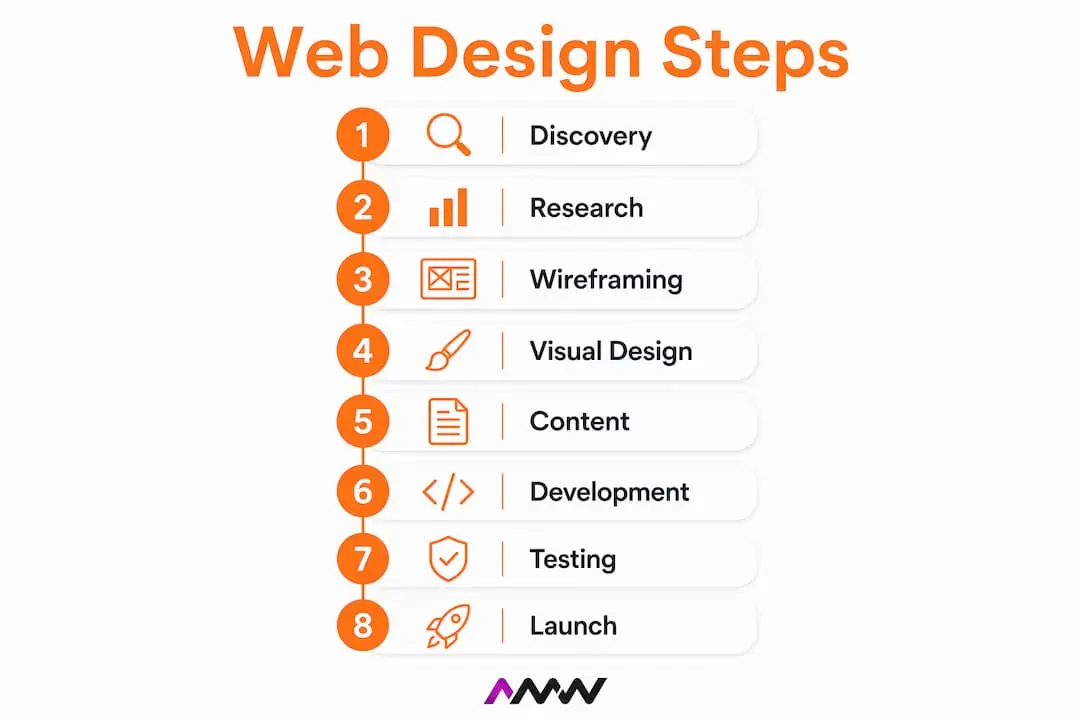
Here are the core phases every serious web design project should move through:
Discovery and goal definition. Establish what the site must achieve, who it serves, and what success looks like. This is not optional groundwork. It is the foundation that every subsequent decision references.
Research and user personas. Analyse competitors, audit existing content if relevant, and build user personas based on real data. Tools like Google Analytics and Ahrefs surface the search behaviour and audience characteristics that inform design choices.
Sitemap and information architecture. Map out the pages, their hierarchy, and how users will move between them. Tools like Octopus.do make this visual and easy to share with stakeholders before a single pixel is designed.
Wireframing. Create low-fidelity layouts for key pages to agree on structure and content placement before visual design begins. Whimsical is a popular choice for quick wireframes that clients can review without getting distracted by colour and typography.
Visual design and prototyping. Develop the full visual language: typography, colour palette, imagery, and component design. Figma and UXPin are the industry standards here, allowing designers to build interactive prototypes that feel close to the finished product.
Content creation and SEO. Content and SEO should be completed before development begins, not retrofitted afterwards. Writing copy, sourcing imagery, and planning keyword strategy at this stage prevents expensive rework once the build is underway. Pairing this with your SEO strategy from day one pays dividends at launch.
Development. Developers build the site from approved designs and content. Whether the platform is WordPress, Shopify, Framer, or a custom build, this phase translates design files into a functioning website.
Testing and quality assurance. Check every page across multiple browsers and screen sizes. Test forms, load speeds, accessibility, and broken links. Automated tools catch some issues, but manual review is non-negotiable.
Launch. Go live with a pre-agreed checklist covering DNS configuration, SSL certificates, sitemap submission to Google Search Console, and analytics activation.
Post-launch optimisation. Monitor performance, gather user feedback, and iterate. A website that launched well can still underperform if nobody reviews the data afterwards.
The sequence matters. Skipping or reordering these steps is where most projects run into trouble.
Which tools make the web design workflow more efficient?

The right tools do not replace good process, but they make it significantly faster and less prone to error. Here is a practical breakdown by phase:
Design and prototyping
- Figma is the dominant tool for collaborative visual design and interactive prototyping. Its component libraries and real-time collaboration make it the go-to for teams of any size.
- UXPin goes further with code-backed components, making prototypes behave like real products before a line of production code is written.
- Adobe XD remains a solid option for teams already embedded in the Adobe ecosystem.
Wireframing and sitemaps
- Octopus.do builds visual sitemaps that double as project planning documents, giving clients a clear picture of the site’s structure before design begins.
- Whimsical handles both wireframes and flowcharts in a single workspace, which is useful for mapping user journeys alongside page layouts.
SEO and analytics
- Google Analytics and Google Search Console are the baseline for tracking traffic, indexing status, and search performance.
- Ahrefs provides keyword research, backlink analysis, and competitor gap data that should inform content decisions before the design phase begins.
- WooRank offers quick technical SEO audits that flag issues before they become post-launch problems.
Project management and client collaboration
- Monday.com handles task assignment, timelines, and progress tracking across multi-phase projects.
- PandaDoc manages proposals, contracts, and sign-off documentation in one place, reducing the back-and-forth that delays project starts.
- Collaborative feedback tools like Pastel allow clients to comment directly on staging sites, which cuts approval cycles significantly compared to email chains.
Accessibility auditing
Accessibility deserves its own category. Automated scans cover only 30 to 40% of accessibility issues, which means relying solely on tools like Lighthouse or axe will leave real gaps. A thorough audit combines automated scanning with manual keyboard navigation testing and screen reader review. This is not just good practice. It is increasingly a legal requirement. For a deeper look at accessibility and SEO compliance, the overlap between inclusive design and search performance is worth understanding early.
Pro Tip: Document every design decision in a shared handoff file before development begins. Annotate components, explain spacing logic, and flag interactive states. Developers who receive clear documentation build faster and ask fewer questions.
How to avoid common mistakes in the web design process
Most web design projects do not fail because of bad design. They fail because of process errors that compound over time. Here are the pitfalls that appear most often, and how to sidestep them:
Rushing goal definition. When a project starts without agreed, specific goals, scope creep is almost guaranteed. Every stakeholder fills the vacuum with their own assumptions. A written project brief that outlines scope, timeline, and deliverables is the single most effective way to prevent this. It gives everyone a document to return to when disagreements arise.
Treating SEO and content as afterthoughts. This is one of the most expensive mistakes in web design. When copy is written after the site is built, it rarely fits the design. When SEO is considered after launch, the site often needs structural changes that cost far more than planning would have. Integrating content strategy into the design phase from the start avoids this entirely.
Over-relying on automated accessibility audits. As noted above, automated tools miss the majority of accessibility issues. Manual testing with assistive technologies is required to catch the gaps. Skipping this step creates both a poor user experience and potential legal exposure.
Inadequate cross-browser and cross-device testing. A site that looks perfect in Chrome on a MacBook can break on Safari on an iPhone. Testing must cover multiple browsers, operating systems, and screen sizes before any launch conversation begins.
Treating launch as the finish line. This is perhaps the most widespread misunderstanding in web design project management. Launch is a transition point, not a conclusion. The real work of optimising for user behaviour, fixing edge cases, and improving conversion rates starts the day the site goes live.
Skipping stakeholder alignment early on. Bringing in decision-makers only at the design review stage almost always results in late-stage changes that unravel earlier work. Early alignment via a detailed brief and a shared sitemap review saves weeks of rework.
Pro Tip: Run a brief kickoff workshop with all key stakeholders before the project starts. Even a 90-minute session to agree on goals, audience, and success metrics will prevent more rework than any other single activity.
What does a strong website launch and post-launch process look like?
Launch day is not just flipping a switch. A solid launch process distinguishes technical go-live from full project delivery, and the gap between the two is where many projects stumble. Our web design Milton Keynes page covers the photography and video shoot day we plan into every build, so nobody ends up hunting for stock images the week before launch.
Here is what a well-run launch sequence looks like:
Pre-launch technical checks. Verify DNS configuration, SSL certificate installation, canonical URLs, redirect mapping, and page speed across devices. A 55-step launch checklist covering strategy, design, technical SEO, accessibility, QA, analytics, legal, and post-launch monitoring gives you a reliable framework to work from.
Client walkthrough and sign-off. Before going live, walk the client through the staging site systematically. Cover every page, every form, and every interactive element. Obtain written sign-off. This protects both parties and confirms shared expectations.
Analytics and tracking activation. Analytics must run on the live domain from day one to capture baseline data. Setting up Google Analytics and conversion tracking on a staging environment and forgetting to migrate it to the live domain is a surprisingly common error. You lose irreplaceable day-one data that would otherwise inform your first optimisation cycle.
Sitemap submission and indexing. Submit the XML sitemap to Google Search Console immediately after launch. Request indexing for priority pages. This accelerates the time it takes for the site to appear in search results.
Post-launch monitoring. Set up error monitoring, uptime alerts, and a schedule for reviewing analytics data. The first 30 days after launch typically surface the most useful user behaviour insights, from unexpected drop-off points to pages with higher-than-expected engagement.
Planned optimisation cycles. Treat post-launch as an iterative process. Use real user data from tools like Google Analytics and heatmap software to prioritise changes. A phased rollout, where you launch a core site and add features incrementally, often produces better results than a single large launch because it reduces risk and generates data earlier.
Pro Tip: Activate live domain tracking before the DNS switch completes. Set up your analytics property and conversion goals on the live URL in advance so tracking is ready the moment traffic arrives.
For projects where digital strategy and web design need to work in tandem, aligning your launch timeline with broader marketing activity, such as a paid campaign or email announcement, amplifies the impact of going live.
Key takeaways
A successful web design process depends on defining clear goals first, integrating SEO and content before development, and treating launch as the start of an optimisation cycle rather than the end of the project.
| Point | Details |
|---|---|
| Goals drive everything | Define specific, measurable objectives before any design or development work begins. |
| Content and SEO come before build | Plan and write copy before development to avoid costly structural rework after launch. |
| Accessibility requires manual testing | Automated audits catch only 30 to 40% of issues; manual and assistive technology testing is required. |
| Launch is a transition, not a finish | Post-launch monitoring and iterative optimisation are where real performance gains are made. |
| Documentation prevents rework | A written project brief and clear design handoff files reduce misalignment and save time across every phase. |
What I have learned from running web design projects
After working on web design projects across industries, the pattern that separates successful launches from frustrating ones is almost always the same. The teams that struggle are the ones who treat the process as a creative sprint rather than a managed workflow.
The most counterintuitive lesson I have picked up is that the more time you invest in the discovery and goal-setting phase, the faster the rest of the project moves. It sounds backwards. Clients often push to get to design quickly because that is the visible, exciting part. But every hour spent agreeing on goals, audience, and success metrics at the start saves three hours of revision later. That is not an estimate. It is a pattern I have seen repeat itself consistently.
The other thing I would push back on is the idea that SEO is something you bolt on at the end. I have seen sites rebuilt from scratch six months after launch because the original information architecture made no sense for search. Integrating keyword strategy and content planning into the sitemap phase is not extra work. It is the work, done at the right time.
On accessibility, the industry is still catching up. Most teams run Lighthouse, see a decent score, and move on. But combining automated and manual testing is the only way to serve all users. Screen reader testing on key user journeys takes a few hours and catches issues that automated tools will never surface.
Finally, I would encourage anyone managing a web project to reframe what launch means. The site going live is the moment you start learning, not the moment you stop working. The data from the first 30 days after launch is more valuable than any assumption made during the design phase. Build a plan for what you will do with that data before you go live, not after.
Amir
How AMW Media can support your web design project
AMW Media builds websites that are designed to perform, not just look good. The team handles every phase of the process, from discovery and wireframing through to development, SEO integration, and post-launch optimisation, with clear project management and documentation at every stage. Whether you need a custom web design built on WordPress, Shopify, or Framer, or a full digital presence that combines web design with SEO services, AMW Media brings the strategic and technical expertise to deliver results. Get in touch to discuss your project and find out how a structured, well-managed web design process can make a measurable difference to your online presence.
FAQ
What are the main steps in the web design process?
The web design process typically covers 7 to 10 phases: discovery, research, sitemap and wireframing, visual design, content and SEO, development, testing, launch, and post-launch optimisation. Each phase builds on the previous one, so skipping steps creates compounding problems later.
How long does a web design project usually take?
Timelines vary significantly based on scope, but a well-managed project for a small to medium business website typically runs between 8 and 16 weeks from discovery to launch. Delays most often occur when goal definition or content creation is left too late in the process.
Why should SEO be planned before development starts?
Content and SEO planned before development prevents expensive structural rework after launch. Information architecture, URL structure, and page hierarchy all affect search performance, and changing these after a site is built is significantly more costly than getting them right at the planning stage.
What tools are used in a professional web design workflow?
Professional web design workflows typically use Figma or UXPin for design and prototyping, Octopus.do for sitemaps, Google Analytics and Ahrefs for SEO research, Monday.com for project management, and Pastel for client feedback on staging sites.
How do you measure website success after launch?
Tracking website KPIs and performance requires analytics running on the live domain from day one. Key metrics include organic traffic, conversion rate, bounce rate, Core Web Vitals scores, and goal completions set up in Google Analytics before launch.
Recommended
- how to design a website a practical guide for 2026 | AMW Media
- Web Development and Design That Elevates Your Brand | AMW Media
- Creative campaign process: Step-by-step guide for growth | AMW Media
- Custom Web Design & Development London | AMW Media | AMW Media
Our free marketing audit looks at your site, your ads and your content, and comes back with a 30 day plan. No pitch deck.

Owns how everything looks and feels, from a brand identity to the grade on a reel, and makes the animated films such as Blue Light Services' Journey to Net Zero. Meet the team.