
 Black Steel Doors
 Woodstock Campers
 Phillips Joinery
Publish SPF and DKIM records now, then switch DMARC on in monitoring mode with p=none and a rua address to collect reports. That combination is the baseline every domain needs before it can trust its own outbound mail. Enforcement, moving to quarantine or reject, comes later, once the reports show every legitimate sender is accounted for. Everything below explains how each piece works, how to check it, and how to get from “records published” to “spoofing blocked” without breaking your own mail in the process.
TL;DR:
- Publishing SPF in DNS should start with a soft fail (
~all) before switching to a hard fail (-all) once all legitimate senders are confirmed.- DKIM records must be published at a selector subdomain and enabled in your email platform; signing must be active for DKIM to work correctly.
- DMARC policies should begin at
p=nonewith a reporting address to collect data and only tighten toquarantineorrejectafter verifying all sources align properly.- Over 10 DNS lookups in SPF will cause permanent errors, so flatten or consolidate your SPF record to avoid exceeding the limit.
- Forwarding issues and vendor misalignments are common pitfalls; using DKIM with aligned signing and ARC can help mitigate these problems.
Table of Contents
- What SPF, DKIM and DMARC actually authenticate
- How SPF, DKIM and DMARC work together
- Where do SPF, DKIM and DMARC records live in DNS?
- How do I check my SPF, DKIM and DMARC setup?
- The mistakes that quietly break DMARC progress
- A realistic rollout timeline from monitoring to enforcement
- What audits actually turn up (and how we check)
- Get your DNS records right without doing it all yourself
- Sources
- FAQ
What SPF, DKIM and DMARC actually authenticate
Each protocol checks a different part of the email, which is exactly why you need all three rather than picking a favourite.
SPF (Sender Policy Framework) checks the invisible envelope address, the MAIL FROM, against a list of IP addresses the domain owner has authorised to send. It lives as a single TXT record at the domain apex.
DKIM (DomainKeys Identified Mail) signs the actual message, headers and body, with a private key. The matching public key sits in DNS at a selector address, something like selector1._domainkey.yourdomain.com. If the signature verifies, the content wasn’t tampered with in transit.
DMARC (Domain-based Message Authentication, Reporting and Conformance) doesn’t check anything new itself. It checks whether SPF or DKIM results line up (“align”) with the domain shown in the visible From header, then tells receiving servers what to do if they don’t, and where to send a report about it.
The distinction matters because attackers can pass SPF using a completely different domain in the From header. Without DMARC tying that back to the visible sender, Microsoft’s own authentication guidance notes that SPF and DKIM alone leave a gap that spoofers exploit constantly.
- SPF authenticates the envelope sender (MAIL FROM), stored as an apex TXT record.
- DKIM authenticates message content via a cryptographic signature, keyed to a DNS selector.
- DMARC checks alignment between SPF/DKIM and the visible From address, then publishes a policy and reporting instructions.
How SPF, DKIM and DMARC work together
The three protocols run in sequence, and understanding that sequence explains why a message can fail DMARC even when SPF technically passes.
SPF evaluation starts the moment a receiving server sees the connecting IP. It looks up your domain’s TXT record, walks through any include mechanisms, and checks whether that IP is on the list. Here’s the constraint most people miss: the whole chain, including nested includes from your CRM, your helpdesk, and your marketing platform, is capped at 10 DNS lookups. Go over that limit and SPF doesn’t just fail quietly. It returns a permerror, which many receivers treat as an outright fail.
DKIM works differently and, frankly, more robustly. The sending server signs specific headers and the body using a private key, and the signature travels with the message. That’s why DKIM often survives forwarding when SPF doesn’t: forwarding changes the connecting IP (breaking SPF), but the DKIM signature stays intact as long as the message body isn’t altered along the way, per Linuxize’s breakdown of the mechanics.
DMARC then asks one question: does the domain that passed SPF, or the domain in the DKIM signature, match the visible From domain? This is “alignment,” and it comes in two flavours. Relaxed alignment (the default) accepts a matching organisational domain, so mail.yourdomain.com aligns fine with yourdomain.com. Strict alignment demands an exact match. A message passes DMARC if either SPF or DKIM is aligned, not both, which is why DKIM’s forwarding resilience matters so much in real-world mail flows.
Worth knowing: a message can fail SPF entirely after forwarding and still pass DMARC cleanly, purely on an aligned DKIM signature. This is the single biggest reason DKIM deserves equal priority to SPF, not second billing.
- SPF: capped at 10 lookups; exceeding it produces a permerror.
- DKIM: signature survives most forwarding; breaks if the body is modified.
- DMARC: passes on aligned SPF or aligned DKIM, governed by
adkim/aspftags.
One more thing worth a passing mention: ARC (Authenticated Received Chain) lets trusted intermediaries, mailing lists, forwarding services, add a cryptographic record showing the message was authenticated before they touched it. It’s a niche fix, but it matters if your organisation runs a mailing list or relies on one, since DMARC’s own documentation flags forwarding as one of the most common causes of legitimate mail failing alignment.
Where do SPF, DKIM and DMARC records live in DNS?
All three live as TXT records, but at different locations, and the exact syntax trips up more admins than anything else in this guide.
SPF goes on the domain apex:
yourdomain.com. TXT "v=spf1 include:_spf.google.com ~all"
The ~all at the end means “soft fail”, mark unauthorised senders as suspicious but don’t outright reject. -all is a hard fail and tells receivers to reject anything not on the list. Most domains should aim for -all eventually; start with ~all if you’re still mapping out every legitimate sender.
DKIM goes on a selector subdomain:
selector1._domainkey.yourdomain.com. TXT "v=DKIM1; k=rsa; p=MIGfMA0GCS..."
Publishing this record does nothing on its own. You must also flip the “enable DKIM signing” switch inside whatever platform sends your mail, Google Workspace, Microsoft 365, your ESP. Skipping that step is, by a wide margin, the most common DKIM mistake Microsoft’s own guidance calls out.
DMARC goes at a fixed subdomain:
_dmarc.yourdomain.com. TXT "v=DMARC1; p=none; rua=mailto:reports@yourdomain.com; adkim=r; aspf=r"
- Start
p=noneto monitor without affecting delivery. - Set
adkim=r; aspf=r(relaxed) as sensible defaults for most setups. - Rotate DKIM keys periodically and keep TTLs modest (an hour or two) while you’re actively tuning records, so changes propagate fast.
- Double check you have exactly one SPF record per domain; two TXT records starting with
v=spf1will break evaluation outright.
How do I check my SPF, DKIM and DMARC setup?
Verification splits into two jobs: reading what receivers actually saw, and checking what you’ve published.
- Pull the full headers of a message you’ve received (in Gmail: “Show original”; in Outlook: “View message source”). Look for the
Authentication-Resultsline, which shows entries likespf=pass,dkim=pass (header.d=yourdomain.com), anddmarc=pass, exactly as Cloudflare’s guide to these headers explains. - Query DNS directly with dig. Run
dig txt yourdomain.comfor SPF,dig txt selector1._domainkey.yourdomain.comfor the DKIM public key, anddig txt _dmarc.yourdomain.comfor the DMARC policy. - Send a test message to a mailbox you control at a different provider (Gmail and Outlook are the two worth checking) and repeat step one.
- Run an online validator as a sanity check against manual dig output, useful for catching typos in long SPF strings.
- Review your DMARC aggregate reports once they start arriving, usually within 24 to 48 hours, to confirm every real sending source shows up with a pass.
Pro Tip: If dig returns nothing for your selector record, don’t assume DNS is broken; check first whether DKIM signing is actually switched on in your mail platform. A missing signature and a missing DNS record look identical from the outside.
If headers show a fail you can’t explain, or dig returns a different value than what you published, that’s the moment to loop in your ESP support team or DNS host rather than guessing.
The mistakes that quietly break DMARC progress
Most domains that stall at p=none for months are stuck on one of four recurring problems.
The 10-lookup SPF limit bites growing organisations hardest, since every new tool (CRM, helpdesk, marketing platform) often adds its own include. Fix it by flattening your SPF record into a static list of IPs (with a process to re-flatten periodically), or by consolidating sends through fewer authorised paths.
Vendor DKIM misalignment happens when a third-party platform signs mail with its own domain rather than yours, so DKIM technically passes but doesn’t align with your From address. Most reputable platforms offer a custom DKIM signing option, use it, or configure a custom return path so SPF can carry the alignment instead.
Forwarding and mailing lists frequently break SPF (the forwarding server’s IP isn’t on your list) and sometimes DKIM too, if the list software rewrites the subject or footer. This is precisely the gap ARC exists to patch for cooperating intermediaries; for everything else, aligned DKIM from the original send is your best defence.
- 10-lookup overruns: flatten SPF or delegate to fewer send paths.
- Vendor signing mismatches: enable custom DKIM or a custom return-path.
- Forwarding failures: lean on DKIM alignment; consider ARC for known intermediaries.
- Multiple SPF records: merge into one; two records cause an automatic fail.
A realistic rollout timeline from monitoring to enforcement
Publishing the DNS records takes minutes. Getting to a safe p=reject takes considerably longer, and rushing that step is how organisations accidentally block their own newsletter.
- Publish SPF and DKIM first, and confirm signing is active before touching DMARC at all.
- Set DMARC to
p=nonewith aruaaddress. This is pure monitoring, nothing gets blocked, but every sending source starts showing up in aggregate reports. - Collect and triage reports for several weeks. Build a list of every IP and domain sending on your behalf, including the ones marketing forgot about.
- Remediate each sender individually, custom DKIM, corrected SPF includes, or removal if it’s a source you no longer use.
- Step up to
p=quarantine, thenp=reject, once reports show consistently clean alignment across every legitimate sender.
For a small organisation with a handful of sending platforms, that whole sequence typically takes 60 to 90 days from first publishing records to reaching enforcement. Larger enterprises with dozens of business units and legacy systems should expect a multi-month programme, not a sprint. Aggregate reports arrive as XML, and at any real volume they’re unreadable by eye, so a dedicated parser or managed monitoring service, rather than manually opening files, is worth the investment early rather than after your inbox fills up with unread attachments.
What audits actually turn up (and how we check)
Every deliverability audit runs into the same handful of issues: domains with DKIM records published but signing never switched on, subdomains nobody remembered still sending mail with no authentication at all, and selector records left over from platforms the business stopped using years ago. Third-party senders are the recurring blind spot. Marketing tools, CRMs, invoicing platforms, they all send as “you,” and most never get counted until a DMARC report forces the issue.
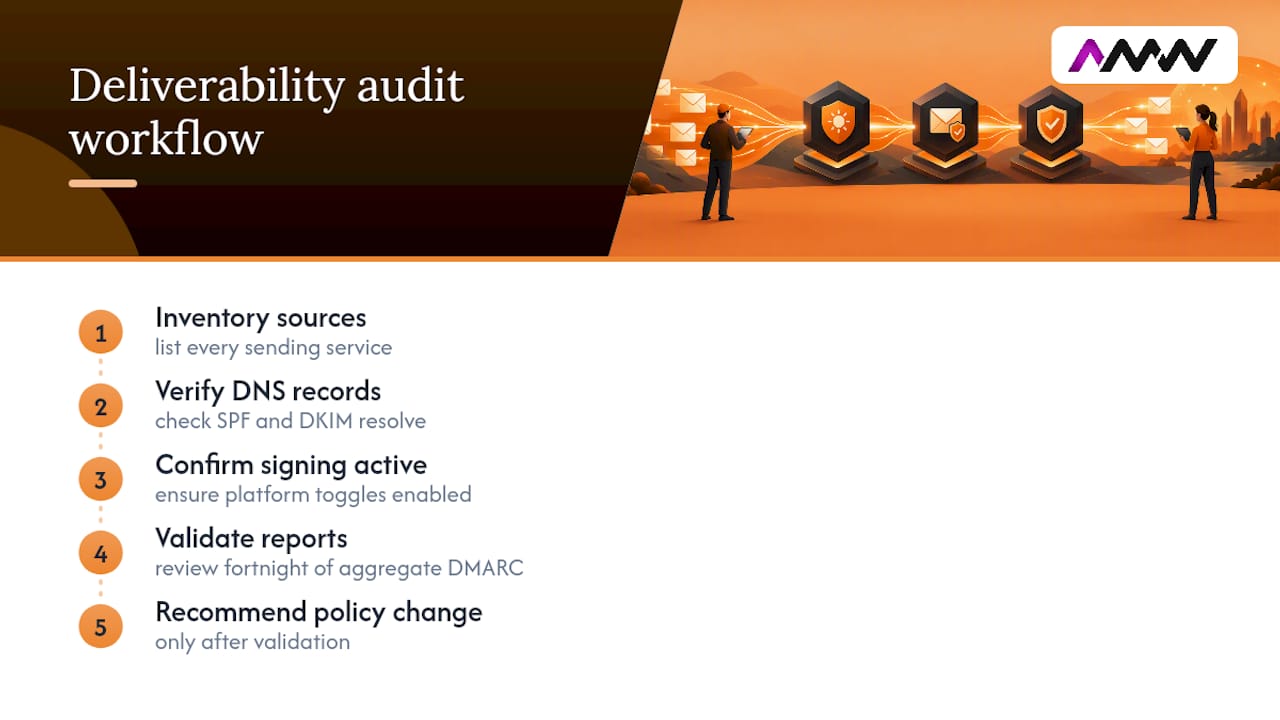
Our checklist runs the same way every time: inventory every sending source, verify SPF and DKIM records resolve correctly via DNS, confirm signing toggles are actually active in each platform, then validate a fortnight of aggregate reports before recommending any policy change. It’s unglamorous work, but it’s the difference between a policy that protects your domain and one that quietly blocks your own invoices.
— Amir
Get your DNS records right without doing it all yourself
Getting SPF, DKIM and DMARC properly aligned is one of those jobs that looks simple on paper and turns into a fortnight of DNS archaeology in practice, chasing down every forgotten sender, every vendor’s signing quirk, every stale subdomain. AMW Media runs deliverability audits that do the sender inventory, DNS record checks and DKIM signing verification for you, then monitors your DMARC aggregate reports until it’s genuinely safe to move to enforcement.

A typical engagement starts with a full audit of your current email deliverability setup, moves through DNS and DKIM remediation, and ends with ongoing DMARC monitoring so spoofing attempts get blocked without your own legitimate mail getting caught in the crossfire. If your marketing platform relies on solid inbox placement, our email marketing services fold authentication work in as standard rather than as an afterthought. Take a look at our services page and get in touch to talk through where your domain currently stands.
Sources
- Email authentication and DMARC guidance — Microsoft Defender for Office 365
- Email authentication: SPF, DKIM and DMARC
- DMARC: The Complete Guide to the DMARC Record
- SPF DKIM DMARC setup guide: the 2026 operator walkthrough
FAQ
What is SPF, DKIM and DMARC in plain terms?
SPF checks whether a sending server is authorised to use your domain, DKIM checks whether the message content was tampered with, and DMARC checks whether those results line up with the visible sender address and tells receivers what to do if they don’t. Together they form the baseline for email authentication that major providers now expect from any legitimate sender.
How do I authenticate email using SPF, DKIM and DMARC?
Publish an SPF TXT record at your domain apex listing authorised senders, publish a DKIM selector record and switch on signing in your mail platform, then add a DMARC TXT record at _dmarc.yourdomain.com starting with p=none and a rua reporting address. Move to stricter DMARC policies only once reports confirm every legitimate sender passes.
How do I check SPF, DKIM and DMARC records?
Query DNS directly with a tool like dig against your domain, selector, and _dmarc subdomain, or read the Authentication-Results header on a delivered message to see live spf=, dkim=, and dmarc= outcomes. Reviewing a few days of DMARC aggregate reports gives the clearest overall picture.
How do I set up SPF, DKIM and DMARC without breaking my mail?
Set DMARC to p=none first so nothing gets blocked while you collect data, then use the reports to spot any sender failing SPF or DKIM alignment before tightening the policy. This staged approach, moving to quarantine and then reject only once reports are clean, is what operator rollout guidance consistently recommends over jumping straight to enforcement.
What does AMW Media do for SPF, DKIM and DMARC setup?
AMW Media audits existing DNS records, checks that DKIM signing is genuinely active across your sending platforms, and monitors DMARC aggregate reports through to enforcement. Current pricing for this and related email marketing services is available on the site.
Recommended
- Email deliverability issues: diagnose and fix them fast
- Hiring an agency for email marketing: a UK SME guide
Our free marketing audit looks at your site, your ads and your content, and comes back with a 30 day plan. No pitch deck.

Founded AMW Media in 2024 and runs strategy, paid media and the CRM builds. The reason everything here is in house and measured in revenue. Meet the team.