
 Black Steel Doors
 Woodstock Campers
 Phillips Joinery
Automated lead routing is the set of rules and technology that decides which lead goes to which rep, automatically, based on data like territory, company size, or behaviour, rather than someone manually eyeballing a spreadsheet. Get it working properly and a lead lands with the right person in seconds. Get it wrong and leads sit in a queue, go to the wrong rep, or vanish entirely.
The single decision that matters most right now: set an explicit service level agreement (SLA) for time-to-first-action, and build a catch-all fallback so no lead is ever left unowned. Everything else, round robin, scoring, territory rules, is secondary to those two things.
Two facts worth knowing before you touch your routing rules:
- Faster response windows, measured in minutes rather than hours, produce clear, measurable lifts in lead qualification and conversion.
- When routing breaks, it’s rarely the software’s fault. The root causes are almost always data inconsistencies at capture, overly complex rule stacks, or a missing fallback..
That second point is the one most teams get backwards. They buy a more sophisticated router when the actual problem is a form that lets someone type “N/A” into the company size field.
Key Takeaways
Automated lead routing succeeds when speed-to-lead is measured from submission to first human action, and every rule set has a catch-all fallback.
| Point | Details |
|---|---|
| Define SLA correctly | Measure from form submission to first human action, not from assignment timestamp. |
| Build a catch-all queue | Every lead needs a fallback destination if no rule matches, with timed escalation. |
| Fix data at capture | Use picklists and validation on forms; most routing failures start with messy input data. |
| Keep logic auditable | Apply the 80/20 rule: simple core rules for most leads, separate flows for edge cases. |
| AMW Media builds the full stack | AMW Media pairs data hygiene, CRM integration, and measurement dashboards for routing projects that hold up at volume. |
How does automated lead routing actually work?
Picture the journey a lead takes as a relay race, not a single handoff. A lead fills in a form, or a chatbot captures their details, or an inbound call gets logged. That’s capture. From there, the data typically passes through four more stages before a human ever sees it.
- Enrichment. Firmographic and technographic tools fill in the gaps, company size, industry, revenue band, so the router isn’t working from a bare name and email.
- Scoring. The lead gets a score or tier based on fit (does it match your ideal customer profile?) and intent (did they visit the pricing page three times this week?).
- Routing decision. A router, sitting either inside your CRM or as a separate orchestration layer, applies rules against that enriched, scored record.
- Assignment and notification. The lead lands in a rep’s queue, often with a calendar link attached so a meeting can be booked without another email exchange.
Where this decision actually happens varies a lot between organisations, and it’s worth knowing the three broad categories:
- CRM-native engines work directly inside your CRM’s own logic (think Salesforce flows or HubSpot’s workflow tool), cheapest to run, but they tend to get unwieldy once you’re managing more than a handful of rules.
- Orchestration layers sit between your marketing stack and your CRM, handling enrichment, scoring, and calendar booking in one place. These generally scale better for complex go-to-market motions.
- Account-graph routers map leads against existing account relationships, so a new contact at an existing customer gets routed to the rep who already owns that account rather than into general pool.
The recommended pattern and one that shows up consistently across implementation guides, is to keep capture in your marketing system, run enrichment and scoring as a distinct step, then route via an orchestration or CRM layer. Bolting scoring logic directly into your router usually creates a mess that’s painful to audit later.
Here’s the failure point most teams don’t see coming: the inputs. Most routing systems still make decisions based on static form fields, which can be a fairly blunt instrument. Adding a conversational qualification layer in front of the router tends to produce richer, more accurate inputs than a static form ever will, because it can ask a follow-up question a form simply can’t.
Which routing strategy fits your sales team?
There’s no single “best” routing strategy. There’s a best strategy for your team’s shape, size, and sales motion right now, and it might look completely different in a year.
Round robin is the simplest option: leads get distributed to reps in strict rotation, one after another. It works well for smaller teams where every rep sells the same thing to the same type of customer, and fairness matters more than specialisation. The catch is that round robin has no concept of rep capacity or lead quality, so a rep who’s slammed with existing deals gets the same volume as one twiddling their thumbs.
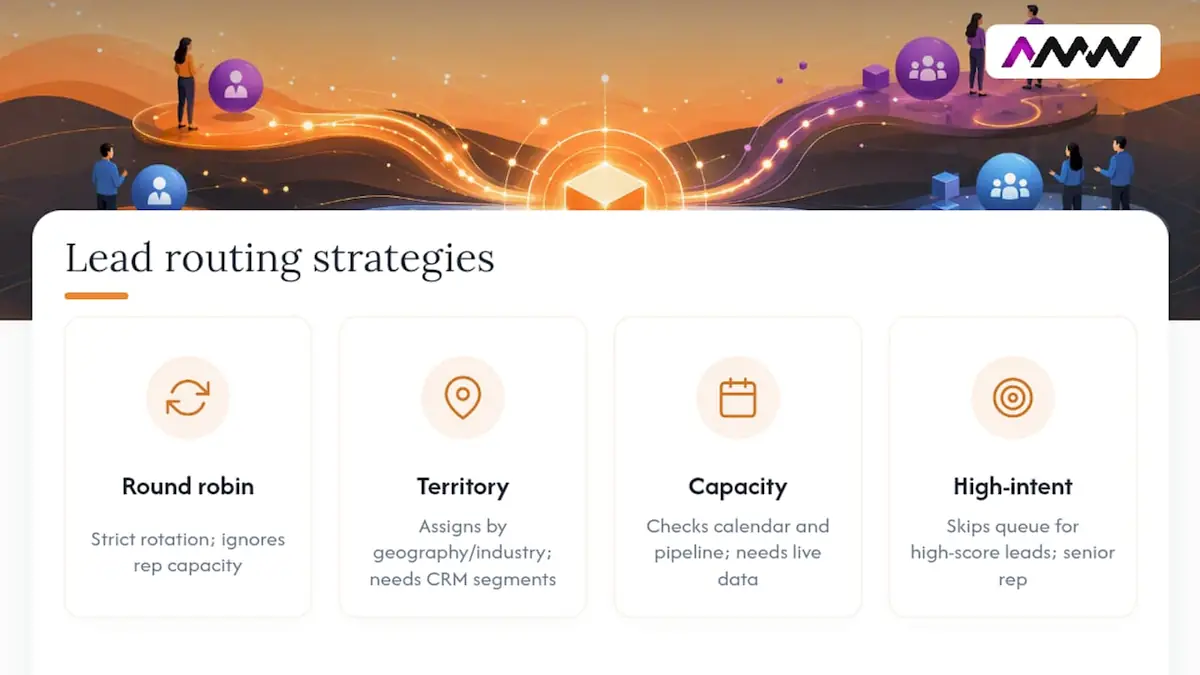
Territory or segment routing assigns leads based on geography, industry vertical, or company size. This only works if your segments are defined properly upstream, in your CRM’s account and lead fields, not invented on the fly inside a routing rule. If your ideal customer profile isn’t documented anywhere, your territory rules will drift the moment someone new joins the team and starts guessing.
Availability and capacity routing checks a rep’s calendar and current pipeline load before assigning a new lead. This solves round robin’s blind spot, but it needs live data. If your calendar integration is patchy, this strategy will quietly starve your busiest reps of new business while your least busy rep gets everything.
Priority or high-intent routing skips the queue entirely for leads that cross a scoring threshold, say, anyone who requests a demo AND matches your top revenue tier. These go straight to a senior rep or a dedicated closer, bypassing whatever else is happening in the router.
Most mature teams end up running a hybrid: round robin as the default, territory rules layered on top, and a high-intent override that jumps the queue for the leads worth jumping for.
Pro Tip: Apply an 80/20 approach to your rule complexity. Build simple rules that correctly handle 80% of your leads, then route the remaining 20%, the odd exceptions, multi-product enquiries, edge-case territories, into a separate, clearly labelled flow rather than bolting endless “if this, but not that” conditions onto your main logic.
How do you implement automated lead routing?
Building this properly isn’t complicated, but it does need to happen in the right order. Skip a step and you’ll be firefighting within a month.
- Set the objective and the SLA first. Decide what “fast” means for your team, five minutes for inbound demo requests, four hours for a downloaded whitepaper, and measure it from form submission to first human action, not from assignment.
- Standardise your capture forms. Replace free-text fields with picklists wherever you can. A dropdown for “company size” beats a text box every time, because a text box invites “big-ish” as an answer.
- Run enrichment and scoring before final assignment. Where it’s practical, don’t route a raw, unscored lead. Give it a fighting chance to land with the right person the first time.
- Build routing logic that’s simple enough to audit on a single page. If you can’t explain your rule set to a new hire in five minutes, it’s too complicated.
- Add a catch-all queue and a timed escalation rule. Any lead unassigned after, say, 15 minutes should automatically escalate to a manager or a backup pool. No lead should ever sit with zero owner.
- Test with sample data before going live. Run fake leads through every branch of your logic, including the edge cases, and check where they land.
- Build visibility into who got assigned what, and why. A simple audit log saves hours of “why did this go to Dave?” conversations later.
A few things worth checking as you go:
- Does every form field that feeds a routing rule have validation on it?
- Is there a named owner for the routing logic itself, not just the tool it runs on?
- Does your fallback queue actually get checked daily, or does it become a graveyard?
If you’re still capturing leads through inconsistent channels, it’s worth revisiting your lead generation methods before you touch the routing layer at all. Clean input beats clever rules every time.
What KPIs show whether lead routing is working?
The metric everyone tracks, time-to-assignment, is actually one of the least useful numbers in your dashboard. A lead can be “assigned” in eight seconds and then sit untouched for six hours if the rep doesn’t see the notification. What you actually need to measure is the gap between form submission and first human action, a call, an email reply, a booked meeting.
Four numbers worth putting on a weekly dashboard:
- Median time to first action. Not the average, which one slow outlier will skew badly. The median tells you what a typical lead actually experiences.
- SLA breach rate. What percentage of leads missed your defined response window entirely?
- Reassignment rate. How often does a lead get bounced from one rep to another before anyone actually engages with it? A high number here usually points to bad routing rules, not bad reps.
- Conversion rate by route. Leads that went through your high-intent path should convert at a meaningfully different rate than round robin leads. If they don’t, your scoring thresholds are wrong.
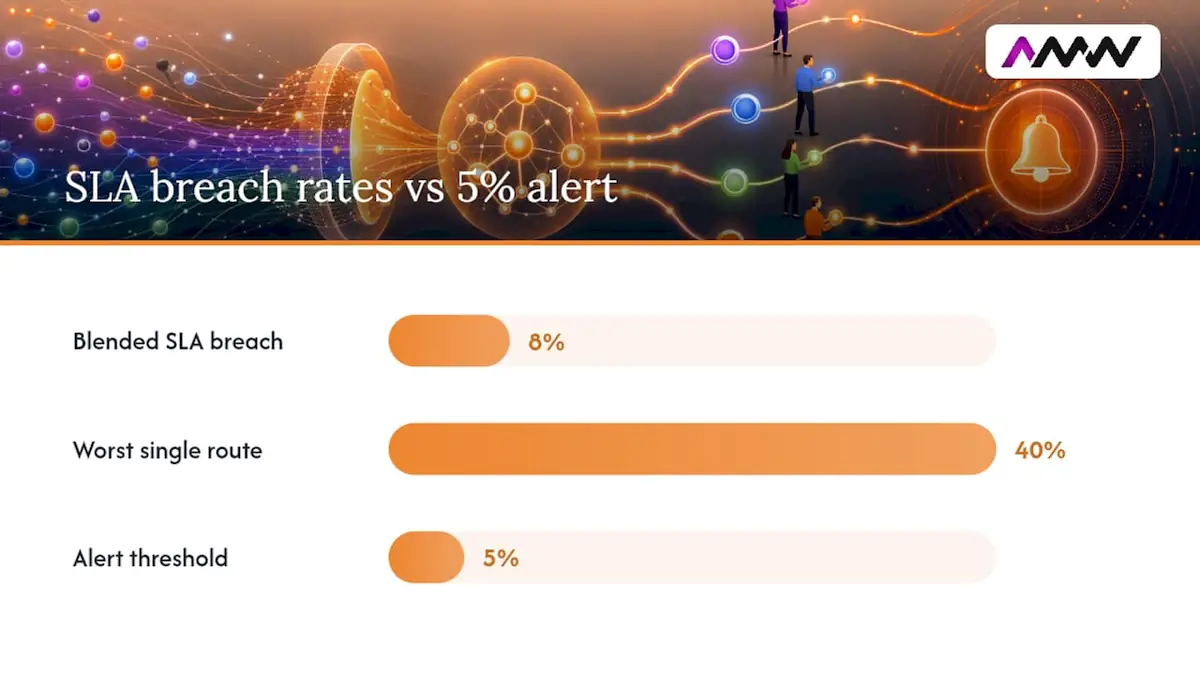
Segment these by lead type and routing path, not just in aggregate. A blended SLA breach rate of 8% might be hiding a route that’s breaching 40% of the time while everything else performs fine.
A simple alerting rule that works well: trigger a weekly report any time SLA breaches exceed 5% on any single route. That threshold catches problems while they’re still small, rather than three months into a slow leak nobody noticed.
Why does automated lead routing break down, and how do you fix it?
Most routing failures trace back to one of three causes, and none of them require a new tool to fix.
Data inconsistency at capture is the most common culprit. A misspelt country name or an inconsistent industry label sends a lead down the wrong branch of your logic before it’s even scored. Fix this at the form, with picklists and validation, not downstream in the router.
Overly complex rule stacks are the second big one. Routing logic tends to accumulate exceptions over time, one more “if” statement for one more edge case, until nobody fully understands what the rules actually do anymore. The 80/20 fix still applies here: strip your core logic back to what handles the bulk of leads cleanly, and move genuine exceptions into a clearly separate flow.
Missing fallback and escalation is the one that costs the most money silently. If a rep is on leave, or a rule has a gap nobody spotted, a lead with no matching condition needs somewhere to go. Without a catch-all, it just disappears.
Pro Tip: Run a simple weekly query for leads with no owner assigned, and a separate one for leads reassigned more than twice. Both are early warning signs of a routing rule that’s quietly broken.
How does AMW Media approach a lead routing project?
Routing projects tend to fail for the same reason a lot of automation projects fail: someone builds the rules without first fixing the mess underneath them. AMW Media’s approach starts with discovery and data hygiene before a single routing rule gets written, because a beautifully designed rule set running on inconsistent data still produces bad outcomes.
The typical shape of a project looks like this:
- Discovery. Map the existing lead flow, every form, every handoff, every manual step someone’s doing because “the system doesn’t do it properly.”
- Data hygiene. Standardise fields, tighten form validation, and sort out enrichment before touching the routing logic itself.
- Rule design. Build routing logic that a non-technical stakeholder can actually read and understand, with fallback and escalation built in from day one.
- Implementation and integration. Connect the router properly to the CRM and marketing automation stack, so nothing relies on manual exports or copy-pasting between systems.
- Measurement. Set up the dashboard before launch, not as an afterthought once someone asks “is this actually working?”
Treat lead routing as a product, not a one-off configuration project. It needs an owner, a visible audit trail, and rules that evolve deliberately rather than accumulating by accident.
That’s not a controversial idea, but it’s one most teams skip because routing feels like a “set it and forget it” job. It isn’t. AMW Media’s team holds Google, Meta, Shopify, WordPress, and Framer partnerships and works across automation, CRM integration, and analytics, which is exactly the combination a routing project needs, because the router is never really the hard part. The data feeding it is.
What actually shifts the numbers in lead routing
Most of the advice out there treats routing as a technology problem: pick the right tool, configure the right rules, done. That’s backwards. The research consistently points the same direction, most routing failures aren’t router failures at all, they’re upstream data problems and missing fallbacks dressed up as software bugs.
The overrated part of this whole conversation is scoring sophistication. Teams spend weeks tuning a scoring model to the third decimal place while their fallback queue sits unchecked for a fortnight. A mediocre scoring model with a bulletproof SLA and escalation path will outperform a brilliant scoring model with no safety net, every single time.
If you’re starting from scratch, prioritise in this order: fix your capture forms, define your SLA, build the catch-all, then worry about round robin versus territory versus priority routing. The router itself is the easy bit. Getting clean, honest data into it, and making sure nothing ever falls through the gaps, is where the real work lives.
Amir
Get your lead routing built properly, not just switched on
If you’ve read this far, you’ve probably already spotted a gap somewhere in your own setup, a form with no validation, a fallback queue nobody checks, a scoring model nobody’s touched since it was built. AMW Media builds custom automation and CRM integration work for SMEs who want routing that actually holds up under real lead volume, not a rushed workflow bolted together in an afternoon. Our Milton Keynes marketing page starts with a better question than comparing monthly fees: what would you leave out of the first proposal?
The gain for you is simple: fewer leads leaking through gaps, faster response times, and a routing setup you can actually explain to your team without pulling up a diagram. That work often starts with something as unglamorous as your capture forms, which is why web design work and automation build-outs go hand in hand on most of AMW Media’s routing projects. If your traffic and form volume need attention too, AMW Media’s SEO services and ongoing social media management support feed cleaner, more qualified leads into whatever routing system gets built. If nurture sequences are part of your follow-up once a lead’s been assigned, it’s worth pairing routing work with proper lead nurturing strategy so leads don’t go cold between the handoff and the first real conversation.
Get in touch through AMW Media’s contact page and tell the team what your current routing setup actually looks like. That first conversation usually surfaces the fix that matters most.
Sources
- Lead routing automation challenges, OrbitForms
- The ultimate lead routing guide and tech stack, Chili Piper
- AI lead routing software: how it works, where it breaks, and how to pick one in 2026, Perspective AI
- Lead routing rules: why most B2B teams leak revenue here, Ziellab
FAQ
What is automated routing?
Automated routing is the process of assigning incoming leads, tickets, or enquiries to the right person or team using predefined rules, rather than manual assignment. In sales, it typically factors in territory, company size, or behaviour to decide the best-fit rep.
What is a lead automation system?
A lead automation system covers the full pipeline from capture to assignment: form submission, enrichment, scoring, and routing, usually connected across a marketing platform, a CRM, and sometimes a dedicated router. AMW Media builds these systems by connecting existing marketing and CRM tools rather than replacing them outright.
What is an automation lead?
This usually refers to a lead that has moved through an automated qualification or routing process, as opposed to one handled entirely manually. It’s shorthand for a lead whose journey, from capture through to assignment, was governed by rules rather than a person deciding case by case.
How can AI help automate lead generation?
AI most commonly supports lead generation through conversational qualification tools that ask follow-up questions a static form can’t, producing richer data for scoring and routing. It also strengthens enrichment, filling in firmographic detail automatically so reps aren’t starting from a bare name and email address.
Recommended
- Lead generation methods: proven strategies for sales growth | AMW Media
- What is lead generation? A practical guide for 2026 | AMW Media
- Top automated marketing strategies to accelerate growth | AMW Media
- Automation strategy guide for business leaders in 2026 | AMW Media
Our free marketing audit looks at your site, your ads and your content, and comes back with a 30 day plan. No pitch deck.

Founded AMW Media in 2024 and runs strategy, paid media and the CRM builds. The reason everything here is in house and measured in revenue. Meet the team.