
 Black Steel Doors
 Woodstock Campers
 Phillips Joinery
If you run Google Ads or GA4 and any of your traffic comes from the EEA or UK, Consent Mode v2 isn’t optional anymore. Set the four required signals now, before anything else fires: ad_storage, analytics_storage, ad_user_data, and ad_personalization. Two more are worth adding on top, functionality_storage and personalization_storage, though Google doesn’t mandate those.
Consent Mode v2 has been required since 6 March 2024, and enforcement around personalisation restrictions tightened further in July 2025. Skip it and your remarketing lists shrink, your conversion tracking gets patchy, and Smart Bidding starts optimising against incomplete data. Not a great look when a client asks why campaign performance dipped for no obvious reason.
Here’s what to do this afternoon, not next sprint:
- Open your Google Tag Manager container and check whether a Consent Initialization trigger exists. If it doesn’t, you’re already behind.
- Set default consent states to “denied” for EEA/UK visitors until they actively accept.
- Add wait_for_update (roughly 500 milliseconds) so your consent management platform has time to push a stored choice before tags fire.
- Run Tag Assistant straight after and watch the sequence: default first, then update, never the other way round.
Get those four steps right and you’re covering the technical bulk of what most sites get wrong.
Key Takeaways
Consent Mode v2 requires four mandatory signals for EEA/UK traffic, and correct GTM sequencing, default before update, is the single biggest factor separating working implementations from broken ones.
| Point | Details |
|---|---|
| Four signals are mandatory | Set ad_storage, analytics_storage, ad_user_data, and ad_personalization for EEA/UK visitors. |
| Trigger choice matters most | Use Consent Initialization for defaults, never Page View, to avoid timing failures. |
| Advanced mode needs sign-off | Cookieless pings improve modelling but should get legal approval before going live. |
| Verification is non-negotiable | Check Tag Assistant, network gcs/gcd parameters, and GA4 diagnostics after every change. |
| Persistence prevents false denials | Store and reapply user consent choices so returning visitors don’t register incorrect “denied” hits. |
Authoritative links for specs and deeper reading
- Consent mode concepts, Google Tag Platform
- Consent mode overview, Google Ads Help
- Google Consent Mode v2 in GTM: step-by-step setup guide
What is consent mode v2 and what changed since v1
Consent Mode sits between your consent management platform (CMP) and your Google tags, acting as a translator. It doesn’t ask users for permission itself, that’s the CMP’s job, but it tells Google Tag, Google Tag Manager, and GA4 exactly which categories of data collection are granted or denied at any given moment. Our PPC agency Milton Keynes page opens with the check we run before touching any bid: what the account is actually counting as a lead.
Version 1 handled two signals: ad_storage and analytics_storage. That was fine for basic cookie consent, but it told Google nothing about whether a user had agreed to their data being used for ad personalisation versus just measurement. Google’s own technical documentation explains that v2 closes that gap by adding ad_user_data (can this data be sent to Google for advertising) and ad_personalization (can it be used to build remarketing audiences or personalised ads).
That distinction matters for two specific features:
- Enhanced conversions rely on ad_user_data being granted, since the feature hashes and sends customer data like email addresses to improve match rates.
- Remarketing audiences depend on ad_personalization. Deny it and that visitor simply won’t appear in any audience list, no matter how many pages they browsed.
The enforcement timeline isn’t subtle. Google has been explicit that advertisers without v2 signals in place will see conversion modelling gaps and audience shrinkage that get worse as browsers restrict third-party cookies further. If you’re still running v1, you’re not “a bit behind”, you’re actively losing measurable conversions right now.
Basic vs advanced: which implementation should you run?
Google gives you two ways to implement Consent Mode v2, and the choice affects both your data quality and your legal exposure.
Basic mode blocks Google tags entirely until a user makes a consent choice. Nothing fires, nothing pings, nothing gets sent to Google in any form until the CMP records an explicit “granted” state. It’s the safer legal posture but also the leakiest for measurement, because every visitor who doesn’t interact with your banner before leaving contributes zero data.
Advanced mode lets tags load immediately but sends cookieless pings when consent is denied. Google uses those pings, alongside your granted first-party data, to build advertiser-specific conversion models that estimate what you’d have measured had consent been granted.
| Factor | Basic mode | Advanced mode |
|---|---|---|
| Data sent pre-consent | None | Cookieless pings only |
| Measurement completeness | Lower | Higher, via modelling |
| Smart Bidding impact | More conversion gaps | Better optimisation signal |
| Legal conservatism | Higher | Requires legal sign-off |
| Best suited to | Small sites, low traffic | Sites running Google Ads at scale |
Smart Bidding needs volume to work properly. Advanced mode’s modelled conversions give the algorithm something to optimise against even when consent rates are patchy, which basic mode simply can’t offer.
Pro Tip: If you’re running Google Ads with meaningful budget and targeting EEA or UK users, get advanced mode signed off by whoever handles your data protection obligations before you switch it on. It’s the right call for most advertisers, but it’s a decision worth documenting, not defaulting into.
How do I set up consent mode v2 in Google Tag Manager?
GTM is the recommended route for most sites, mainly because it keeps your consent logic in one place instead of scattered across template files. Here’s the sequence that actually works.
- Turn on Consent Overview. In your GTM workspace, go to Admin and enable the Consent Overview feature. This opens up consent settings on individual tags and shows you, at a glance, which tags are checking consent and which aren’t.
- Build a default consent tag. Create a Google tag using the “Consent Settings” type, set every signal to “denied” as a starting point for EEA/UK visitors, and fire it on the built-in Consent Initialization trigger, not Page View. This distinction trips up more implementations than anything else.
- Add wait_for_update. Set this to around 500 milliseconds inside your default tag configuration. It buys your CMP a moment to check for a previously stored choice before GTM assumes a fresh “denied” state.
- Create the update tag. This fires from a Custom Event trigger tied to whatever dataLayer event your CMP pushes on user interaction (accept, reject, or partial consent). Use Data Layer Variables (DLVs) to map each of the four signals individually rather than hardcoding a blanket “granted” call.
- Enable ads_data_redaction and url_passthrough. The first strips identifiers like click IDs from requests when ad_storage is denied. The second preserves gclid parameters across page navigation in a multi-step checkout, so you don’t lose attribution halfway through a purchase flow.
- Check every Google tag has consent checks switched on. GA4 Configuration, Google Ads Conversion Tracking, Remarketing, all of them need the relevant consent boxes ticked under “Consent Settings” in their individual tag configuration.
- Test in Preview mode, then confirm with Tag Assistant. Watch for default firing before gtm.js loads and update firing only after banner interaction.
Most broken implementations don’t fail because someone forgot a signal. They fail because the default tag fires on the wrong trigger, or the CMP’s update event pushes before GTM has finished initialising. Get the sequence right and the rest tends to fall into place.
Pro Tip: Persist the user’s consent choice and reapply it automatically on every subsequent page load, within the wait_for_update window. Without this, returning visitors can register a fleeting “denied” hit before their stored preference loads, which quietly corrupts your data even when your setup looks correct.
Setting up consent mode v2 without Google Tag Manager
Not every site runs on GTM, and that’s fine, gtag.js handles Consent Mode v2 natively.

Add the default call directly in your <head>, before the main gtag.js library loads:
gtag(‘consent’, ‘default’, {
‘ad_storage’: ‘denied’,
‘analytics_storage’: ‘denied’,
‘ad_user_data’: ‘denied’,
‘ad_personalization’: ‘denied’,
‘region’: [‘GB’, ‘FR’, ‘DE’]
});
That region parameter is worth knowing about. It lets you scope defaults geographically, so US visitors, for instance, can get a different default posture than UK or EEA visitors, if your legal basis for processing differs by market.
Once the user interacts with your banner, fire an update call with the same structure but “granted” or “denied” values reflecting their actual choice.
For CMS builds, WordPress in particular, most certified CMP plugins handle both calls automatically through their own settings panel. A WordPress-specific compliance breakdown is worth a read if you’re managing consent through a plugin rather than code, since plugin defaults vary more than people expect. Before trusting any plugin, check its settings for ad_user_data and ad_personalization explicitly, plenty of older plugin versions only ever configured the original v1 signals and never got updated.
Direct gtag.js implementation makes sense when you’re not using GTM at all or need tighter control over exact timing. The trade-off is maintenance: every future tag change means a code deployment rather than a GTM publish.
How do you verify consent mode v2 is actually working?
Talk is cheap. Here’s how to prove it’s live.
- Open Tag Assistant, load your site in an incognito window, and check the Consent tab. Default should fire before gtm.js loads, and update should only appear after you interact with the banner.
- Open your browser’s network tab and filter for requests to google-analytics.com or googleads.g.doubleclick.net. Look for the gcs and gcd parameters in the request string, these encode the consent state Google actually received.
- If ads_data_redaction is switched on, confirm gclid and other identifiers are stripped from those requests when ad_storage shows denied.
- In GA4, check your Admin > Data Settings for consent-related warnings, and keep an eye on behavioural modelling reports, which only activate once traffic clears certain volume thresholds.
No tags should fire before a consent decision if you’re running basic mode. If you spot GA4 hits with no gcs parameter at all, something upstream is bypassing your consent layer entirely, usually a hardcoded tag someone added outside GTM.
Common consent mode v2 mistakes and how to fix them
Most broken setups share the same handful of root causes.
- Default tag fires on Page View instead of Consent Initialization. Fix: rebuild it on the dedicated Consent Initialization trigger. Page View fires too late for genuine “default denied” behaviour.
- Missing v2 parameters entirely. Fix: audit your CMP’s GTM template or code snippet and confirm ad_user_data and ad_personalization are present, not just the two original v1 signals.
- CMP event pushes before GTM finishes loading. Fix: increase wait_for_update, or configure your CMP to re-push its event once gtm.js has loaded.
- Third-party or server-side tags bypassing the consent layer. Fix: route server-side tagging through your own consent checks too, since GTM’s built-in consent settings only govern client-side tags by default.
AMW Media’s applied checklist for consent mode audits
When we audit a site’s tagging setup, we run through the same seven checks every time, in this order:
- Confirm default states are set correctly and scoped to the right regions.
- Confirm the update call reflects every user choice accurately, including partial consent.
- Check ads_data_redaction and url_passthrough flags are configured where relevant.
- Verify every Google tag has consent checks enabled individually.
- Run GTM Preview to confirm firing sequence matches expectations.
- Confirm consent choices persist correctly across sessions and page loads.
- Set up ongoing monitoring so a future tag change doesn’t quietly break the sequence.
The three failures we see most often: default tags built on the wrong trigger, CMP templates still running v1 signals only, and nobody checking back in after the initial build to see if anything’s drifted. Most of these take an afternoon to fix once spotted, the expensive part is the months of lost measurement before anyone notices.
Pro Tip: Book a Consent Mode audit into your quarterly PPC review cycle rather than treating it as a one-off project. Tag setups drift as CMPs update and campaigns get added, and yesterday’s correct configuration doesn’t stay correct on its own.
If your own audit turns up more questions than answers, get in touch with AMW Media and we’ll take a proper look at what’s firing, what isn’t, and what it’s costing you.
Where most teams get consent mode v2 wrong
The conventional advice treats Consent Mode v2 as a checkbox exercise: add the two new signals, tick a box in your CMP, move on. That’s how you end up with a technically compliant setup that still leaks conversions, because the checkbox mentality skips the part that actually determines whether it works: trigger sequencing.
Every broken implementation we’ve come across traces back to timing, not missing signals. Teams get the four consent types right and still lose data because the default tag fires on Page View, or the CMP’s update event races ahead of GTM’s initialisation. Google’s own documentation is clear about the mechanism, but it’s easy to read the spec, tick the parameters, and never actually watch the request sequence in a network tab to confirm it behaves as written.
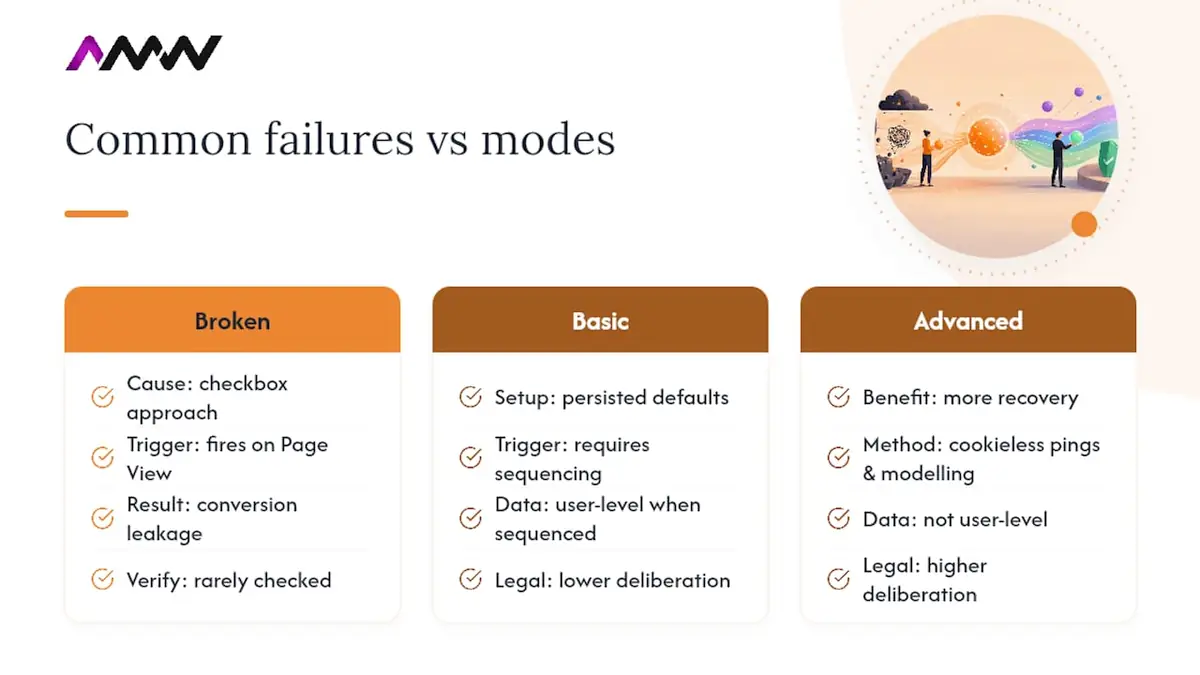
The other place conventional wisdom oversells itself is advanced mode. It’s presented as the obviously superior choice because it recovers more data, but that recovery comes from cookieless pings and modelling, not real user-level data. For sites without meaningful ad spend, basic mode with correctly persisted defaults will often serve just as well, and with considerably less legal deliberation required upfront. Our Google Ads and Meta Ads management is priced as a flat monthly fee, from £599 and £299 a month, never a percentage of your advertising budget.
Sources
FAQ
Is Google Consent Mode v2 mandatory?
Yes, for advertisers using Google Ads or GA4 to measure or target users in the EEA and UK, Consent Mode v2 has been required since March 2024, with enforcement tightening further through 2025.
How do I implement Google Consent Mode v2?
Set the four required signals, ad_storage, analytics_storage, ad_user_data, and ad_personalization, through either Google Tag Manager’s Consent Initialization trigger or a direct gtag.js default call, then push updated values once a user makes a choice.
How do I activate Google Consent Mode v2?
Build a default consent tag firing before any other tags load, add wait_for_update to allow your CMP time to check stored preferences, then verify the sequence works correctly using Tag Assistant.
What does consent mode do in Google Tag Manager?
Consent Mode in GTM controls which tags are allowed to fire and what data they can send, based on consent states passed from your CMP, communicated to Google tags through default and update calls.
What’s the difference between basic and advanced consent mode?
Basic mode blocks all Google tags until consent is granted, sending nothing beforehand. Advanced mode allows tags to load and sends cookieless pings for modelling even when consent is denied.
Recommended
- Cookie Policy | Manage Your Preferences | AMW Media
- Website optimisation checklist: your 2026 UK guide | AMW Media
- Conversion optimisation: a practical guide for UK SMEs | AMW Media
Our free marketing audit looks at your site, your ads and your content, and comes back with a 30 day plan. No pitch deck.

Runs the business alongside Amir: contracts, onboarding and making sure every client knows what is happening and when. Meet the team.